
Hyundai VIN Decoder
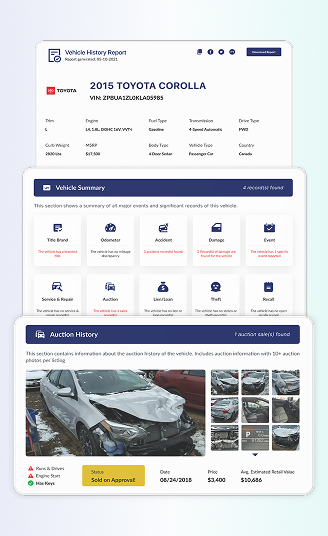
Thinking about a used Hyundai? Before you shake hands, run the Hyundai VIN Decoder and get the core specs for free, upgrade to a full history report, and see accidents, recalls, ownership history, and more.
What is a Hyundai VIN Decoder?
A Hyundai VIN decoder breaks down the VIN into important information. Those letters and numbers show the car’s specifications, build year, engine family, transmission, and more. It’s the quickest way to confirm a Hyundai’s identity.
And if you’re dealing with older or classic Hyundai models that have fewer than the 17-digit standard, our tools can read those pre-1981 formats. It’s handy whether you’re a buyer, seller, or someone who just wants to learn more about your vehicle. Instant VIN Reports make the whole process easy.
What is a Hyundai VIN (Vehicle Identification Number)?
A Hyundai VIN is a unique code made up of 17 characters assigned to each Hyundai vehicle, which has been used since the 1980s. Until now, most road vehicles around the world have used this 17-character format.
This VIN is not just random. It carries information about:
- the country and manufacturer
- the vehicle’s type and key specifications
- the model year, assembly plant, and a serial number that makes your Hyundai different from every other one on the road
Checking the VIN is usually one of the first things people do before buying a used vehicle. It helps you confirm what the car actually is and, when combined with a history report, gives you information about the vehicle’s past, because nobody wants to deal with dishonest sellers, accidentally buy a stolen car, or discover expensive hidden repairs after money has changed hands.

How to Read a Hyundai VIN Number?
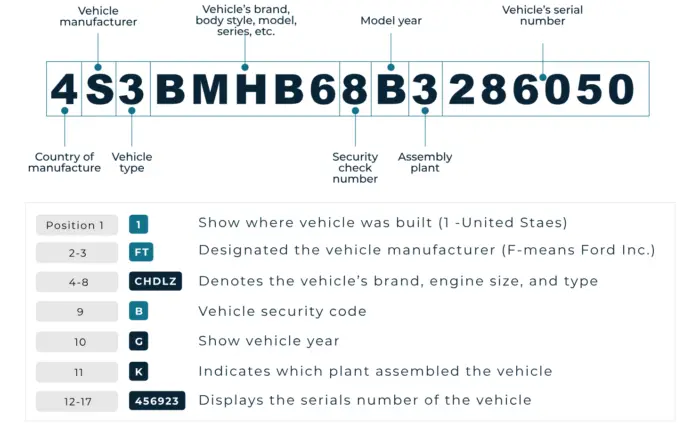
At first glance, a Hyundai VIN looks like a jumble of characters. But it actually follows a clear pattern that’s used across the car industry. Since 1981, most vehicles have used a 17-character VIN that is divided into three main parts: the WMI, VDS, and VIS. Each section tells you something different about the vehicle. Here are the details of each section:
WMI (World Manufacturer Identifier)
The first three characters of the Hyundai VIN make up the WMI. This points to the manufacturer and the region or country where the vehicle was built. Here is the breakdown:
- The 1st character shows the country or broad region of origin.
- The 2nd and 3rd characters work together with the first to identify Hyundai as the manufacturer and sometimes the vehicle category (for example, passenger car vs. multi-purpose vehicle).
VDS (Vehicle Descriptor Section)
Characters 4 to 9 make up the VDS. This part describes the vehicle itself. In this section, you’ll usually see codes that represent things like:
- body style (e.g., sedan, hatchback, SUV)
- model or series
- engine family
- safety and restraint systems (e.g., airbags, belts)
The 9th character is a check digit used to verify that the VIN is valid and hasn’t been mistyped or tampered with. This is part of the standardized VIN rules used by manufacturers worldwide.
VIS (Vehicle Identifier Section)
Characters 10 to 17 are the VIS, and this is where the VIN gets very specific to your Hyundai. Here’s what these positions mean:
- 10th character: Model year
Each year has its own letter or number code. Simply match the 10th digit of your VIN to the code below to find out your Hyundai’s exact model year.
- 11th character: Assembly plant
This tells you which factory assembled the car. Manufacturers use internal plant codes, just like in the Ford and Mazda examples in the reference template. - 12th to 17th characters: Serial number
This is the individual production sequence number. It doesn’t tell you what options the car has, but it makes your Hyundai unique in the system.
Our VIN decoder Hyundai tool reads all three sections and turns them into simple specs you can read in a minute, instead of staring at the VIN for half an hour. And we can also extend to classic Hyundais with shorter VINs with the available data.
| 10th Digit | Model Year | 10th Digit | Model Year | 10th Digit | Model Year | 10th Digit | Model Year |
|---|---|---|---|---|---|---|---|
| A | 1980 | M | 1991 | 2 | 2002 | D | 2013 |
| B | 1981 | N | 1992 | 3 | 2003 | E | 2014 |
| C | 1982 | P | 1993 | 4 | 2004 | F | 2015 |
| D | 1983 | R | 1994 | 5 | 2005 | G | 2016 |
| E | 1984 | S | 1995 | 6 | 2006 | H | 2017 |
| F | 1985 | T | 1996 | 7 | 2007 | J | 2018 |
| G | 1986 | V | 1997 | 8 | 2008 | K | 2019 |
| H | 1987 | W | 1998 | 9 | 2009 | L | 2020 |
| J | 1988 | X | 1999 | A | 2010 | M | 2021 |
| K | 1989 | Y | 2000 | B | 2011 | N | 2022 |
| L | 1990 | 1 | 2001 | C | 2012 | P | 2023 |
Where to Find the VIN on a Hyundai?
Before you decode the Hyundai VIN, you can find the Hyundai VIN in some places. Here are the main places to look:
- Driver’s side dashboard: Stand outside the car and look through the windshield at the base of the glass on the driver’s side.
- Driver’s door jamb/door frame: Open the driver’s door and check the pillar or frame area.
- Under the hood: On some Hyundai models, especially older ones, the VIN may also be stamped or printed in the engine bay, such as the firewall, radiator support, or near the front of the engine compartment.
- Front frame or inner fender: For classic or early Hyundai models, you may find the number on the front frame rail, slam panel, or inner fender area.
- Vehicle documents: If the car isn’t nearby, you can still find the VIN on the registration, title, insurance papers, and many service or inspection records.

What Information Can You Get from a Hyundai VIN Decoder?
When you run a Hyundai VIN through Instant VIN Reports, you are not just “checking a number.” You’re opening a report that explains what the car is, how it has been used, and what kind of risks or value might be hiding behind the paint.
Below are the key sections you’ll see for a Hyundai VIN number:
Vehicle Specifications
This is the identity section of the Hyundai. The vehicle specifications section shows the year, make, model, trim, body style, engine, transmission, drivetrain, and other build details. For a used Hyundai like the Hyundai Tucson, Sonata, or Elantra, this tells you exactly how the car left the factory, not just what the seller remembers.
Service & Maintenance Records
The service & maintenance records section lists the available data of the oil changes, brake jobs, tire services, and other repairs or checks. For a Hyundai that’s a few years old, this helps you see if basic maintenance was done on time or skipped. A long, steady line of maintenance entries usually hints at a careful owner.
Theft Records
This section checks for theft records linked to the Hyundai VIN. If the car was ever reported stolen and later recovered, the report can show when and where that happened. For buyers, it’s an extra layer of protection. For owners, it explains odd notes in the paperwork and keeps you from stepping into legal trouble without realizing it.
Title Brand Records
The title brand records section shows you the Hyundai’s title records, such as salvage, rebuilt, flood, junk, or lemon. These brands can affect value, insurability, and safety. If a Hyundai carries a flood or salvage title, you’ll want to know before you put it in your driveway or try to resell it later.
Accident Records
Accidents are not always a dealbreaker, but you deserve to know. The accident records section collects reported events from trusted databases where available. It shows whether a Hyundai has been involved in minor fender benders or major crashes that could affect safety and resale value.
Damage History
Accident records tell you that something happened; the damage history section helps you understand what kind of damage. This can include structural damage, flood/water damage, hail damage, fire damage, and other serious issues when they have been reported.
Recalls Check
Hyundai, like other manufacturers, issues safety recalls when they discover issues that need to be fixed. The recalls check uses the VIN to see if any recall entries are tied to that vehicle and whether they appear open or already addressed. This helps you plan a visit to a Hyundai dealer and makes sure you’re not driving around with an unresolved safety problem.
Auction & Sales History
If the Hyundai ever passed through an auction or an online listing, the report shows you when and where it appeared, and includes condition notes and mileage at the time. Many reports also show up to 10 available auction photos. This lets you compare how the car looked then versus now, which is especially helpful for higher-end or heavily modified Hyundai models.
Warranty Status
Hyundai is famous for strong warranty programs, especially on newer vehicles. With a VIN-based warranty status check, you can often see if a Hyundai may still be under the basic manufacturer warranty or if that cover has expired. This can include basic warranty, powertrain, or other limited coverage, when such data is available.
Past Usage Records
The past usage records in a Hyundai vehicle history report show the available records on whether a car has been used as a personal vehicle, commercial vehicle, fleet car, or rental when such data exists. High-stress or high-mileage usage can mean more wear and tear.
Lien / Loan Check
The lien/loan check section of your Hyundai VIN lookup tells you whether the vehicle might still have an unpaid loan attached. This is crucial because if you buy a Hyundai with an active lien and the previous owner disappears, the lender can still come after the car.
Mileage History
Odometer tampering still happens, sadly. The mileage history part of a Hyundai vehicle history report shows recorded mileage readings from inspections, registrations, auctions, or service entries when available. If the miles suddenly go backward or look suspicious, that’s a red flag.
Why Use a Hyundai VIN Decoder?
Plenty of online decoders show “invalid VIN” when a number has fewer than 17 characters. Our system is built to work with many classic and pre-1981 VIN or chassis formats, including Hyundai, so you can still decode your classic Hyundai and get your historical reports.
Who Can Benefit from Using a Hyundai VIN Decoder?
Whether you are buying, selling, restoring, or managing a lot full of Hyundai vehicles, decoding the VIN brings structure and calm to the whole process.
For Buyers
- Confirm the exact Hyundai model, trim, and engine instead of trusting the ad.
- See mileage patterns and spot possible odometer rollback.
- Check for salvage, rebuilt, flood, or lemon title brands before paying.
- Review accident and damage records to understand the real condition.
- Confirm there are no active liens that could block clean ownership.
For Sellers
- Prove the exact specs of your Hyundai, including the engine, trim, and options, to your buyers.
- Show that the title is clear of salvage or flood brands.
- Demonstrate consistent mileage using the history timeline.
- Provide evidence that recalls were handled when those records exist.
- Share previous service and maintenance entries to show proper care.
For Dealers
- Flag title brands and problem histories before bidding at auction.
- Help set realistic prices using market value and sales history.
- Reveal odometer issues that could cause returns or complaints later.
- Provide shareable reports that boost transparency with customers.
- Save time by using one consistent format across all brands, Hyundai included.
How to Use the Free Hyundai VIN Decoder?
To use the free Hyundai VIN decoder from Instant VIN Reports, you just need the VIN or classic chassis number. You can follow these simple steps:
1) Find the VIN
First, locate the VIN on your Hyundai. Common spots are the dashboard at the base of the windshield on the driver’s side, the driver’s door jamb label, under the hood on some older models, or on your registration and insurance documents.
2) Fill in the Form
Type the 17-character VIN (or the shorter classic Hyundai VIN) carefully into the search field, and submit it. Double-checking the code, one wrong character can change the entire result.
3) Get the Report
You’ll see a quick preview with the basic reports for free. From there, you can upgrade to the full history report, which includes title checks, accident and damage history, mileage records, liens, service entries, auction photos, and more.
Free Hyundai VIN Decoder vs. Paid Hyundai VIN Decoder
A lot of people like to “try before they buy,” and that’s fair. Our Hyundai VIN decoder can decode the VIN for you for free. If you need deeper records, you can upgrade to the paid reports. Here’s how they compare:
| Feature | Free VIN Decoder | History Report (Paid) |
|---|---|---|
| VIN decoding for all vehicle types | ||
| Year, make, model, trim | ||
| Full vehicle specifications / detailed car specs | ||
| Market value snapshot | ||
| Sales listings (current/online ads) | ||
| Sales history (timeline of past listings/sales) | ||
| Auction records (when available) | ||
| Auction history with photos | ||
| Mileage during auction/sales (when available) | ||
| Odometer rollback checks | ||
| Ownership history | ||
| Vehicle usage type (personal, fleet, rental, commercial) | ||
| Title brand records (salvage, rebuilt, flood, lemon, etc.) | ||
| Lien & loan records | ||
| Accident & damage history | ||
| Theft / stolen records | ||
| Flood/hail/fire damage checks | ||
| Service/repair records | ||
| Warranty status & coverage | ||
| Recall information |
Decode VIN by Other Manufacturers
 Alfa romeo
AM general
Aston Martin
Audi
Austin Healey
Avanti Motors
Bentley
BMW
Bricklin
Bugatti
Buick
Cadillac
Chevrolet
Chrysler
Daewoo
Daihatsu
Datsun
Dodge
Eagle
Ferrari
Fiat
Fisker
Ford
Freightliner
Genesis
Geo
GMC
Harley Davidson
Hino
Honda
Hummer
Hyundai
Infiniti
Isuzu
Jaguar
Jeep
Kawasaki
Kenworth
Kia
Koenigsegg
Lamborghini
Land Rover
Lexus
Lincoln
Lotus
Maserati
Maybach
Mazda
McLaren
Mercedes Benz
Mercury
MG
MINI
Mitsubishi
Morgan
Nissan
Oldsmobile
Panoz
Peterbilt
Plymouth
Polestar
Pontiac
Porsche
Rolls-Royce
Ram
Saab
Saleen
Saturn
Scion
Shelby
Smart
Subaru
Suzuki
Tesla
Toyota
Triumph
Volkswagen
Volvo
Yamaha
Alfa romeo
AM general
Aston Martin
Audi
Austin Healey
Avanti Motors
Bentley
BMW
Bricklin
Bugatti
Buick
Cadillac
Chevrolet
Chrysler
Daewoo
Daihatsu
Datsun
Dodge
Eagle
Ferrari
Fiat
Fisker
Ford
Freightliner
Genesis
Geo
GMC
Harley Davidson
Hino
Honda
Hummer
Hyundai
Infiniti
Isuzu
Jaguar
Jeep
Kawasaki
Kenworth
Kia
Koenigsegg
Lamborghini
Land Rover
Lexus
Lincoln
Lotus
Maserati
Maybach
Mazda
McLaren
Mercedes Benz
Mercury
MG
MINI
Mitsubishi
Morgan
Nissan
Oldsmobile
Panoz
Peterbilt
Plymouth
Polestar
Pontiac
Porsche
Rolls-Royce
Ram
Saab
Saleen
Saturn
Scion
Shelby
Smart
Subaru
Suzuki
Tesla
Toyota
Triumph
Volkswagen
Volvo
Yamaha
Frequently Asked Questions about Hyundai VIN Decoder
How to decode a Hyundai VIN number?
To decode a Hyundai VIN, locate the 17-character number on the car or documents and enter it into a Hyundai VIN decoder like Instant VIN Reports. Our system reads the WMI, VDS, and VIS segments of the VIN, validates the check digit, and then turns that into clear reports with specs and a history record.
Is a Hyundai VIN lookup really free?
Yes, the Hyundai VIN lookup is free at Instant VIN Reports. You can see the car year, make, model, trim, and core specifications at no cost. If you want the complete vehicle history with all the deeper checks, that part is in the paid report.
What extra details do I get in the paid report?
The paid report adds the “heavy” information, such as the ownership history, mileage timeline with rollback checks, title brands, liens and loans, accidents and damage, theft, flood/hail/fire checks, service records, recalls, warranty status, auction data with photos, and more, as listed in our comparison tables above.
Is the Hyundai Elantra VIN decoder free to use?
Yes, we can decode any of the Hyundai models, including the Hyundai Elantra. Enter the VIN into the VIN decoder by Instant VIN Report, and the system will give you the basic specs at no charge, with the option to upgrade to a full history report if you need more details.
Can I find my Hyundai Elantra’s engine type using the VIN?
Yes, you can find the Hyundai Elantra’s engine type using the VIN. The vehicle specifications section of the report lists engine family and displacement based on the Hyundai VIN. So a Hyundai Elantra VIN decoder will clearly show whether the car has the engine you expect before you agree to buy it.
Can I check Hyundai recalls by VIN?
Yes. The Hyundai VIN decoder and full report can show recall entries attached to that VIN. You’ll see recall dates and brief reasons so you can arrange fixes through Hyundai’s dealer network if needed.
How accurate is the information from a Hyundai Elantra VIN decoder?
The decode itself is based on standardized VIN rules and manufacturer data. Historical items like accidents, mileage, and service records come from multiple trusted data sources. Our report is designed to gather as much as possible so you can see a fuller picture before making a decision.
Why is getting a report before buying a Hyundai important?
A history report shows things you cannot see in photos, including the title brands, accidents, mileage issues, liens, and more. Our reports can show serious problems or confirm that a car has a clean, stable background. For a Hyundai buyer, that means fewer surprises, fewer regrets, and a better chance of paying a fair price.