
Mercury VIN Decoder
Many Mercury listings leave out important factory details, especially for discontinued models. Use our free Mercury VIN decoder to verify specs, engine, trims, estimated market value, and more for any era of Mercury, including with 5 to 14-digit chassis numbers for classic collectible Mercury!
What is a Mercury VIN Decoder?
A Mercury VIN decoder is a tool that reads a VIN number and explains what it means. On most modern Mercury vehicles, the VIN is a 17-character code that identifies one specific car, not just a model name.
When you run our Mercury VIN lookup, you’re basically translating the VIN into details you can understand and compare. This is useful when you’re buying used, checking paperwork, or confirming a listing. And if you’re dealing with an older Mercury, we can also decode many classic, pre-1981 VIN formats that don’t follow the 17-character standard.
Why Mercury VIN Decoding Matters Before Buying a Car
Every Mercury VIN number tells a story about how the vehicle left the factory. Running it through our Mercury VIN decoder lets you verify key specifications before spending money.
Confirm the exact Mercury model
Many Mercury models share similar styling. VIN decoding helps distinguish the correct model before you schedule a viewing.
Verify the production year
The VIN identifies the model year, helping you avoid confusion when registration dates and production years don't match.
Identify the factory engine
Check which engine the Mercury was originally built with before ordering parts or evaluating performance.
Help with restoration planning
For older Mercury models, decoding the VIN provides valuable factory details that support accurate restoration work.
What Information Does a Mercury VIN Decoder Show?
A Mercury VIN contains more than just an identification number. Once decoded, it reveals factory information that helps you confirm the vehicle's identity before you decide whether to purchase a full vehicle history report. Here's what you can see with the free Mercury VIN decoder.
Manufacturer
Mercury vehicles were manufactured by Ford Motor Company under the Mercury brand.
Vehicle Origin
See where your Mercury was manufactured.
Mercury's Model Type & Year
Distinguish between vehicles that may look similar but belong to different production years or model lines.
Engine Specifications
View the original engine specifications associated with the VIN.
Transmission Setup
The decoder provides available transmission information.
Body Style
Confirm Mercury's original factory body style.
Trims
Confirming the correct trim of any Mercury vehicle.
MSRP & Market Value
See the MSRP preview with the available market value estimate.
See How to Use the Mercury VIN decoder
Using a free Mercury VIN decoder is simple. You don’t need special tools, and you don’t need to be a mechanic. Just copy the VIN carefully, enter it once, and review the results before you make decisions.
Enter the VIN
Enter the VIN exactly as shown. You can find it on the dashboard near the windshield, the driver-side door jamb, or your title and registration
Fill Out the Form
After you type the VIN, check again before submitting. One wrong character can change the result, so take your time.
Check the Vehicle Specs
View your quick Mercury VIN lookup results, then upgrade if you need deeper history details.
How To Read a 17-Digit Mercury VIN Number
You can decode a Mercury VIN manually, sure. But most people don’t want to sit with charts and second-guess letters. The VIN is built in sections, and each section has a job. That’s the clean way to read it. We’ll break down WMI, VDS, and VIS below, and you’ll see why using an online Mercury VIN lookup tool saves time.
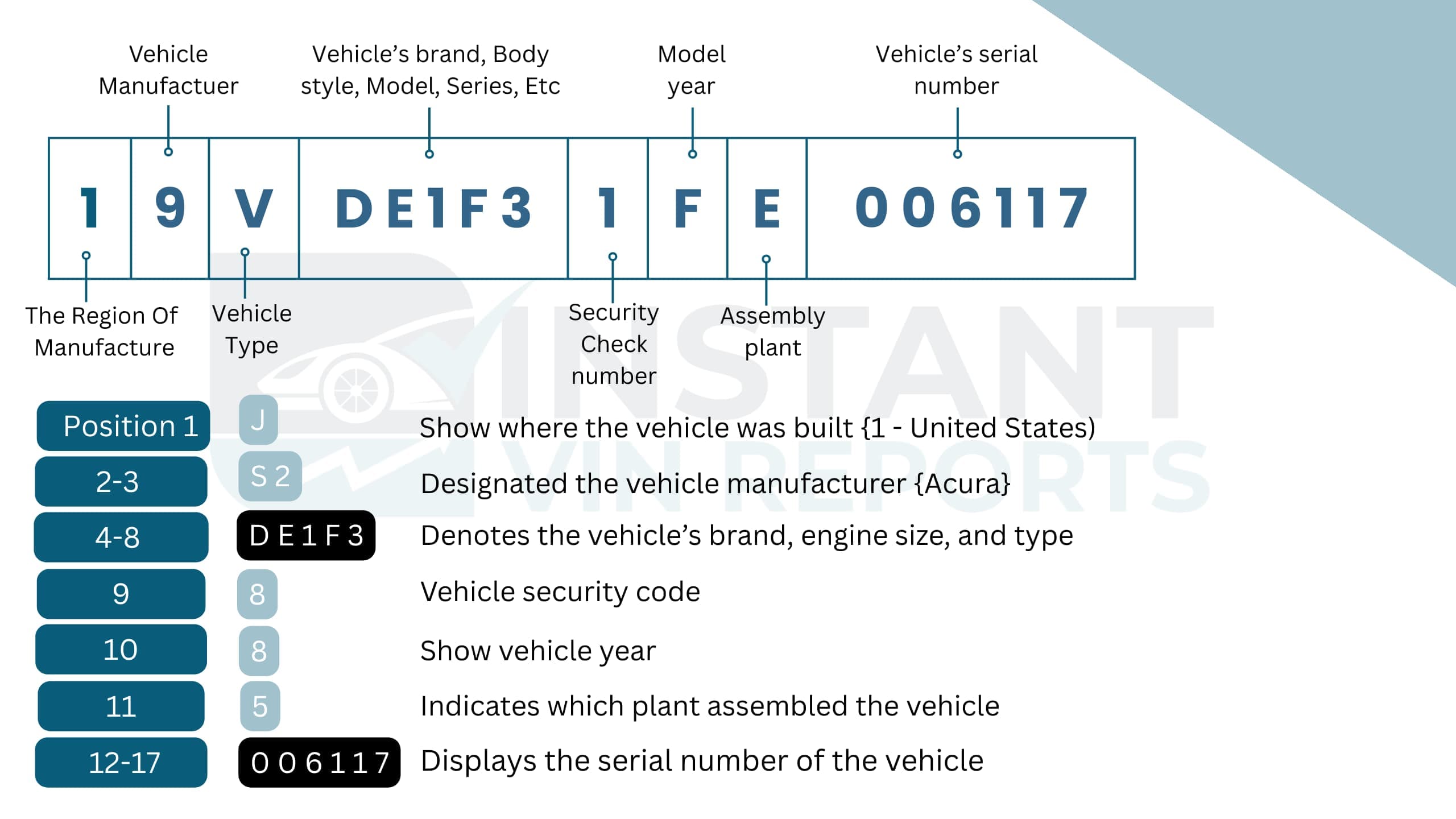
Mercury VIN Positions Explained For: **4M2EU48E59UJ00905**
WMI (World Manufacturer Identifier)
Position 1 (4)
Manufactured in the United States
Position 2 (M)
Mercury division (Ford Motor Company)
Position 3 (2)
Multipurpose Passenger Vehicle (SUV)
VDS (Vehicle Descriptor Section)
Position 4 (E)
Vehicle series/restraint configuration
Position 5 (U)
Mountaineer model
Position 6 (4)
4-door SUV
Position 7 (8)
Safety restraint system (Ford-specific code)
Position 8 (E)
4.0L SOHC V6 gasoline engine
Position 9 (5)
Check digit (validates the VIN)
VIS (Vehicle Identifier Section)
Position 10 (9)
2009 model year
Position 11 (U)
Louisville Assembly Plant, Kentucky, USA
Positions 12 to 17 (J00905)
Sequential production number
Classic Mercury VIN Decoder (Pre-1981)
Classic Mercury vehicles can have VINs ranging from 5 to 11 characters. From 1965 through 1980, Mercury used a standardized 11-character VIN across all its models, while earlier vehicles (pre-1965) used shorter, less standardized formats.
Unlike GM and Chrysler, which moved to 13-character VINs in the early 1970s, Ford/Mercury stayed with 11 characters right up until the 1981 standardization. If you find a 13-digit number on a late-1970s Mercury, it is likely the Door Data Plate code, the Warranty Number, or an aftermarket/state-issued VIN, and not the factory original VIN.
Instant VIN reports can decode many old vintage vehicles with 5 to 14 chassis numbers. Below is an example of an 11-digit Mercury classic VIN breakdown:
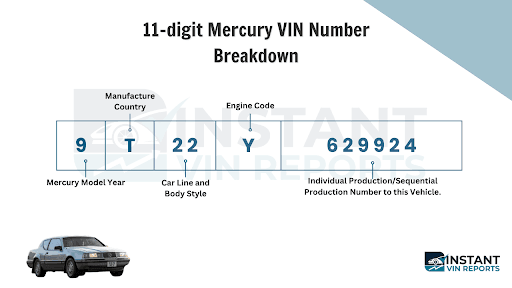
| VIN Position | Value | Meaning |
|---|---|---|
| 1 | 9 | 1979 model year |
| 2 | T | Built in the USA |
| 3–4 | 22 | Mercury Bobcat, 3-door hatchback body series |
| 5 | Y | 1.6L Inline 4-cylinder SOHC engine |
| 6–11 | 629924 | Sequential production number |
Where to Find the VIN on a Mercury?
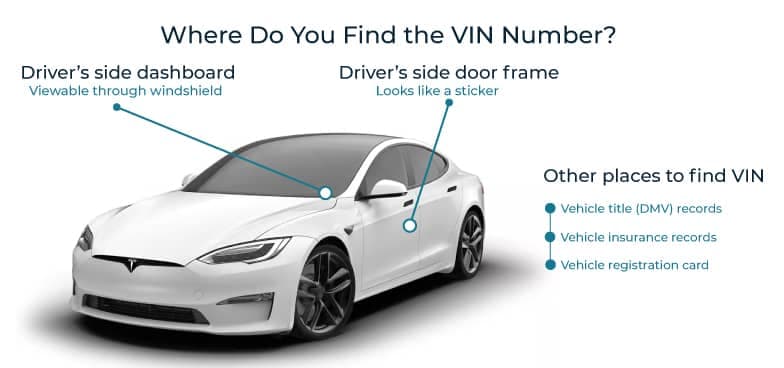
Start with the simple places first. Mercury VINs are often visible without tools, even on older cars. Check the usual spots on the vehicle, then compare it to the paperwork so you know you copied the correct number.
- Driver-side dashboard (near windshield): Often visible through the glass from outside.
- Driver-side door jamb label: Common spot for the VIN label and build info.
- Paperwork (title, registration, insurance): Usually printed clearly and easy to compare.
- Under-hood labels or stamped areas: Varies by year and model; use as confirmation.
Need To See More? Get the Full Mercury Vehicle History Report
A Mercury VIN is like the car’s ID card. Once you decode it, you stop guessing and start confirming what you actually have, especially when the badge and the paperwork don’t fully agree.
Vehicle Specifications
A Mercury VIN decoder can confirm the car’s basic identity and key specs tied to that VIN. For example, the make, model, year, and recorded build identifiers like body style and engine type. This matters when two Mercurys look almost the same, but one is a different trim or year.
Mileage History
Mileage is one of those things people argue about, quietly. A vehicle history report can show recorded odometer entries when they exist, so you can see if the numbers move in a normal direction over time. That helps with older Mercury models that have changed hands a few times.
Auction history
Auction history can show whether the Mercury appeared in auction channels and will include auction-related details when available. If auction photos are available in the report, they can be useful for comparing conditions over time. It’s a real-world trail, not just a single snapshot.
Sales History
Sales history can include signals of past sales activity and listing patterns when available, helping you understand how often the Mercury has been on the market. A car that changes hands frequently might be totally fine, or it might be a sign that something keeps bothering owners.
Service & maintenance Records
Service and maintenance records, when available, help tell the story of how a Mercury was treated over time. You might see signs of routine care like inspections, maintenance visits, or repair notes tied to reported services. This matters because a well-maintained Mercury can drive like it’s younger than it is.
Title Brand Check
Title brands are labels that can affect the value and legal status of a Mercury. Whether the Mercury has a clean, salvage, rebuilt, or lemon branding, that brand can change how easily the vehicle can be registered, insured, or resold. This section helps you avoid the surprise that shows up after you’ve already committed.
Lien/Loan check
A lien or loan flag is a big deal because it can affect ownership transfer. This section will show signals that Mercury has an outstanding financial interest recorded when that information is available in reported data.
Stolen Check
A stolen-vehicle check looks for theft-related flags when reported in available records. If you’re buying a classic Mercury with older paperwork, this check can be a simple step that makes the whole transaction feel more solid.
Accident and Damage Records
Accidents are not always visible in photos, and they’re not always mentioned clearly in a listing either. Accident records, when reported, can give context on whether the Mercury was involved in a crash event and the record available to it.
Recalls Check
A recall check looks for open or recorded recall-related information tied to a vehicle identity. If you’re buying a used Mercury, this is a practical safety step, especially for older vehicles that may have missed earlier service visits.
Free Mercury VIN Decoder vs Vehicle History Report
A free Mercury VIN check is great for quick identity confirmation. But if money is about to move, or the car is being shipped, the full vehicle history report is where you get the deeper story.
Feature | Free VIN Decoder | History Report (Paid) |
|---|---|---|
VIN decoding for all vehicle types | ||
Year, make, model, trim | ||
Full vehicle specifications / detailed car specs | ||
Market value snapshot | ||
Sales listings (current/online ads) | ||
Sales history (timeline of past listings/sales) | ||
Auction records (when available) | ||
Auction history with photos | ||
Mileage during auction/sales (when available) | ||
Odometer rollback checks | ||
Ownership history | ||
Vehicle usage type (personal, fleet, rental, commercial) | ||
Title brand records (salvage, rebuilt, flood, lemon, etc.) | ||
Lien & loan records | ||
Accident & damage history | ||
Theft / stolen records | ||
Flood/hail/fire damage checks | ||
Service/repair records | ||
Warranty status & coverage | ||
Recall information |
How Olivia Used a Free Mercury VIN Lookup to Avoid Costly Mistakes
Olivia found a 2009 Mercury Mountaineer listed online and wanted to verify its details before contacting the seller. She first used our free Mercury VIN Decoder, which uncovered missing information in the listing. After confirming the factory specifications, she upgraded to the full vehicle history report to review the vehicle's past before negotiating.
VIN: 4M2EU48E59UJ00905
Initial Impression
- Online listing described it as a Mercury Mountaineer, but omitted the Premier AWD trim.
- Engine details were incomplete, making it difficult to compare with similar listings.
- The asking price seemed reasonable, but the listing lacked supporting vehicle information.
Critical Findings
- Confirmed it was a 2009 Mercury Mountaineer Premier AWD.
- Corrected missing factory specifications from the online listing.
- Found 3 previous owners with long-term ownership history.
- Identified 4 recorded lien/loan records, giving Olivia an important topic to discuss with the seller.
- Found 14 service and repair records, showing the SUV received regular maintenance over several years.
Outcome
Olivia discovered the listing omitted the Premier AWD trim and active lien records. Rather than accepting the asking price, she used the verified information to ask better questions and negotiate with confidence.
Why 1 Million+ Drivers Choose Instant VIN Reports
Mercury vehicles are no longer in production, which makes accurate VIN verification more important than ever. Many used and classic Mercury listings contain incomplete specifications, making VIN decoding one of the easiest ways to confirm the vehicle's original factory configuration before you buy.
Instant VIN Reports makes a Mercury VIN lookup simple, and it’s built for real-world checks, not just theory. Here’s why:
High Accuracy, Cross-Checked Results
Our system cross-checks available VIN data before presenting the results. Reducing inconsistencies, giving you a clearer picture of your Mercury's factory specifications and reported vehicle information.
No Hidden Fees or Subscriptions
Pay only if you choose to access a full vehicle history report. There are no recurring subscriptions or unexpected charges for using the free Mercury VIN decoder.
24/7 Customer Support
Questions can come up at any stage of buying or researching a Mercury. Our support team is available around the clock to help you better understand your VIN lookup results.
Most Comprehensive Database
We gather vehicle information from multiple trusted data sources to provide more complete and accurate results, so you receive organized results that help you verify the vehicle with greater confidence.
Who Should Use a Mercury VIN Decoder?
Our Mercury VIN decoder is not only for buyers. It helps sellers prove what they’re selling, dealers screen inventory, and restorers confirm details before spending money. Mercury models often attract collectors and older owners who like doing things properly, with paperwork that matches the car.
Buyers
Confirms Mercury’s basic identity before the payment.
Sellers
Helps you describe the Mercury accurately and confidently.
Dealers
Supports pricing and merchandising with market value ranges.
Classic Car Collectors
Classic Mercury VIN decoding helps confirm factory identity for collectible vehicles with shorter pre-1981 VIN formats.
Restorers
Factory specifications provide a useful starting point when planning an accurate Mercury restoration project.
Insurers & Appraisers
Knowing the correct Mercury model and configuration supports more accurate documentation during valuation.
Supported Mercury Models
Instant VIN Reports can decode virtually every Mercury VIN, from modern 17-character VINs to classic VINs. Below are some of the most searched Mercury models, but they're only a small part of the vehicles we support.
| Bobcat | Capri | Colony Park | Comet | Comet Caliente |
| Commuter | Cougar | Cougar Eliminator | Cougar XR-7 | Cyclone |
| Cyclone CJ | Cyclone GT | Eight | Grand Marquis | Marauder |
| Mariner | Mariner Hybrid | Medalist | Meteor | Milan |
| Milan Hybrid | Montclair | Montego | Monterey | Monterey Custom |
| Mountaineer | Mystique | Park Lane | Sable | Topaz |
| Tracer | Turnpike Cruiser | Villager | Voyager |
Frequently Asked Questions about Mercury VIN Decoder
How can I decode my Mercury VIN for free?
Use the free Mercury VIN decoder on Instant VIN Reports. Find the VIN on the car or paperwork, enter it carefully, and you’ll get a quick identity check. If you need deeper history, like title brands, mileage records, or lien flags when reported, you can upgrade to the full vehicle history report.
Where is the VIN located on a Mercury Grand Marquis or Sable?
Most often, you’ll find it on the driver-side dashboard near the windshield (visible through the glass), on the driver-side door jamb label, and on your title or registration documents. For older Mercury models, checking more than one spot is smart.
What does each digit in a Mercury VIN mean?
A modern VIN is structured in sections. The first part points to the manufacturer group, the middle describes vehicle attributes, and the last part identifies the specific vehicle unit, often including the model year code and plant code. If you want the clean version without manual decoding, a Mercury VIN decoder does the translation for you.
Can I get a Mercury vehicle history report with just the VIN?
Yes, you can get a Mercury vehicle history report with just the VIN. The depth of information depends on what has been reported and is available for that specific vehicle, but the VIN is the key that ties the record together.
How do I check for Mercury recalls by VIN?
Use the VIN to run a recall check through a report that includes recall indicators. Start with a Mercury VIN check, then review the recall and warranty sections if available. If you’re buying used, it’s a practical safety step, especially on older vehicles.
Does a Mercury VIN decoder show service history?
Sometimes. Service and maintenance records may appear when they are available from reported sources. It can include routine service signals or repair-related entries. If service history matters to you, the premium report is usually the better option than a basic decode.
How do I find the production year of my Mercury using the VIN?
On modern VINs, the model year is commonly tied to a specific character in the VIN structure. But year codes can repeat across cycles, so interpreting them correctly is best done by decoding the full VIN and not just one character. Instant VIN Reports makes that easier.
Can I see my Mercury's trim level (e.g., LS, GS) with a VIN decoder?
Yes, you can get trim-related clues through VIN-based specs, especially when the VIN encoding includes trim/series indicators for that model and year. For more detailed information about the trim details, you can run the Mercury window sticker lookup tool by Instant VIN report.