
Smart VIN Decoder
Buying a used Smart should feel clear, not confusing. Use our free Smart VIN decoder to confirm the vehicle’s specifications, then access a full Smart vehicle history report to review accident records, title status, mileage history, and more.
What is a Smart VIN Decoder?
A Smart VIN decoder is a tool that reads a vehicle’s identification number and translates it into understandable information. In the U.S., VINs follow a regulated 17-character structure for modern vehicles, including a check digit in the 9th position.
That structure makes it possible to confirm basics like model year, manufacturer group, and serial details without guessing. With Instant VIN Reports, you can run a quick Smart VIN check for the essentials. It can also help with older vehicles where VIN formats were not always 17 characters (common for pre-1981 classics).
What is a Smart VIN (Vehicle Identification Number)?
A Smart VIN (Vehicle Identification Number) is the official identification code assigned to a specific Smart vehicle. In the United States, regulations require a VIN to be 17 characters long for on-road vehicles. This code can contain information such as the manufacturer identifier, vehicle descriptor details, model year, assembly plant, and a unique serial sequence.
For a buyer, the VIN is often the first serious step before money changes hands. It can help reduce risks like purchasing a vehicle with mismatched paperwork, unclear origins, or avoidable surprises.
You can try decoding the VIN manually, but honestly, it is easy to misread one character and end up with the wrong conclusion. Using Instant VIN Reports for a Smart VIN check is the simpler path: decode the basics first, then consider a full history report when you need deeper verification.
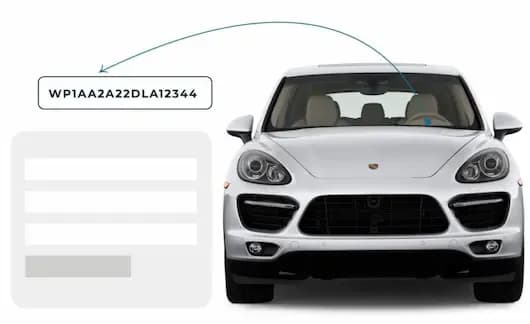
How to Read a Smart VIN Number?
Reading a Smart VIN is not hard, but it is precise. One character out of place changes the meaning. The VIN is usually broken into three sections: WMI, VDS, and VIS. If you like doing things by the book, you can read it piece by piece. If you want it faster, a Smart VIN decoder does the formatting work for you.
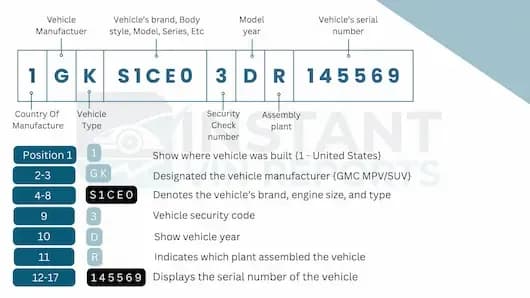
World Manufacturer Identifier (WMI)
The WMI is the first three characters of the VIN. It identifies the manufacturer and the region/country coding used within the VIN standard system. For many Smart passenger cars built for European production lines, you will commonly see VINs starting with WME, followed by model-generation identifiers in the next section.
Position 1 (Region/Country)
- W = Germany (commonly used country/region code in VIN systems).
- Position 2 (Manufacturer group code):
- For Smart examples, M is commonly seen as part of WME on Smart VINs.
- Position 3 (Brand/manufacturer division code):
- For Smart examples, E is commonly seen as part of WME on Smart VINs.
Vehicle Descriptor Section (VDS)
The VDS is generally positioned 4 through 9. It describes the vehicle in a way set by the manufacturer, within VIN rules. It often includes platform or model family coding (positions 4–8) and the check digit in position 9 for U.S.-standard VINs. Because the manufacturer controls much of this section, it is where a Smart car VIN decoder becomes very helpful.
Positions 4–8
Manufacturer-specific descriptors (model line/platform/body/engine-related coding can appear here).
Position 9
Check digit (required in the U.S. VIN standard).
Vehicle Identifier Section (VIS)
The VIS is positioned 10 through 17. For careful buyers, this section matters because it helps confirm the car’s stated year and gives a unique identity that should match titles, registrations, and insurance records.
Position 10 (Model Year)
Coded year marker used for standardized 17-character VINs (vehicles built during/after the 1981 standard).
Position 11 (Plant/Assembly)
A manufacturer plant code.
Positions 12–17 (Serial/Sequence)
The unique production sequence for that specific vehicle.
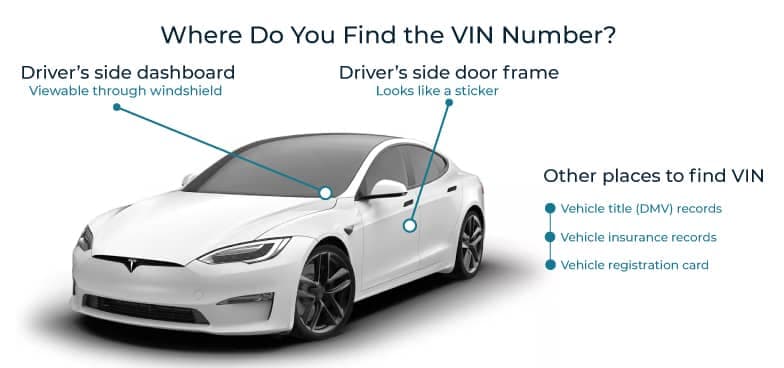
Where to Find the VIN on a Smart?
If you are buying a used Smart, do not accept a typed VIN alone. Look at the vehicle. A legitimate VIN should appear in at least one visible location, and often more than one.
- Dashboard/base of the windshield (driver side): Often visible from outside the car.
- Driver-side door jamb label: Very common VIN label location.
- Vehicle documents: Registration, insurance card, title paperwork.
- Secondary/stamped locations: Some Smarts have an additional “more permanent” location referenced by model-specific guides.
What Information Can You Get from a Smart VIN Decoder?
When you upgrade to a vehicle history report with Instant VIN Reports, you are not just getting random data. You are getting structured information that helps you understand what really happened to the vehicle before it reached you.
Here is what our paid full vehicle history report can include:
Vehicle Specifications
Clear, detailed information about the vehicle’s core identity. You will see the model year, make, model, engine type, trim level, country of origin, MSRP, drive type, transmission, and standard equipment. It helps confirm that the vehicle matches the seller’s description.
Accident History
Records indicating whether the vehicle has been involved in reported accidents. You will see dates, locations, and in some cases, the severity or number of incidents. This section helps you assess potential structural or safety concerns before making a decision.
Ownership History
Information about previous ownership, such as how many owners the vehicle had and the type of use. Understanding how long each owner kept the vehicle can offer insight into how it has been treated and maintained.
Sales Records
See the recorded overview of past sales activity. This will show when the vehicle was listed or sold, and sometimes price-related data. Reviewing sales history can help you identify unusual patterns or frequent ownership changes.
Auction History
Details on whether the vehicle was sold through auction channels. Auction records may include sale dates, reported condition notes, and available images from the time of sale. This can provide valuable context about the vehicle’s prior condition and market exposure.
Title Status
Information about the vehicle’s title condition. This section may indicate whether the vehicle has a clean title or if it has been reported as salvage, rebuilt, or subject to other title brands. Title status plays a major role in determining legal standing and resale value.
Lien and Loan Records
Reports on any recorded liens or outstanding loans tied to the vehicle. This is important because unresolved financial claims can affect ownership transfer. Always confirm that prior liens have been cleared before completing a purchase.
Open Recalls
Safety recall information related to the vehicle. You may see recall dates, issue descriptions, and whether the recall remains open. Addressing open recalls is essential for safety and compliance.
Theft Records
Theft records indicate whether the Smart vehicle was reported stolen. Even if the car looks fine, paperwork problems can appear later. A Smart VIN lookup helps confirm whether there are theft-related flags in available records, offering peace of mind before you commit.
Actual Odometer Verification
Mileage-related records that help verify odometer readings over time. For compact cars like Smart models, mileage strongly affects value. A rollback flag can save you from paying too much for a vehicle that has traveled more than advertised.
Service and Maintenance History
Available service and maintenance records showing reported repairs or routine servicing. Consistent maintenance history may indicate responsible ownership and better long-term reliability.
Past Vehicle Usage
Insights into how the vehicle was previously used. This may include personal use, lease history, commercial use, rental service, or government fleet records. Usage type can significantly affect wear and overall condition.
Why Use a Smart VIN Decoder?
Smart vehicles have evolved across multiple generations, including the 450, 451, and 453 platforms, as well as Electric Drive models. Many were designed primarily for urban commuting, which means higher stop-and-go wear and frequent short trips. A Smart VIN decoder helps verify the exact generation, drivetrain type, and history before purchase.
Who Can Benefit from Using a Smart VIN Decoder?
A Smart VIN decoder is not only for mechanics. It matters for buyers, sellers, dealers, restorers, and enthusiasts. Decoding the Smart VIN number 10th digit for model year, checking trim codes, and verifying history helps different people in different ways.
Buyers
- Confirm Smart year, model, and trim.
- Detect title brand issues early.
- Review accident and damage records.
- Avoid vehicles with hidden financial liens.
- Make informed price negotiations.
Sellers
- Prove your Smart vehicle’s authenticity.
- Show documented ownership history.
- Provide mileage transparency.
- Reduce buyer hesitation.
- Speed up the sales process.
Dealers
- Pre-screen Smart inventory quickly.
- Reduce acquisition risk at auctions.
- Detect rollback concerns early.
- Strengthen reputation through transparency.
- Improve inventory valuation accuracy.
How to Use the Free Smart VIN Decoder?
Checking a Smart VIN online is simple. You do not need technical knowledge.
Find the VIN
Locate the VIN on the dashboard, driver-side door jamb, or vehicle documents. Make sure you copy all 17 characters correctly.
Fill in the Form
Enter the Smart VIN number into the search field on Instant VIN Reports. Double-check each character before submitting.
Get the Report
View the free Smart VIN decoder results instantly. If you need deeper insight, choose the premium Smart vehicle history report for full records.
Free Smart VIN Decoder vs. Paid Smart VIN Decoder
Not every check needs a full report. Sometimes you only want to confirm the basics. Other times, you need complete background information. Here is the difference.
Feature | Free VIN Decoder | History Report (Paid) |
|---|---|---|
VIN decoding for all vehicle types | ||
Year, make, model, trim | ||
Full vehicle specifications / detailed car specs | ||
Market value snapshot | ||
Sales listings (current/online ads) | ||
Sales history (timeline of past listings/sales) | ||
Auction records (when available) | ||
Auction history with photos | ||
Mileage during auction/sales (when available) | ||
Odometer rollback checks | ||
Ownership history | ||
Vehicle usage type (personal, fleet, rental, commercial) | ||
Title brand records (salvage, rebuilt, flood, lemon, etc.) | ||
Lien & loan records | ||
Accident & damage history | ||
Theft / stolen records | ||
Flood/hail/fire damage checks | ||
Service/repair records | ||
Warranty status & coverage | ||
Recall information |
Decode VIN by Other Manufacturers
Frequently Asked Questions about Smart VIN Decoder
Where is the VIN located on a smart for two?
The VIN on a Smart fortwo is commonly found on the dashboard near the windshield on the driver’s side, and on the driver-side door jamb label. Always check the physical vehicle. You can then run the Smart VIN number through our decoder to confirm details.
How do I check for smart car recalls (e.g., Takata airbags) using the VIN?
You can use the Smart VIN number to check recall status. Enter the VIN into our system to see recall-related information when available, helping you understand if further action may be needed.
Can I get a vehicle history report for a used Smart car with just the VIN?
Yes, you can get a vehicle history report for a used Smart car with just the VIN. A Smart VIN lookup tool through Instant VIN Reports allows you to generate a full vehicle history report using only the VIN, covering accident, title, mileage, and more when reported.
What do the characters in a smart VIN mean?
Each character in a 17-character Smart VIN has a purpose. The first three identify the manufacturer group, the middle section describes the vehicle, and the last section identifies model year, plant, and serial number. Our Smart VIN decoder translates this clearly.
How do I decode the VIN to find the model year and trim level (Passion, Prime, etc.)?
The 10th character of a standard 17-character VIN represents the model year. Trim details may appear in the descriptor section. A Smart car VIN decoder simplifies this process and confirms the correct trim and year.
How can I verify the production plant and country of origin using the VIN?
The first character often indicates the country code within VIN standards, and specific positions identify assembly plant information. Our Smart VIN check tool organizes this data for easy reading.