
Genesis VIN Decoder
What is a Genesis VIN Decoder?
A Genesis VIN decoder is a tool that translates your vehicle identification number (VIN) into readable vehicle details. A VIN is designed to identify a specific vehicle, and decoding it can help you confirm basics like where it was built, the model year, and other identifying attributes tied to the manufacturer’s coding.If your Genesis is older and uses a shorter, pre-standard VIN format, Instant VIN Reports can still decode many classic-style VINs as well.
What is a Genesis VIN (Vehicle Identification Number)?
A Genesis VIN (Vehicle Identification Number) is the vehicle’s unique identification code. For modern vehicles, it is typically a 17-character string of letters and numbers, and it is meant to identify one specific vehicle across registration, insurance, service, and recall systems.
When you are buying a used Genesis, checking the VIN is usually the first “sensible step,” even before you get emotionally attached to the car. The VIN can help you confirm the vehicle’s identity and avoid confusion with the wrong trim, wrong model year, or mismatched paperwork.
If you want to decode the VIN manually, you can, but it takes practice, and you still hit the manufacturer-specific parts pretty quickly. That’s why most owners just run a free online Genesis VIN lookup tool by Instant VIN Reports first, then decide if they need a deeper history report.
How to Read a Genesis VIN Number?
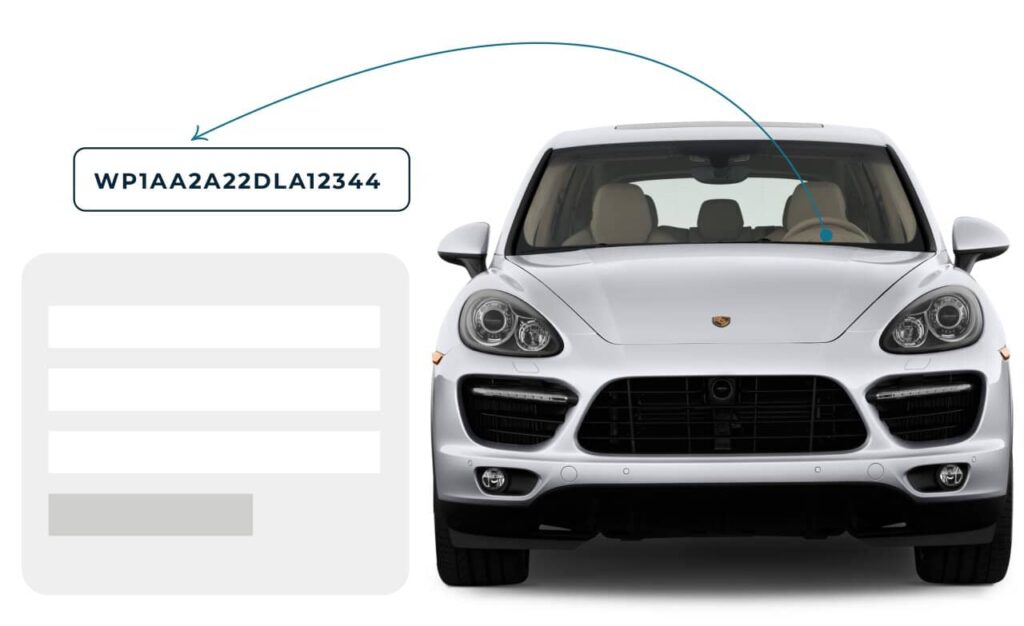
Reading a Genesis VIN is not hard, but it’s easy to get lost if you try to do it all in your head. The VIN is split into three main parts: WMI, VDS, and VIS. Once you know what each section is responsible for, the whole thing starts to feel less like random code and more like a structured label.
WMI (World Manufacturer Identifier)
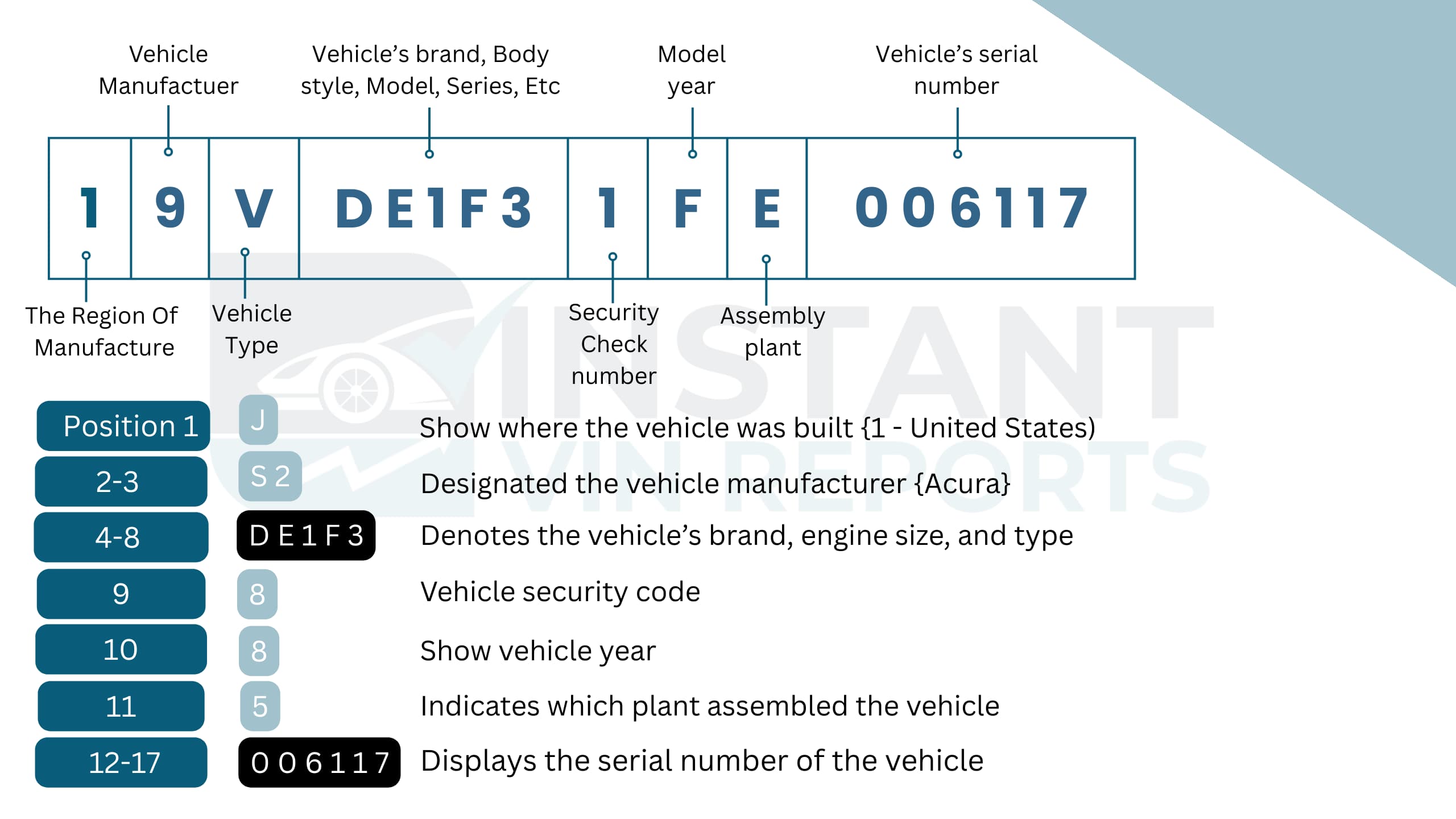
The WMI is the first three characters of the VIN. This section is meant to identify the manufacturer and the region/country tied to that manufacturer identifier.
- Position 1: Region/country code (for example, “K” is commonly used for South Korea; “1/4/5” is used for the United States in many VIN systems).
- Position 2: Manufacturer identifier (this is assigned as part of the WMI system).
- Position 3: Often used to distinguish vehicle type/division within the manufacturer, depending on how the WMI is assigned.
Common WMIs you may see on Genesis-related vehicles (examples):
- KMH (commonly associated with Hyundai/Genesis-related manufacturing identifiers)
- 5NM (commonly associated with Hyundai/Genesis-related identifiers in the U.S.)
- KMT / KMU (reported as Genesis-related WMIs in some datasets)
VDS (Vehicle Descriptor Section)
The VDS typically covers positions 4 through 9. This is where manufacturers encode core vehicle descriptors such as model, body style, engine family, restraint system, and other internal identifiers. These codes are often manufacturer-specific.
VDS Character Meaning
- Positions 4–8: Manufacturer-defined descriptors (these vary by brand, model, and sometimes by year/market).
- Position 9: The check digit on many North American VINs is used to validate the VIN mathematically.
If you are trying to “decode” position 4–8 manually, you can hit a wall fast because the exact mapping is controlled by the manufacturer’s scheme. That’s normal. It doesn’t mean the VIN is fake. It just means you’re doing it the hard way.
VIS (Vehicle Identifier Section)
The VIS is generally positioned 10 through 17. This section commonly includes the model year code, plant code, and the vehicle’s sequential production number. It’s the part that helps distinguish your exact Genesis from another one that looks identical on the outside.
VIS Character Meaning
- Position 10: Model year code. The year codes can repeat in cycles, so you often confirm using paperwork or additional vehicle data. For more detailed information, see the table below:
| 10th Digit | Model Year | 10th Digit | Model Year | 10th Digit | Model Year | 10th Digit | Model Year |
|---|---|---|---|---|---|---|---|
| A | 1980 | M | 1991 | 2 | 2002 | D | 2013 |
| B | 1981 | N | 1992 | 3 | 2003 | E | 2014 |
| C | 1982 | P | 1993 | 4 | 2004 | F | 2015 |
| D | 1983 | R | 1994 | 5 | 2005 | G | 2016 |
| E | 1984 | S | 1995 | 6 | 2006 | H | 2017 |
| F | 1985 | T | 1996 | 7 | 2007 | J | 2018 |
| G | 1986 | V | 1997 | 8 | 2008 | K | 2019 |
| H | 1987 | W | 1998 | 9 | 2009 | L | 2020 |
| J | 1988 | X | 1999 | A | 2010 | M | 2021 |
| K | 1989 | Y | 2000 | B | 2011 | N | 2022 |
| L | 1990 | 1 | 2001 | C | 2012 | P | 2023 |
- Position 11: Plant code (identifies the factory/plant associated with that VIN).
- Positions 12–17: Sequential production number (the unique serial for that vehicle).
Where to Find the VIN on a Genesis?
Sometimes the VIN is right there, and people still miss it. It’s usually because they’re looking in the wrong lighting or at the wrong angle. See the common place list before
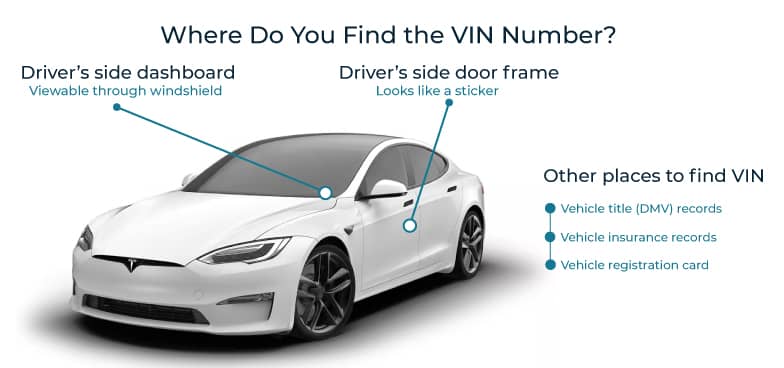
- Driver-side dashboard: View the VIN through the windshield, on the lower corner where the dashboard meets the glass.
- Driver-side door jamb: Open the driver’s door and look for the manufacturer label on the door frame or pillar.
- Vehicle documents: Your insurance card, registration, and title will always list the VIN. This is helpful if you don’t have the car nearby but still want to run a Genesis VIN decoder.
- Engine bay: The VIN may be stamped on metal surfaces such as the firewall or near the engine. This is often used for verification during inspections or repairs.
- Trunk area: Some Genesis vehicles have the VIN stamped on metal inside the trunk. This is mainly used for cross-checking identity.
- Build or compliance plates: These plates or stickers contain factory information and can help confirm the VIN when ordering parts or reviewing vehicle history.
What Information Can You Get from a Genesis VIN Decoder?
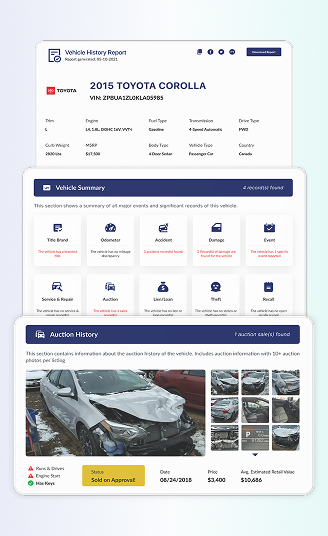
Every Genesis vehicle carries a VIN that quietly stores its story. From factory specs to past ownership records, decoding the VIN helps you understand what you are really dealing with.
Vehicle Specifications
A Genesis VIN decoder confirms the vehicle’s factory specifications as it was originally built. This includes model year, body type, engine configuration, drivetrain, and trim level. For Genesis buyers, this matters because trims and engines can look similar but drive very differently.
Ownership History
Ownership history shows how many times a Genesis has changed hands and whether it was privately owned, leased, or transferred multiple times. Fewer owners often suggest more consistent care, while frequent ownership changes can raise questions.
Mileage History
Mileage records track reported odometer readings over time. This helps confirm whether the Genesis mileage looks consistent or unusual. Sudden drops or gaps may signal errors or possible odometer issues. Mileage history is especially important when comparing market value or estimating future maintenance needs.
Lien/Loan Check
A lien or loan record shows whether a Genesis still has a financial claim attached to it. If a lien exists, the car may not legally be sold until it is cleared. This section helps buyers avoid ownership problems after purchase. For sellers, clearing liens before listing can prevent delays. It is a small check that can save a lot of stress later.
Service & Maintenance Records
Service and maintenance records show reported repairs or routine service when available. Regular maintenance suggests responsible ownership. For Genesis vehicles, this helps confirm proper care of engines, transmissions, and electronics. Even limited records add confidence when reviewing the vehicle’s past.
Theft Records
The theft check looks for reports that a Genesis was stolen and not properly recovered. This protects buyers from legal risks and registration issues. Even if theft records are rare, checking adds peace of mind. It is a quick step that helps confirm the vehicle’s legal standing.
Warranty Status
Warranty status provides insight into whether a Genesis may still be covered under factory or extended warranty, depending on age and mileage. While coverage details should always be confirmed with the manufacturer, this section offers a helpful starting point. For buyers, it can mean lower repair costs early on.
Auction History
Auction history shows whether a Genesis was previously listed or sold through vehicle auctions. This can explain pricing changes or ownership transfers. We will show you the recorded auction photos that offer visual context and help buyers compare past condition with current listings.
Sales History
Sales history tracks previous listings and advertised sales when reported. This helps identify price changes, relisting patterns, or long market times. For buyers, it can reveal negotiation room. For sellers, it helps price the vehicle competitively.
Accident Records
Accident records show whether a Genesis was reported in a collision. This can include minor incidents or more serious events, depending on what was reported. Knowing this helps buyers understand possible structural or mechanical risks. Not every accident means the car is bad, but transparency matters. This section allows you to weigh price, condition, and risk more calmly.
Recalls Check
The recall section shows whether a Genesis has open or past recalls reported by the manufacturer. Recalls are common and not a deal-breaker, but unresolved recalls should be addressed. This helps owners stay safe and compliant. Buyers can also confirm whether recall work has already been completed before finalizing a purchase.
Title Brand Records
Title brand records indicate serious labels like salvage, rebuilt, or lemon titles when reported. This is one of the most important checks for used Genesis vehicles. A branded title can affect resale value, insurance, and financing. Seeing this clearly allows buyers to make informed choices and avoid misunderstandings after purchase.
Why Use a Genesis VIN Decoder?
Genesis vehicles are known for comfort and precision, but their history can be complex. Many Genesis VIN decoders stop at basic identification. Instant VIN Reports combines VIN decoding with reported history data such as ownership changes, mileage records, title brands, and auction activity. This helps users move from simple verification to informed decision-making.
Instead of just telling you what the car is, we help show what it has been through. This reduces guesswork, protects buyers from hidden risks, and helps sellers present clear facts.
Who Can Benefit from Using a Genesis VIN Decoder?
Decoding a Genesis VIN matters at every stage of ownership. Whether you are buying, selling, or managing multiple vehicles, understanding the VIN helps protect value, legality, and trust.
For Buyers
- Confirms the Genesis model and year
- Checks for title brands
- Reviews reported accident history
- Identifies mileage consistency
- Builds confidence before purchase
For Sellers
- Confirms accurate listing details
- Answers buyer questions clearly
- Explains past ownership clearly
- Shows maintenance responsibility
- Reduces negotiation friction
For Dealers
- Faster Genesis inventory verification
- Reduced compliance risks
- Easier auction evaluations
- Consistent reporting standards
- Support for classic Genesis VIN numbers
How to Use the Free Genesis VIN Decoder?
Using our free Genesis VIN decoder is simple and quick. No technical skills needed.
1) Find the VIN
Locate the VIN on the dashboard, door jamb, or vehicle documents.
2) Fill in the Form
Enter the Genesis VIN into the Instant VIN Reports decoder tool.
3) Get the Report
View basic vehicle details instantly and upgrade if a deeper history is needed.
Free Genesis VIN Decoder vs. Paid Genesis VIN Decoder
A free Genesis VIN lookup is a smart first step, while a paid report supports serious decisions.
| Feature | Free VIN Decoder | History Report (Paid) |
|---|---|---|
| VIN decoding for all vehicle types | ||
| Year, make, model, trim | ||
| Full vehicle specifications / detailed car specs | ||
| Market value snapshot | ||
| Sales listings (current/online ads) | ||
| Sales history (timeline of past listings/sales) | ||
| Auction records (when available) | ||
| Auction history with photos | ||
| Mileage during auction/sales (when available) | ||
| Odometer rollback checks | ||
| Ownership history | ||
| Vehicle usage type (personal, fleet, rental, commercial) | ||
| Title brand records (salvage, rebuilt, flood, lemon, etc.) | ||
| Lien & loan records | ||
| Accident & damage history | ||
| Theft / stolen records | ||
| Flood/hail/fire damage checks | ||
| Service/repair records | ||
| Warranty status & coverage | ||
| Recall information |
Decode VIN by Other Manufacturers
 Alfa romeo
AM general
Aston Martin
Audi
Austin Healey
Avanti Motors
Bentley
BMW
Bricklin
Bugatti
Buick
Cadillac
Chevrolet
Chrysler
Daewoo
Daihatsu
Datsun
Dodge
Eagle
Ferrari
Fiat
Fisker
Ford
Freightliner
Genesis
Geo
GMC
Harley Davidson
Hino
Honda
Hummer
Hyundai
Infiniti
Isuzu
Jaguar
Jeep
Kawasaki
Kenworth
Kia
Koenigsegg
Lamborghini
Land Rover
Lexus
Lincoln
Lotus
Maserati
Maybach
Mazda
McLaren
Mercedes Benz
Mercury
MG
MINI
Mitsubishi
Morgan
Nissan
Oldsmobile
Panoz
Peterbilt
Plymouth
Polestar
Pontiac
Porsche
Rolls-Royce
Ram
Saab
Saleen
Saturn
Scion
Shelby
Smart
Subaru
Suzuki
Tesla
Toyota
Triumph
Volkswagen
Volvo
Yamaha
Alfa romeo
AM general
Aston Martin
Audi
Austin Healey
Avanti Motors
Bentley
BMW
Bricklin
Bugatti
Buick
Cadillac
Chevrolet
Chrysler
Daewoo
Daihatsu
Datsun
Dodge
Eagle
Ferrari
Fiat
Fisker
Ford
Freightliner
Genesis
Geo
GMC
Harley Davidson
Hino
Honda
Hummer
Hyundai
Infiniti
Isuzu
Jaguar
Jeep
Kawasaki
Kenworth
Kia
Koenigsegg
Lamborghini
Land Rover
Lexus
Lincoln
Lotus
Maserati
Maybach
Mazda
McLaren
Mercedes Benz
Mercury
MG
MINI
Mitsubishi
Morgan
Nissan
Oldsmobile
Panoz
Peterbilt
Plymouth
Polestar
Pontiac
Porsche
Rolls-Royce
Ram
Saab
Saleen
Saturn
Scion
Shelby
Smart
Subaru
Suzuki
Tesla
Toyota
Triumph
Volkswagen
Volvo
Yamaha
Frequently Asked Questions about Genesis VIN Decoder
How do I decode my Genesis VIN for free?
You can decode a Genesis VIN for free by entering the VIN into an online Genesis VIN decoder. A free check usually confirms basic details like model, year, and manufacturer. At Instant VIN Reports, the free Genesis VIN decoder is a quick starting point. If you later need ownership history, mileage records, or title checks, you can choose to upgrade without re-entering the VIN.
Where is the VIN located on a Genesis luxury car?
On most Genesis vehicles, the VIN is easy to find. You can look through the windshield on the driver’s side dashboard, check the driver-side door jamb sticker, or review official documents like registration and insurance. These locations are set by manufacturers to make VIN verification consistent and reliable.
What information can I get from a Genesis VIN decoder?
A Genesis VIN decoder can confirm the vehicle’s identity, including model year, make, and basic specifications. With a full Genesis vehicle history report, you may also see ownership records, mileage history, title brands, accident reports, lien status, recalls, and market value indicators. This helps buyers and owners understand the vehicle beyond its appearance.
How do I find my Genesis's production year using the VIN?
To find the Genesis’s production year using the VIN, see the 10th character of the VIN. Each letter or number represents a specific model year. While this can be decoded manually, using a Genesis VIN decoder reduces mistakes and confirms the year alongside other production details for accuracy.
Can I get the Genesis trim level and package information from the VIN?
Yes, a Genesis VIN can reveal trim level and package details when the data is available. This is important because Genesis trims may look similar but differ in features and value. A VIN decoder helps confirm whether the vehicle is Standard, Advanced, Prestige, Sport, or another configuration based on factory records.
What do the digits in a Genesis VIN mean for luxury vehicles?
Each section of a Genesis VIN has a purpose. The first part identifies the manufacturer, the middle section describes vehicle attributes, and the final section includes the model year, plant, and serial number. Luxury brands like Genesis use these codes to track production and specifications accurately across global markets.
How do I check Genesis recalls by VIN?
You can check Genesis recalls by entering the VIN into a decoder that includes recall data. Recalls are issued by the manufacturer and tied directly to the VIN. A Genesis VIN lookup helps confirm whether recalls exist and whether they may need attention, which is important for safety and compliance.
How can I tell what engine my Genesis has from the VIN?
The engine type is often encoded in the VIN’s descriptor section. While the code itself may not be obvious to read manually, a Genesis VIN decoder like Instant VIN reports translates it into understandable engine information. This is helpful for buyers, owners, and anyone ordering parts or planning maintenance.
Does Genesis have different VIN systems for US vs Korean models?
Genesis follows the international VIN standard, but certain codes can differ based on market and production location. Korean-built and U.S.-assembled models may show different plant or manufacturer identifiers. A VIN decoder helps interpret these differences clearly without needing technical knowledge.