
Get Tesla Build Sheet by VIN - Check Factory Specifications
Tesla vehicles evolve quickly through hardware revisions and factory configurations. Get your Tesla factory Build Sheet online. View original battery size, drivetrain, Autopilot hardware, software configuration, option packages, MSRP, and factory specifications.
What is a Tesla Build Sheet?
A Tesla Build Sheet is the factory production record that documents how a Tesla was originally configured before leaving the factory.
Many Teslas look identical while having different batteries, hardware revisions, software capabilities, and factory-installed equipment. A Build Sheet removes the guesswork by documenting the original production configuration.
Why Tesla Build Sheets Matter
From the original Roadster to today’s Cybertruck, every Tesla has its own factory production record. A Build Sheet documents the hardware and equipment installed when the vehicle was built. Whether you’re researching a Tesla before purchase or documenting the one you already own, the Build Sheet provides reliable factory information directly linked to the VIN.
Buyers
Buying a used Tesla often means verifying battery configuration, Autopilot hardware, and factory equipment. A Tesla Build Sheet confirms those original specifications before you complete the purchase.
Verify Battery Configuration
Confirm the original battery type, battery designation, and factory battery configuration installed when the vehicle was built.
Compare Original MSRP
Review the original MSRP together with factory equipment to better understand the vehicle’s original value.
Verify Factory Equipment
Confirm Premium Audio, Premium Connectivity, heated seats, glass roof, towing equipment, interior configuration, and other factory-installed features.
What Information Will You Get From a Tesla Build Sheet?
Whether you’re verifying Full Self-Driving capability, confirming a Dual Motor configuration, checking the original battery, or researching a used Tesla, the Build Sheet provides factory information that helps remove uncertainty.
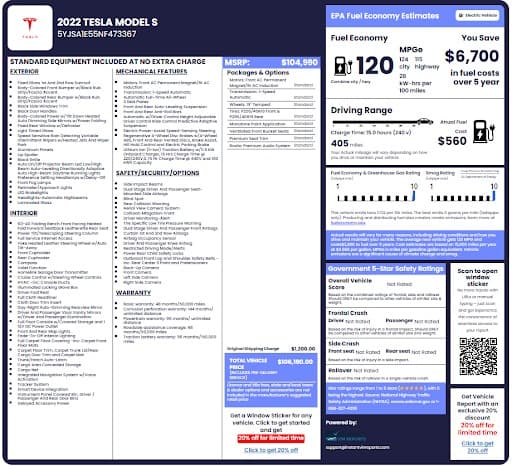
Tesla Original Factory Details
Verify the original model year, Tesla model, trim, body style, VIN, and factory production information assigned during manufacturing.
Battery Configuration
View the original battery type, battery designation, estimated capacity, battery architecture, and other available factory battery specifications associated with the VIN.
Motor Configuration
Verify whether the vehicle was originally built as Rear-Wheel Drive, Dual Motor All-Wheel Drive, Tri-Motor, or another factory drivetrain configuration.
Autopilot Hardware Version
Review the original Autopilot hardware generation, including HW1, HW2.0, HW2.5, HW3, HW4, or other supported factory hardware where available.
Full Self-Driving (FSD) Capability
Verify the original factory driver-assistance configuration, including whether the vehicle was originally configured with Full Self-Driving capability where available. Because software licenses and subscriptions can change over time, compare the Build Sheet with the vehicle’s current software status.
Premium Connectivity & Infotainment
Confirm factory-installed connectivity features, Premium Connectivity eligibility, navigation, streaming services, infotainment configuration, and related equipment where available.
Premium Audio System
Verify whether the Tesla originally included Premium Audio, upgraded speakers, amplifier configuration, subwoofer, and related factory audio equipment.
Factory Option Codes
Review Tesla factory option codes, production identifiers, region codes, hardware identifiers, and other factory production information associated with the VIN.
Original MSRP
View the original Manufacturer’s Suggested Retail Price (MSRP), optional equipment pricing, destination charges, and factory pricing information.
Build Location
Verify where your Tesla was originally built, including factories such as Fremont, Austin, Berlin, Shanghai, or other manufacturing facilities when available.
Warranty Information
Review original warranty coverage for the vehicle, battery, drive unit, corrosion protection, and other factory warranty information applicable when the Tesla was delivered new.
Safety Features
Verify factory-installed safety technologies, Autopilot hardware, active safety systems, cameras, sensors, airbags, collision avoidance systems, and other available driver-assistance equipment.
How to Get a Tesla Build Sheet by VIN
There’s no need to search through old purchase documents or service records. Our Tesla Build Sheet lookup retrieves available factory production information in just a few simple steps.
Enter the VIN
Enter your Tesla VIN into the lookup tool above. If you don't have the VIN available, you can also search using a U.S. license plate or the vehicle's year, make, and model.
Submit the VIN
Our system will retrieve available production records linked to the VIN.
Access the Build Sheet
Review your Tesla Build Sheet online or download it as a PDF. The build sheet is useful when buying, selling, servicing, documenting, or verifying factory hardware and production specifications.
Where Can I Find the VIN on a Tesla?
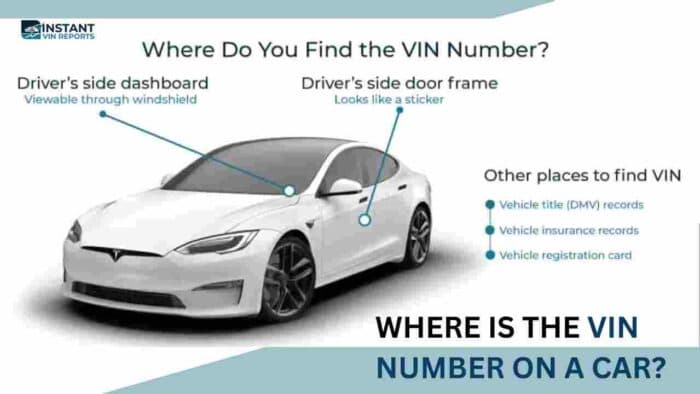
Tesla displays the VIN in several physical and digital locations. Once you’ve located it, you can retrieve your factory Build Sheet in just a few minutes.
Driver's Side Dashboard
On most Tesla vehicles, the VIN is visible through the driver’s side windshield at the base of the dashboard. This is usually the quickest place to locate it.
Driver's Door Jamb
Open the driver’s door and inspect the certification label attached to the door jamb. This label includes the VIN along with manufacturing information and vehicle weight specifications.
Tesla Touchscreen
You can also find the VIN directly from your Tesla’s center touchscreen. Navigate to: “Controls”, and then click “Software”. The VIN is displayed together with the current software version and vehicle information.
Tesla Mobile App
If your Tesla is linked to your Tesla account, open the Tesla mobile app and select your vehicle. The VIN is typically available within the vehicle information section.
Tesla Account
Owners can also view their VIN by logging into their Tesla account online. Vehicle information associated with your account usually includes the VIN and delivery details.
Vehicle Documents
The VIN is also printed on your vehicle registration, insurance card, financing paperwork, purchase agreement, title, and many Tesla service records.
Why Choose Our Tesla Build Sheet Lookup?
More than 1 million drivers rely on Instant VIN Reports to verify factory vehicle specifications before buying, selling, servicing, or maintaining their vehicles. Here’s why:
Most Comprehensive Database Coverage
Our VIN database supports millions of vehicles across numerous manufacturers, including Tesla models from multiple production facilities and model years, helping you verify factory specifications using a single lookup.
High Accuracy, Cross-Checked Results
We combine multiple automotive data sources to verify Tesla production specifications, battery configuration, hardware versions, factory equipment, and manufacturing information with greater confidence.
No Hidden Fees or Subscriptions
Purchase only the report you need. There are no recurring memberships, automatic renewals, or hidden subscription fees.
Live Chat with VIN Experts
Need help understanding your Tesla Build Sheet? Our VIN specialists are available through live chat to answer questions about reports, VIN decoding, and factory production information.
Explore More Tesla VIN Tools
Need more than a Tesla Build Sheet? Explore our additional VIN tools to decode your VIN for free or retrieve the Tesla Window Sticker with MSRP, factory equipment, battery configuration, and option details.
Free Tesla VIN Decoder
Decode your Tesla VIN for free to identify the model year, drivetrain, body style, manufacturing plant, and other basic factory information. It’s the ideal first step before ordering a Build Sheet or Vehicle History Report.
Chevrolet Window Sticker Lookup
Our Chevy window sticker tool shows the Monroney label with all factory-installed features, MSRP, and equipment details in seconds
Get Build Sheets for Other Tesla Models
Tesla’s lineup has expanded significantly over the years. Our Build Sheet service supports current production models as well as discontinued Tesla vehicles.
Cybertruck
Model 3
Model S
Model X
Model Y
Roadster (2008–2012)
Roadster (Second Generation)
Lookup Build Sheets for Other Makes
Need a Build Sheet for another manufacturer? Instant VIN Reports supports factory Build Sheet lookups for hundreds of vehicle brands, from electric vehicles and luxury cars to trucks, SUVs, classics, and performance models.
Tesla Build Sheet Frequently Asked Questions
Where can I find a free Tesla Build Sheet by VIN?
Free Tesla VIN lookup tools provide only basic information, such as the model year, body style, and drivetrain. A complete Tesla Build Sheet includes factory production specifications like the original battery configuration, motor setup, Autopilot hardware, factory-installed equipment, MSRP, build location, and other details that free VIN decoders typically don’t provide.
Can Tesla Service Centers provide my factory Build Sheet?
Tesla Service Centers primarily focus on maintenance and repairs rather than providing consumer Build Sheets. Depending on the vehicle and available records, service personnel may access certain production information.
Our Tesla Build Sheet lookup offers another convenient way to verify original factory specifications using the VIN, and can be used anytime and anywhere.
How can I tell which Autopilot hardware (HW1, HW2.5, HW3, or HW4) my Tesla has?
Autopilot hardware generation depends on the vehicle’s production date and factory configuration. Our Tesla Build Sheet helps verify the original hardware version installed during manufacturing, making it easier to understand the vehicle’s capabilities before buying, selling, or servicing it.
Can I tell if my Tesla originally included Full Self-Driving (FSD)?
Yes. Factory production records can help identify whether the vehicle originally included Full Self-Driving capability or another factory driver-assistance configuration. Because software licenses and features may change over time, it’s helpful to compare the Build Sheet with the vehicle’s current software status.
What do Tesla battery codes like BT35, BT37, BT42, BT43, and BTF0 mean?
Tesla battery codes identify specific battery configurations used during production. Their exact meaning depends on the model, production period, and engineering revisions. A Tesla Build Sheet provides additional context by displaying the battery configuration alongside the vehicle’s original factory specifications.
How do I know where my Tesla was built?
A Tesla Build Sheet can help identify the vehicle’s original production facility, where available, including factories such as Fremont, Austin (Gigafactory Texas), Berlin (Gigafactory Berlin-Brandenburg), or Shanghai (Gigafactory Shanghai). The VIN also contains manufacturing information that helps identify the assembly location.
Can I verify whether my Tesla is Rear-Wheel Drive, Dual Motor, or Performance?
Yes. A Tesla Build Sheet helps verify the original drivetrain configuration assigned during production, including Rear-Wheel Drive, Dual Motor All-Wheel Drive, Performance, Plaid, or other factory configurations where applicable.
How do I find out if my Tesla has Premium Audio?
A Tesla Build Sheet can help verify whether the vehicle originally included Premium Audio or other factory-installed infotainment equipment. This is useful when purchasing a used Tesla or comparing different model configurations.
Can I verify Premium Connectivity from a Tesla Build Sheet?
A Tesla Build Sheet helps identify the vehicle’s original connectivity configuration and factory-installed infotainment features. Current subscription status depends on the owner’s Tesla account and software services, so it may differ from the original factory configuration.
What is SpecKR, and how is it related to Tesla production information?
SpecKR is a community-developed reference used by some Tesla enthusiasts to interpret production information and factory configurations. While it can provide helpful insights, a Tesla Build Sheet presents factory production information in a more organized format linked directly to the VIN.
What is the difference between a Tesla Build Sheet and a Tesla Window Sticker?
A Tesla Build Sheet documents the vehicle’s original factory production specifications, including battery configuration, hardware, production details, and factory equipment. A Tesla Window Sticker focuses on consumer information available when the vehicle was delivered new, such as MSRP, standard equipment, optional equipment, EPA range estimates, and warranty information.