
Get the Factory Chevrolet Build Sheet by VIN for any Chevy
Looking for reproduction build data for your collectible Chevy? Instant VIN Reports has got you covered. We provide the Chevy build sheet by VIN for any Chevrolet vehicles, including classic collectible and old discontinued vehicles, with chassis numbers ranging from 5 to 14 digits.
What is a Chevrolet Build Sheet?
A classic Build Sheet is a reproduction of the original document that comes with a classic car. Classic window stickers are generally hard to find and not easily located. As a result, many owners find it very hard to get any insight into their vehicles. With our Build Sheet, car owners can get valuable information and data on their vehicle.
The Importance of Chevy Factory Build Sheet
In the used truck and performance market, factory configuration data directly impacts value, trust, and negotiation power.
Buyers
Buyers use Chevy build sheets to verify what a vehicle actually includes before spending money. It helps buyers move from assumptions to verified factory specifications.
Know exactly what you’re paying for
Confirms engine, trim, and drivetrain so buyers know exactly what they are purchasing before committing to a Chevrolet.
Know exactly what you’re paying for
Confirms engine, trim, and drivetrain so buyers know exactly what they are purchasing before committing
Buy with complete confidence
Enables confident purchase decisions backed by verified Chevrolet factory data.
What Information Will You Get From a Chevrolet Build Sheet?
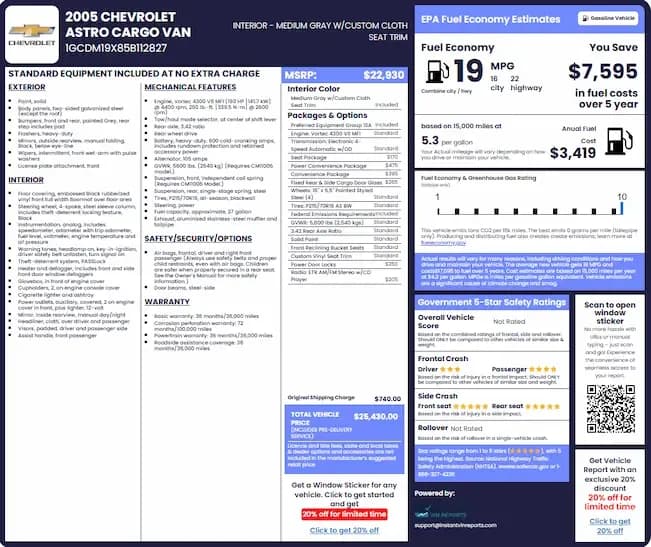
A Chevrolet Build Sheet breaks down your vehicle’s complete factory configuration into structured sections. Each section explains exactly how your Chevy was built, including specifications, options, and production data.
Chevrolet Factory Details
This section confirms your Chevrolet’s core factory identity, including year, make, model, and trim level, such as WT, LS, LT, RST, LTZ, Z71, High Country, SS, ZL1, or classic configurations. It also includes production plant information and build date, helping verify originality for both modern vehicles and classic Chevrolets.
Engine Specifications
Your Chevrolet Build Sheet is primarily used to verify factory-installed packages such as Z71 off-road systems, towing configurations, LTZ luxury upgrades, and performance trims. Not just basic specifications like engine size or fuel economy.
Transmission Information
This section outlines the transmission system installed at the factory. It includes automatic or manual type, transmission model (e.g., Hydra-Matic), gear ratios, and drivetrain pairing. This is essential for verifying performance setup and compatibility for repairs or modifications.
Factory Options & Packages
See if Chevrolet factory options and packages, whether it is a base WT work truck or a fully equipped Z71, LTZ, Trail Boss, or High Country. Every factory-installed feature is encoded in RPO data and fully decoded in your build sheet.
Interior & Exterior Colors
This section confirms the original color configuration of your Chevrolet. It includes exterior paint colors like Summit White, Black, Red Hot, or Shadow Gray Metallic, and interior trims such as Jet Black, Gideon, or leather/cloth combinations. This is especially important for restorations and originality verification.
Wheels & Tire Specifications
Here you’ll find the wheel size, design, and tire specifications installed at the factory. This includes rim diameter, tire dimensions, and optional wheel upgrades tied to specific packages or trims. It helps ensure correct replacements and maintains factory authenticity.
Suspension & Drivetrain
This section shows how your Chevrolet was engineered to drive. It includes suspension type (standard, sport, Z71 off-road, or performance-tuned), drivetrain layout (FWD, RWD, AWD, 4WD), and differential configuration. Critical for trucks, SUVs, and performance models where capability matters.
MSRP
This section shows the Manufacturer’s Suggested Retail Price when the vehicle was new. It includes base price, factory options pricing, destination charges, and total MSRP. Useful for valuation, resale positioning, and historical comparison.
Standard and Optional Equipment
This section lists every feature installed on your Chevrolet from the factory. It includes standard equipment plus optional upgrades such as infotainment systems, Bose audio, heated seats, navigation systems, wireless charging, and advanced safety features. It shows the full factory equipment picture beyond just packages.
How to Get a Chevrolet Build Sheet by VIN?
Follow these three steps to get any Audi factory build sheet within seconds:
Enter the VIN
Locate your Chevrolet VIN and enter it into the lookup form above.
Submit the VIN
Submit the VIN to retrieve available factory information. Don’t have the VIN? You can also use U.S. license plate numbers or the Chevy year and models.
Access the Build Sheet
Instantly access and download your completed build data report.
Where Can I Find the VIN on a Chevrolet?
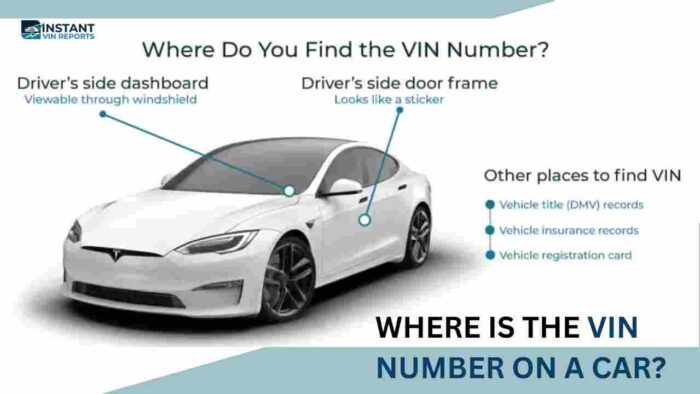
To locate Chevy VIN numbers, you can check several common physical and documented locations on your vehicle and ownership papers
Dashboard (Driver's Side)
Look through the lower corner of the windshield from outside the vehicle. The VIN is visible on a metal plate at the base of the windshield on most Chevrolet models.
Driver's Door Jamb
Open the driver-side door and check the compliance sticker on the door frame or pillar. This label often includes the VIN along with RPO codes on many Chevy vehicles.
Engine Bay / Firewall
Lift the hood and locate the VIN stamped on the firewall near the brake booster or mounted on a metal plate near the engine bay area.
Strut Tower / Shock Tower
On some Chevrolet models, the VIN is stamped on the top of the strut tower or attached to a nearby metal identification plate inside the engine compartment.
Spare Tire Well / Trunk Area
Certain older Chevrolet models may have the VIN stamped or labeled in the trunk floor, spare tire well, or rear body panel area.
Vehicle Documentation
The VIN is always listed in official documents such as the vehicle registration, title, insurance policy, bill of sale, and purchase paperwork.
myChevrolet Mobile App
Vehicle Information section for connected vehicles.
Why Choose Our Chevrolet Build Sheet Lookup?
Instant VIN Reports is used by over a million drivers because it turns a VIN into clear factory-level build sheet data in seconds. We help remove guesswork and provide structured, easy-to-understand vehicle specifications that support confident decisions.
No hidden fees or subscriptions
Our services is built with transparent pricing. Users only pay for full build sheet reports when needed, with no hidden charges, recurring subscriptions, or unexpected upgrade requirements.
Most comprehensive database coverage
Instant VIN Reports aggregates extensive factory-level Chevrolet data, including modern vehicles and classic models with shorter chassis number formats.
Live Chat with VIN Expert
Users can connect with a VIN specialist in real time to clarify Chevrolet-specific details such as trim differences, factory packages, or classic VIN decoding questions.
High accuracy, cross-checked results
Each build sheet result is processed through multiple validation layers to reduce inconsistencies.
Explore Other Chevrolet VIN Search Tools
Check full Chevrolet factory information in seconds using our free VIN decoder and window sticker lookup system.
Free Chevrolet VIN Decoder
Decode any Chevrolet VIN for free to see basic specs like engine, trim, model year, and transmission details at no cost.
Chevrolet Window Sticker Lookup
Our Chevy window sticker tool shows the Monroney label with all factory-installed features, MSRP, and equipment details in seconds
Get Build Sheets for Other Chevrolet Models
Our system supports Chevrolet models that are widely searched today, along with vintage and collector vehicles with a 5 to 14 chassis number format, which other tools often can’t decode. Below are some models people often search for with our services.
Lookup Build Sheets for Other Makes
Need to check other build data other than Chevy? Access build sheets for available makes below!
Chevrolet Build Sheet Frequently Asked Questions
Where is the RPO sticker located in a Chevrolet vehicle?
The RPO sticker is located inside the glove box or on the driver-side door jamb, depending on the model year.
What are GM RPO codes on a Chevrolet build sheet?
GM RPO codes are factory identifiers that define every option installed on your Chevrolet, including engine, trim, suspension, and packages.
Is a Chevrolet build sheet the same as a VIN decoder?
No, our Free Chevy VIN decoder provides only basic vehicle information such as year, make, model, and engine type. A Chevrolet build sheet provides deeper factory-level data, including full option lists, production details, and complete original configuration.
What's the difference between a Chevrolet build sheet and a window sticker?
A build sheet shows the exact factory configuration of your Chevrolet. A window sticker focuses on marketing details at the time of sale. Both provide different but complementary vehicle information.
Can I get a free Chevrolet build sheet by VIN?
A basic Chevrolet VIN decode will give limited information for free, but a full build sheet with factory options, specifications, and other build data will require a paid lookup.
Can a Chevrolet dealership print my factory build sheet?
Yes, a Chevrolet dealership will be able to access factory systems to print build information for your vehicle. However, availability depends on records and model year. A digital build sheet lookup like Instant VIN Reports will provide instant and accurate access without needing a dealership visit.
How do I get a build sheet for a Chevrolet truck by VIN?
You can get a Chevrolet truck build sheet by entering your VIN into our lookup tool. It will return full factory details, including towing package, drivetrain, engine configuration, axle ratio, and all factory-installed truck-specific options.
How do I get a build sheet for a classic Chevrolet or vintage GM car?
You can get a build sheet for classic Chevrolet and vintage GM vehicles by entering shorter VIN formats (usually ranging from 5 to 14 digits) into the form above. Our system will decode older production formats and provide available factory specifications based on archived build data.
Why are some options missing from my Chevrolet build sheet?
Some options may be missing if they were added after production, installed by dealers, or not recorded in factory systems. Only factory-installed equipment tied to the VIN will appear on our official Chevrolet build sheet.
Does the GM Heritage Center provide build sheets for old Chevrolets?
The GM Heritage Center provides limited historical documentation for select classic Chevrolet models. Our build sheet lookup tool will provide faster and more accessible factory specification results for older vehicles without manual requests.