
Get Nissan OEM Factory Build Sheet by VIN
Every Nissan leaves the factory with a unique combination of trim, engine, transmission, packages, colors, and factory-installed equipment. Retrieve your Nissan Build Sheet by VIN to verify the vehicle’s original specifications. Our lookup supports both modern 17-character VINs and classic Nissan Chassis numbers from 5 to 14 digits.
What is a Nissan Build Sheet?
A Nissan Build Sheet is the factory production record that documents how a Nissan was originally built before leaving the assembly line.
Every Nissan is built according to a unique factory configuration. Whether it’s a NISMO performance model, a PRO-4X off-road truck, a Platinum luxury trim, or an everyday commuter, the Build Sheet records the factory-installed equipment, packages, colors, drivetrain, and production specifications assigned when the vehicle left the assembly line.
Why Nissan Build Sheets Matter
Our Nissan Build Sheet isn’t only useful when purchasing a vehicle. It also helps owners verify factory specifications, order compatible parts, restore classic models, and document original equipment throughout the vehicle’s lifetime.
Buyers
Two Nissan vehicles may look nearly identical while having very different factory equipment. A Build Sheet helps buyers identify those differences before making an investment.
Verify NISMO Authenticity
Some vehicles receive aftermarket NISMO badges or appearance upgrades. The Build Sheet helps verify whether your Nissan was originally produced with genuine factory NISMO equipment.
Compare Original MSRP
Review the original MSRP together with optional equipment pricing to better understand the vehicle’s original value.
Order Correct Replacement Parts
Knowing the original factory specifications helps ensure replacement parts match the vehicle’s original configuration.
What Information Will You Get From a Nissan Build Sheet?
A standard VIN decoder only provides basic vehicle identification. Our Nissan Build Sheet goes much further by documenting factory-installed packages, original colors, MSRP, drivetrain, warranty information, and production specifications.
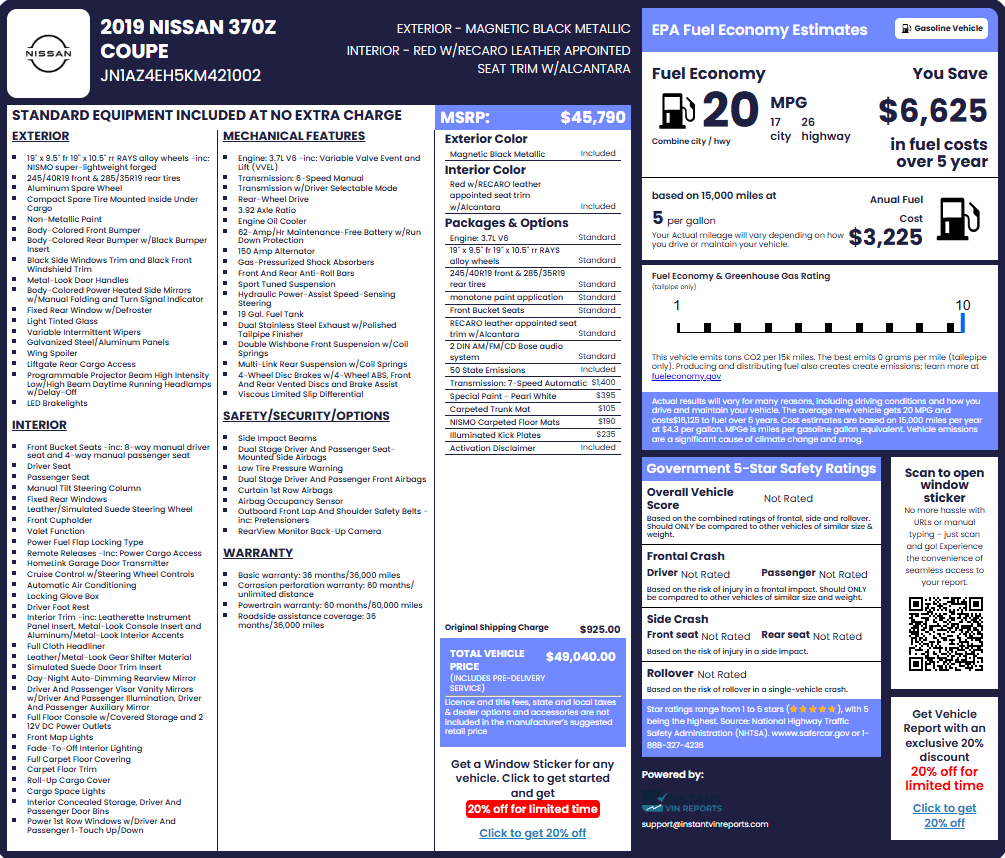
Nissan Original Factory Details
Verify the original model year, Nissan model, trim level, body style, production information, VIN, drivetrain, and manufacturing details assigned when the vehicle was built
Engine & Drivetrain
View the original engine, transmission, drivetrain, horsepower, fuel type, and mechanical specifications. This includes gasoline, diesel, hybrid, and electric powertrains where applicable.
Factory Packages & Options
Confirm factory-installed packages such as SV, SR, SL, Platinum, Platinum Reserve, PRO-4X, Rock Creek, Midnight Edition, NISMO, and other available equipment. Because package contents vary by model year, the Build Sheet confirms exactly which equipment was factory-installed instead of relying solely on trim names.
NISMO Performance Equipment
Verify whether your Nissan was originally equipped with factory NISMO performance upgrades, appearance packages, suspension components, wheels, interior trim, and other model-specific equipment.
Interior & Exterior Colors
Review the original factory paint color, upholstery, interior trim, seat materials, and other appearance details assigned during production.
Standard Equipment
See the factory equipment included with your Nissan trim level, including infotainment features, seating, climate control, convenience equipment, and driver assistance technologies.
Wheels, Suspension & Brakes
Verify factory wheel specifications, suspension components, brake systems, tire sizes, and off-road or performance equipment originally installed on your Nissan.
Original MSRP
View the Manufacturer’s Suggested Retail Price (MSRP), destination charges, and pricing for optional packages and factory-installed equipment.
Fuel Economy
Review the original EPA fuel economy ratings, including city, highway, and combined estimates for gasoline, diesel, hybrid, and electric Nissan models where applicable.
Warranty Information
See the original Nissan warranty coverage, including basic warranty, powertrain coverage, corrosion protection, emissions warranty, roadside assistance, and EV battery coverage where applicable.
Safety Features
Verify factory-installed safety equipment, including Nissan Safety Shield® 360, ProPILOT Assist, Intelligent Around View® Monitor, Blind Spot Warning, Rear Automatic Braking, Lane Departure Warning, and other driver assistance technologies.
How to Get a Nissan Build Sheet by VIN
Finding your Nissan’s original factory specifications is quick and straightforward.
Enter the VIN
Use the VIN located on your vehicle or vehicle documents. You can also search by U.S. license plate or year, make, and model.
Submit the VIN
Click "Search VIN" to retrieve your vehicle's original factory build information.
Access the Build Sheet
We match the VIN with production records to identify its specifications, options, and factory equipment.
Where Can I Find the VIN on a Nissan?
If you’re buying, selling, restoring, or maintaining a Nissan, locating the VIN allows you to access factory documentation that supports more informed decisions throughout ownership.
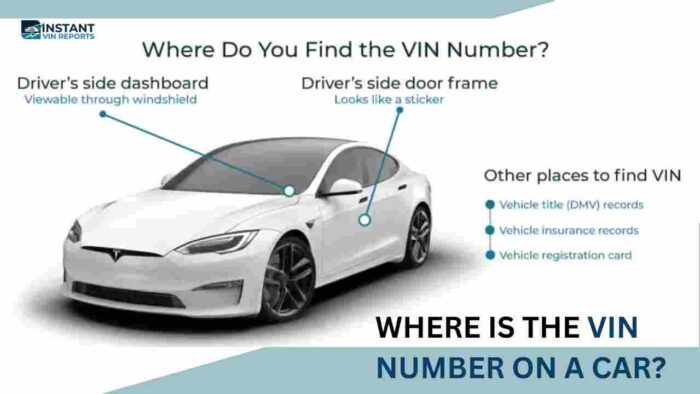
Driver's Side Dashboard
The most common place to find the VIN is on the driver’s side dashboard near the base of the windshield. It can usually be viewed from outside the vehicle by looking through the lower corner of the windshield.
Driver's Door Jamb
Open the driver’s door and inspect the certification label on the door jamb or B-pillar. Besides the VIN, this label often includes the manufacturing date, weight ratings, tire specifications, and other vehicle information.
Engine Compartment
Some Nissan models include an identification plate inside the engine compartment or mounted on the firewall. Depending on the model and production year, this plate may also display the model code and other factory information.
Vehicle Registration & Ownership Documents
If your Nissan isn’t nearby, the VIN can usually be found on the vehicle title, registration, insurance card, financing paperwork, purchase agreement, and other ownership documents.
MyNISSAN App
Many newer Nissan owners can view their VIN through the MyNISSAN app after adding their vehicle to their account. Depending on the model and region, the VIN is typically displayed within the vehicle information or garage section.
Nissan Owner Portal
If you’ve registered your vehicle through Nissan’s owner website, your VIN may also be available after signing in and selecting your registered vehicle. Available features vary by country and account.
Why Choose Our Nissan Build Sheet Lookup?
More than one million drivers, buyers, dealerships, collectors, repair professionals, and automotive businesses trust Instant VIN Reports for reliable factory vehicle information. Here’s why:
High Accuracy, Cross-Checked Results
Our results combine information from trusted automotive data sources whenever available, helping verify factory specifications, trim levels, packages, original equipment, and production details with greater confidence.
Most Comprehensive Database Coverage
Our extensive database supports millions of VINs across hundreds of manufacturers, including modern Nissan vehicles and many classic Nissan VINs from 5 to 14 digits, making factory Build Sheet research available across multiple generations.
24/7 Customer Support
Our customer support team is available around the clock to answer questions about VIN lookups, Build Sheets, report access, orders, and other product-related inquiries whenever assistance is needed.
No Hidden Fees or Subscriptions
Pay only for the results you need. There are no recurring memberships, automatic renewals, or hidden subscription charges to worry about.
Explore Other Nissan VIN Search Tools
Vehicle research should be simple, accurate, and accessible. Check other Nissan tools below:
Free Nissan VIN Decoder
Decode your Nissan VIN for free to identify the model year, engine, body style, transmission, manufacturing plant, and other basic factory information. It’s the ideal first step before ordering a complete Build Sheet or Vehicle History Report.
Nissan Window Sticker Lookup
Retrieve the original Nissan Window Sticker to view the factory MSRP, standard equipment, optional packages, destination charge, EPA fuel economy, warranty coverage, and pricing exactly as the vehicle was sold new.
Get Build Sheets for Other Nissan Models
From compact sedans and family SUVs to sports cars, electric vehicles, commercial vans, and classic Datsuns, our Build Sheet service supports Nissan models from multiple generations.
Lookup Build Sheets for Other Makes
From collectible classics to today’s newest production models, our Build Sheet lookup helps verify factory specifications across a wide range of manufacturers.
Nissan Build Sheet Frequently Asked Questions
Where can I find a free Nissan Build Sheet by VIN?
You can get basic vehicle information, with our free VIN decoder, such as the model year, engine, body style, and trim. However, a complete Nissan Build Sheet includes factory-installed packages, original specifications, paint code, interior trim, MSRP, and production information, which aren’t available through free lookup.
What is the difference between a Nissan VIN decoder and a full factory Build Sheet?
Our Nissan VIN decoder identifies basic information encoded within the VIN, such as the model year, manufacturer, engine, and assembly plant. A Nissan Build Sheet goes much further by documenting factory-installed options, trim level, optional packages, original colors, transmission, MSRP, and production specifications unique to your vehicle.
What is Nissan FAST, and how does it decode option codes by VIN?
Nissan FAST is an electronic parts catalog used to identify Nissan OEM parts and vehicle information using the VIN. While it helps identify factory components and configurations, a Nissan Build Sheet provides an easier-to-read summary of the vehicle’s original specifications, packages, colors, equipment, and production information.
Can a Nissan dealership print my factory Build Sheet using their parts catalog system?
Some Nissan dealerships may be able to access factory vehicle information using your VIN, although availability depends on the dealership, model year, and internal systems. If dealership access isn’t available, our VIN-based Build Sheet lookup provides a convenient way to verify original factory specifications, without having to go to the dealership, and can be done anytime, anywhere.
What are Nissan option codes like option 47, 81, and 82 on older JDM models?
Older Nissan and JDM vehicles often use production or option codes to identify factory-installed equipment and market-specific configurations. The exact meaning depends on the model and production period. Reviewing the complete Build Sheet provides the most accurate context for those factory option codes.
What information is included on a Nissan factory Build Sheet?
A Nissan Build Sheet typically includes the original model, trim level, engine, transmission, drivetrain, paint color, interior trim, factory-installed packages, optional equipment, MSRP, standard equipment, warranty information, fuel economy, and production specifications assigned to the VIN.
How can I find my Nissan's paint code from the Build Sheet or VIN plate?
Our Build Sheet records the original factory paint color assigned during production. Many Nissan vehicles also display the paint code on the certification label or identification plate, depending on the model and production year. Comparing both sources helps confirm the original exterior finish.