
Looking up vehicle specs by VIN is one of the easiest ways to learn how a vehicle was originally built. Each character in the VIN (Vehicle Identification Number) can show you the key factory details such as the engine, transmission, trim level, body style, fuel type, and more.
Today, you don't need to manually decode VIN characters or search through manufacturer databases. With an online free VIN decoder, like Instant VIN Reports, you can access basic vehicle specifications within seconds, at no cost.
If you need more detailed information, such as original MSRP, factory options, standard equipment, interior and exterior colors, fuel economy ratings, and other OEM specifications, you can upgrade to a window sticker lookup for a complete picture of the vehicle's original configuration.
- A VIN acts as a vehicle's unique identifier and contains important manufacturing information.
- A Free VIN lookups tool, like Instant VIN Reports, can help buyers confirm seller claims and avoid purchasing vehicles with incorrect listings.
- For complete OEM equipment details, original pricing, and package information, the window sticker lookup provides a more comprehensive report.
How to get Vehicle specs with a Vehicle History Report
Each character in the VIN can show you a vehicle's factory configuration, including:
Vehicle Make, Model, and Model Year
One of the most basic but important details a VIN can pull up is the vehicle's make, model, and model year. These details confirm the vehicle's identity and help ensure it matches registration records, listings, and ownership documents.
Engine Specifications
Engine specifications influence fuel economy, maintenance costs, towing capability, insurance premiums, and long-term ownership expenses. By checking engine specs by VIN parts in the window sticker, buyers can verify seller claims, owners can order compatible parts, and collectors can confirm originality.
EV Battery and Motor Specifications
For electric vehicles, factory specifications will include battery capacity, motor configuration, drivetrain setup, and estimated driving range. These details can help buyers compare trims, understand charging capabilities, and verify whether a used EV matches its advertised specifications.
Transmission Information
Many VIN records include transmission details such as automatic, manual, continuously variable transmission (CVT), or dual-clutch systems. Understanding the transmission type can help buyers evaluate driving characteristics and maintenance expectations.
Body Style and Vehicle Type
Body style affects everything from cargo capacity to insurance classifications. VIN records help confirm how the vehicle was originally categorized by the manufacturer.
Drivetrain Configuration
Whether a vehicle sends power to two wheels or all four can affect performance in different driving conditions, including front-wheel drive (FWD), rear-wheel drive (RWD), all-wheel drive (AWD), or four-wheel drive (4WD).
Trim Level
A vehicle's original trim level affects far more than convenience features. Higher trims often include upgraded safety technology, premium interior materials, advanced infotainment systems, and performance enhancements. Verifying the original trim level by VIN helps buyers compare vehicles accurately and avoid paying premium prices for incorrectly advertised models.
With a free VIN decoder, you can check vehicle specifications without remembering what each character means, and at no cost. This applies not only to standard 17-character VINs but also to discontinued models and many classic vehicles with classic chassis numbers ranging from 5 to 14 characters, with our free VIN lookup tools.
Why Vehicle Specs Matter More Than You Think
It's common for a single vehicle model to be sold in several different configurations. While the exterior may look the same, the equipment underneath can vary significantly. Because many of these differences aren't visible from the outside, relying on appearance alone can lead to incorrect assumptions about a vehicle's capabilities and value.
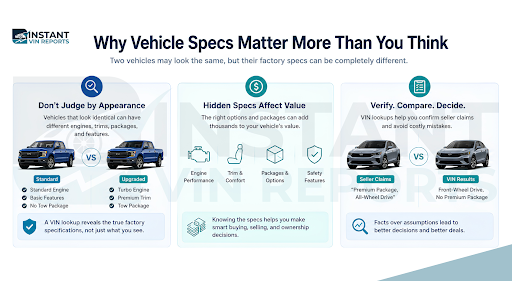
Instant VIN Reports VIN lookup helps uncover those hidden factory details, allowing buyers, sellers, and owners to make decisions based on verified information rather than guesswork.
How To Get Vehicle Specs With the VIN
Modern VIN lookup tools have simplified the process considerably. Instead of decoding each character manually, you can retrieve factory records in a matter of seconds.
Step 1: Locate the VIN
Before you can decode a VIN, you'll need to find it. The VIN is commonly located on:
- The dashboard near the windshield
- The driver's side door jamb
- Vehicle registration documents
- Insurance cards
- Vehicle title records
Step 2 - Enter the VIN Into a Free VIN Decoder
Once you've located the VIN, enter it into a VIN decoding tool. The decoder will analyze the VIN and retrieve factory information associated with that vehicle. In many cases, results are available within seconds.
Step 3 - Review the Factory Specifications
After decoding the VIN, review the available specifications. Our VIN decoding will show:
- Make and model
- Model year
- Engine details
- Transmission type
- Body style
- Fuel type
- Trim level
- Drivetrain configuration
Basic VIN decoding can identify a vehicle's core and basic specifications. However, factory-installed options, premium packages, MSRP, and equipment details may require additional records. This is where a window sticker lookup becomes useful, providing a more complete view of the vehicle's original configuration.
Why Knowing Your Vehicle's Engine Specs Matters
Whether you're buying, selling, repairing, or restoring a vehicle, engine information is one of the most useful pieces of factory data available. They influence how a vehicle performs, how much it costs to maintain, and what parts it requires throughout its lifetime. Knowing these details can help prevent incorrect purchases, inaccurate listings, and expensive repair mistakes.
Better Buying Decisions
Whether you're buying, selling, repairing, or restoring a vehicle, engine information is one of the most useful pieces of factory data available. They influence how a vehicle performs, how much it costs to maintain, and what parts it requires throughout its lifetime. Knowing these details can help prevent incorrect purchases, inaccurate listings, and expensive repair mistakes.
Vehicle Owners Can Order the Correct Parts
Understanding the engine helps owners make informed decisions about upgrades, repairs, and long-term maintenance.
Sellers Can Create More Accurate Listings
Vehicles with larger or more desirable engines often command higher resale values. Including verified engine specifications allows sellers to present reliable information rather than relying on assumptions or incomplete records.
Collectors Can Verify Originality
For classic and vintage collectible vehicles, matching engine specifications can affect both authenticity and market value.
Why Vehicle Specs Sometimes Don't Match the Actual Vehicle?
Vehicles evolve throughout their lives. Components get replaced, accessories are added, and factory equipment is sometimes removed altogether.
Modifications Happen
Vehicles may receive aftermarket upgrades that change their appearance or performance.
Parts Get Replaced
Major repairs can alter the original configuration.
Equipment Gets Removed
Some owners remove factory equipment over time.
Verification Protects Buyers
Comparing the current condition against factory records helps identify discrepancies before purchase.
VIN Lookup Use Cases (Used Car Buying Examples)
VIN Lookup Use Cases (Used Car Buying Examples)
Mistakes in vehicle listings are more common than many buyers realize. A VIN lookup helps verify the factory specifications and uncover discrepancies before money changes hands.
Examples include:
| Seller Claims | VIN Decoder Shows |
|---|---|
| V8 Engine | V6 Engine |
| Premium Trim | Base Trim |
| AWD | FWD |
| Turbo charged | Naturally Aspirated |
| Manual | Automatic |
What Vehicle Specs Cannot Be Found From a VIN?
VIN decoding works well for identifying the basics, but some factory-installed specifications are stored in records beyond the VIN itself. However, detailed factory equipment information may not always be included in basic VIN decoding results.
Details like original pricing, premium equipment groups, and warranty coverage do not appear in standard VIN decoding results. This limitation exists because many optional features are listed in the window stickers.
How to Get Full Vehicle Specs by VIN Number
Basic VIN results can answer many questions, but they don't always provide a complete picture of how the vehicle was equipped when new.
While VIN decoding identifies a vehicle's core specifications, manufacturers often store package and equipment data separately. The original Window Sticker serves as the vehicle's factory equipment record, showing optional packages, MSRP, color combinations, fuel economy ratings, and other details that may not appear in standard VIN decoding results.
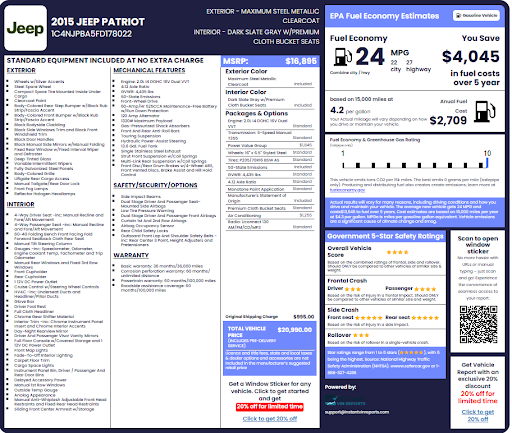
Our window sticker, also known as a Monroney sticker, is a label that provides accurate OEM factory details and build information, such as:
- Original MSRP (manufacturer's suggested retail price)
- Factory-installed options and packages
- Standard equipment list
- Interior and exterior colors
- Engine and transmission details
- City and highway fuel economy ratings
- Factory warranty details
- Safety and warranty information.
It is the most complete source of factory specifications available from a VIN.
How to Get Vehicle Specs With a Window Sticker
To get your Vehicle Specs by VIN Number through a window sticker with Instant VIN Reports, simply follow the steps below:
- First, you need to locate your VIN. The VIN can be found on the dashboard or driver's side door and is usually 17 characters.
- Visit the Instant VIN Reports website by clicking on the highlighted text.
- Enter the VIN number on the form.
- Click on "Get Access Now" to generate the window sticker and view detailed factory information.
READ ALSO: How to get Ford Window Stickers (Step by Step Guide)
VIN Decoder vs Window Sticker: What's the Difference?
The key differences between the two revolve around their purpose, level of detail, and what they reveal about the vehicle. See the detailed breakdown below:
| Information Needed | VIN Decoder | Window Sticker |
|---|---|---|
| Engine Specs | ✓ | ✓ |
| Trim | ✓ | ✓ |
| Factory Packages | Limited | ✓ |
| MSRP | Limited | ✓ Detailed breakdown |
| Fuel Economy | Limited | ✓ |
| Warranty Info | No | ✓ |
| Safety Ratings | No | ✓ |
| Factory Colors | No | ✓ |
| Original Options | Limited | ✓ |
Other than checking vehicle specs by VIN number with our VIN lookup, you can choose our official original factory window sticker lookup to view a complete breakdown of what the vehicle has. The sticker shows important details like the vehicle's birth certificate.
How to Research a Classic Vehicle Using a VIN
Classic vehicle research presents unique challenges because manufacturers used different identification systems before VIN standardization in 1981, and many classic vehicles use shorter chassis numbers ranging from 5 to 14 characters.
Unlike many VIN decoders, which can only decode standardized 17-character VINs and return errors or blanks in your vintage collectible vehicle research. Our classic VIN decoding can help owners identify:
- Original engine specifications
- Body style
- Production year
- Factory configuration
- And more
This information is particularly valuable for collectors, restorers, and buyers evaluating originality and authenticity.
Final Thoughts on How to Look up Vehicle Specs
Now you know how to identify a vehicle's factory specifications using a VIN decoder or Window Sticker.
If you would like to get a snapshot and accurate vehicle specifications, start with a free VIN decoder to verify the vehicle's core specifications, including the engine, trim, transmission, and drivetrain.
If the vehicle requires deeper research and needs detailed factory options, original MSRP, equipment packages, warranty details, and OEM build information, upgrading to a Window Sticker provides a much more complete picture of how the vehicle was originally equipped.
Frequently Asked Questions On Checking Vehicle Specifications
How do I look up vehicle specs by VIN number?
To look up vehicle specs by VIN number, the first thing you do is to find the VIN and enter it into an online VIN decoder, like Instant VIN Reports. The results can show the vehicle's make, model, year, engine, transmission, body style, and other factory specifications.
What information does a VIN give you?
A VIN can reveal manufacturer details, model year, engine information, body style, fuel type, transmission type, and production information.
Can you get vehicle specs from a VIN for free?
Yes. Our VIN decoding tools provide basic factory specifications at no cost. These include engine information, trim level, body style, and model year. We can also be used for collectible classic vehicles with shorter chassis numbers ranging from 5 to 14 digits.
Does a VIN number tell you engine size?
Yes. Our VIN lookup will identify engine displacement, cylinder count, fuel type, and engine family information, tied to your VIN.
How do I find original factory options by VIN?
The best source is usually generated through our original window sticker lookup tool, which lists standard equipment, optional packages, and MSRP.
Can a VIN show the original color?
You can get the original exterior or interior color with our original window sticker lookup. You will see what colour your vehicle came with from the factory.
Can I decode a classic VIN?
Yes. Instant VIN Reports can decode many classic VINs and chassis numbers ranging from 5 to 14 digits, helping owners identify important factory specifications for older vehicles.
Can a VIN reveal aftermarket modifications?
No. A VIN typically reflects how the vehicle left the factory. Modifications made after production, such as engine swaps, suspension upgrades, or aftermarket wheels, are generally not reflected in VIN decoding results.
What are the common VIN Lookup Mistakes?
Common issues in the VIN lookup itself include entering the wrong VIN character, researching a vehicle with major modifications, or assuming the current condition matches the original factory build. Reviewing both the VIN results and the vehicle's condition provides the most accurate picture.
What is the difference between a Window Sticker and a Build Sheet?
A Window Sticker focuses on original pricing, equipment, options, and consumer-facing vehicle information. A Build Sheet focuses on factory production details and is often more useful for classic vehicles, collectors, and restoration projects.
Is a VIN decoder the same as a vehicle history report?
No. A VIN decoder identifies vehicle specifications. A vehicle history report focuses on ownership records, accidents, title issues, auctions, mileage records, and all the recorded events that are tied to the VIN.