
Decode Any Fiat VIN, From Classic Models to Modern Cars
A Free Fiat VIN Decoder tool gives you the full details of any Fiat. From the basics like maker info, model year, trims, and engine. Proceed to the full vehicle history report to check accident & damage records, lien/loan, mileage history, and more. Enter VIN to make an informed decision now.
What Is a Fiat VIN Decoder?
A Fiat VIN decoder is an online lookup tool that takes your Fiat VIN number and breaks it into understandable parts, such as who made it, where it was built (the country/manufacturer level), and how the VIN is structured.
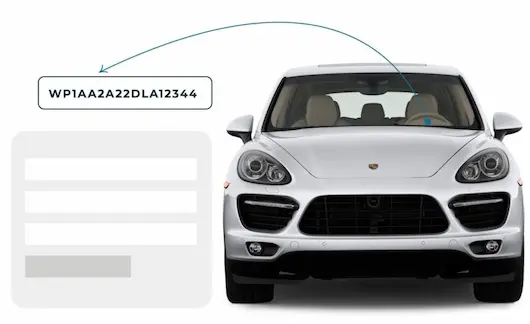
The decoder doesn’t “guess” the results; it follows known VIN structure rules (WMI, VDS, VIS) and the standardized 17-character framework for modern vehicles. If your Fiat’s VIN is not 17 characters, that can indicate it was produced before VIN standardization, and decoding usually needs a tool that recognizes older formats.
Why VIN Decoding Matters Before Buying a Used Fiat?
A Fiat VIN number helps show the real story behind the vehicle before you commit to buying it. With the Instant VIN Reports Fiat VIN decoder, you can verify specifications, review vehicle history records, and reduce the risk of buying a problematic used Fiat, whether it’s a modern 17-digit VIN or a classic Fiat VIN.
Verify classic Fiat authenticity
Classic Fiat VIN decoding helps collectors confirm originality, production details, and factory configurations.
Helps Verify Seller Information
Sometimes sellers accidentally, or intentionally, provide incorrect details about a vehicle. A free VIN decoder helps confirm whether the Fiat matches the advertised specifications.
Save time during research
Instead of guessing, a Fiat VIN decoder quickly organizes key vehicle details and basic history in one place.
Support restoration projects
Classic Fiat restorers can use VIN data to locate correct parts and preserve factory accuracy.
What Information Does a Fiat VIN Decoder Show?
A Fiat VIN is like the car’s ID card. Once it’s decoded, you can check specs and, with a history report, spot issues that do not show up in a quick walkaround.
Manufacturer
Vehicle Origin
Model Type & Year
Engine Specifications
Transmission Setup
Body Style
Trims
MSRP & Market Value
How to Use the Fiat VIN Decoder?
Using the Fiat VIN decoder is simple, even if you are not familiar with vehicle codes. You only need the VIN, and the tool will help decode the available details. It works for modern Fiat vehicles with 17-character VINs and many classic Fiat models with shorter identifiers.
Step 1: Enter the VIN
Type your Fiat VIN or classic chassis number into the form above. Double-check every letter and number before submitting.
Step 2: Check the Vehicle Specs
Review the free preview page to see basic Fiat specs, such as year, make, model, trim, engine, and body style.
Step 3: Get the Full VIN Report
Upgrade if you need deeper history, including accident records, title brands, theft checks, mileage records, liens, auctions, and sales history.
How To Read a 17 Character Fiat VIN Number?
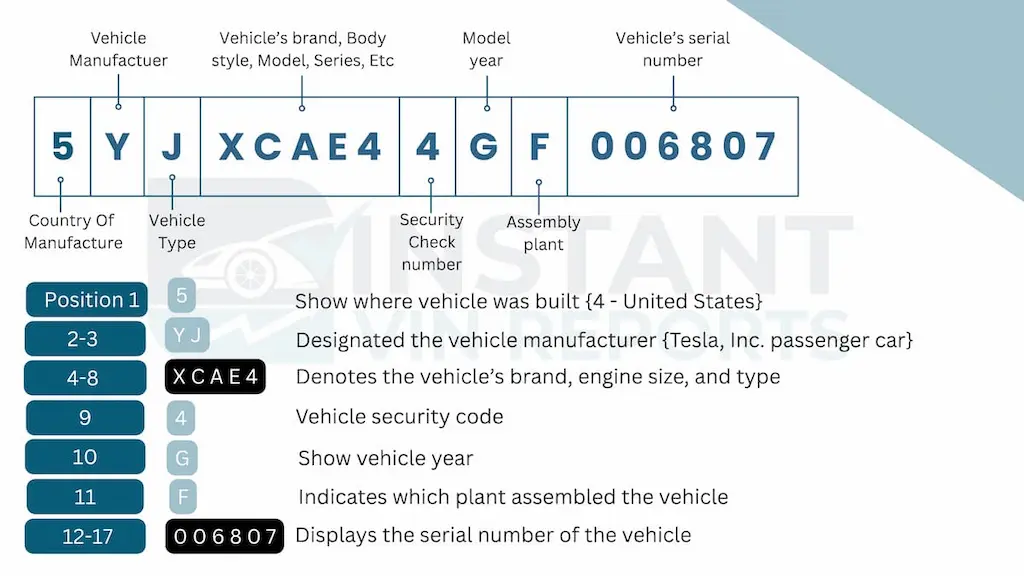
Fiat VIN Positions Explained For: ZFBNFADH2LZ042537
WMI (World Manufacturer Identifier)
Position 1 (1)
ItalyPosition 2 & 3 (F B)
Fiat passenger vehicleVDS (Vehicle Descriptor Section)
Positions 4 to 8 (NFADH)
Fiat 500X SUV, 1.8L gasoline engine, automatic transmission, front-wheel drive, standard safety/restraint system.Position 9 (2)
Check digitVIS (Vehicle Identifier Section)
Position 10 (L)
Model Year: 2020Position 11 (Z)
Stellantis Melfi PlantPositions 12 to 17 (042537)
unique production serial numberDecode a Classic Fiat VIN (pre-1981)
Classic Fiat VIN decoding differs from modern 17-character VIN decoding. Older Fiat VINs could be a 5, 7, 10, 13, or 14-digit VIN, and since older Fiat VINs were not standardized, decoding them usually required an online VIN decoder tool that specializes in classic Fiat VINs. Instant VIN Reports can decode both modern and old classic VIN numbers.
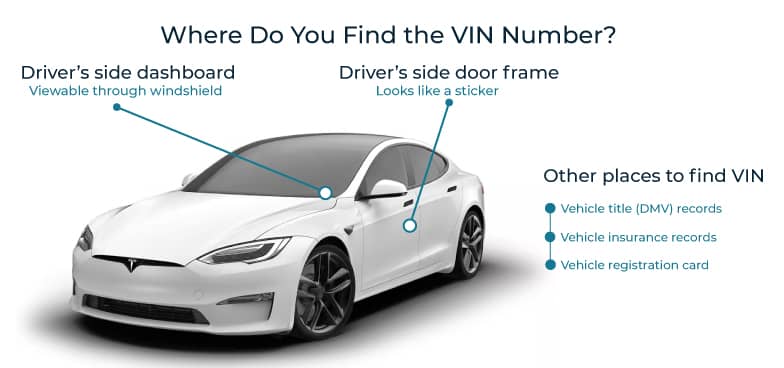
Where to Find the VIN on a Fiat?
Start with the easy spots first. Modern Fiats usually make the VIN visible without tools. Older Fiats can be fussier, so you may need a flashlight and a little patience.
- Dashboard (base of windshield)
- Driver-side door jamb/door frame
- Engine bay/firewall
- Vehicle documents
- Older/classic Fiats
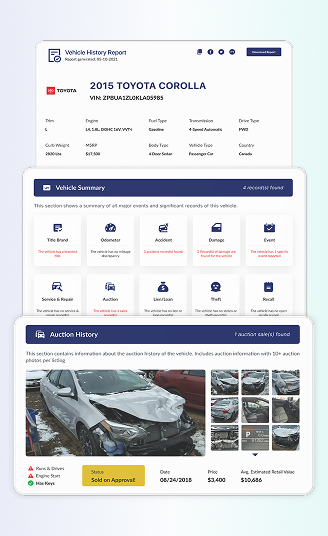
Need to See More? Get the Full Fiat Vehicle History Report
The full Fiat vehicle history report is made for people who want more than a quick decode. It gives deeper records that help you judge risk, value, and long-term confidence.
Vehicle Specifications
When you decode your Fiat VIN number on Instant VIN Reports, you will see the year, make, model, common specification fields, engine type, transmission type, body type, doors, and drive type listed clearly.
Accident Records
Accident records, when reported, help you move from vague claims to something more concrete. A report will show that an accident record exists and sometimes provide supporting details tied to a date or event.
Damage History
Damage history goes beyond classic “accident” labels. A report will show damage-related records (when available) that can include events like flood, hail, fire, or other damage indicators, depending on the data source. This is the section that helps you understand why a Fiat might look clean today but still carry a rough past.
Ownership History
Ownership history is not about exposing private people (names and addresses are not shown). It’s more about the ownership records. how many owners the vehicle had, how long it stayed with an owner, and the state where ownership was recorded. For a used Fiat, this helps you judge stability.
Mileage Records
Mileage records are one of the quickest ways to check if the story matches the numbers. A report may show recorded odometer entries tied to events such as inspections, registrations, service visits, or listings, depending on what’s available. For a Fiat buyer, this helps confirm whether the current odometer reading makes sense over time.
Lien/Loan Records
This section will show lien/loan flags when a lender is recorded on the vehicle, depending on reporting. If a lien is active and you buy the car the wrong way, it can turn into a headache later. A history report can help you spot that early so you can confirm payoff paperwork or choose a safer payment method.
Repair Costs Estimates
Repair cost information, when provided, helps you think beyond the purchase price. Even a cheap Fiat can become expensive if the next repair is a big one. A report will include repair cost estimates in its own section so you can plan more realistically.
Auction & Sales Listing History
Auction and sales listing history helps you see how the Fiat moved through the market before. When available, this section may show auction dates, prices, seller type, listing status, odometer readings, and up to 10 photos. It can also reveal repeated listings, price drops, or details that do not match the seller’s current claim.
Title Brand Records
Title brands are labels applied by states to warn future buyers about serious past events. Examples people recognize include salvage, rebuilt, flood, or similar branding, depending on the jurisdiction. If your Fiat has a branded title, you want to know why, when it happened, and whether the repairs were done properly.
Theft Records
Theft checks help you reduce the risk of buying a stolen vehicle. A full report can show a summary of whether theft records appear in its compiled results. Including the recorded date, location, and the data source of the record. For a Fiat that’s priced “too good,” this is one of those quick sanity checks.
Free Fiat VIN Decoder vs Vehicle History Report
A free Fiat VIN decoder is for early screening. But if you need proof about ownership, mileage, title brands, and accidents, you’ll want the full history report.
| Feature | Free VIN Decoder | History Report (Paid) |
|---|---|---|
| VIN decoding for all vehicle types | ||
| Year, make, model, trim | ||
| Full vehicle specifications / detailed car specs | ||
| Market value snapshot | ||
| Sales listings (current/online ads) | ||
| Sales history (timeline of past listings/sales) | ||
| Auction records (when available) | ||
| Auction history with photos | ||
| Mileage during auction/sales (when available) | ||
| Odometer rollback checks | ||
| Ownership history | ||
| Vehicle usage type (personal, fleet, rental, commercial) | ||
| Title brand records (salvage, rebuilt, flood, lemon, etc.) | ||
| Lien & loan records | ||
| Accident & damage history | ||
| Theft / stolen records | ||
| Flood/hail/fire damage checks | ||
| Service/repair records | ||
| Warranty status & coverage | ||
| Recall information |
See Michael's Story of Using a Full Fiat VIN Report Before Buying
Michael found a 2020 Fiat 500L Trekking listed on the market and wanted to check if the vehicle was really worth the asking price before buying. The listing looked attractive, but instead of relying only on the seller’s photos and description, he bought the Instant VIN Reports vehicle history report to review the exact records tied to the VIN.
VIN: ZFBNFADH2LZ042537
Initial Impression
- The vehicle was listed as a 2020 Fiat 500L Trekking.
- It had a 1.4L gasoline engine, automatic transmission, and FWD setup.
- The car showed as a 4-door MPV/SUV-style vehicle with seating for 5.
- The market listing showed 27,803 miles and a certified condition.
- The white exterior and black interior made it look clean and practical for daily use.
Critical Findings
|
Outcome
|
Why 1 Million+ Drivers Choose Instant VIN Reports
Drivers, buyers, sellers, dealers, and collectors can use a Fiat VIN decoder to confirm listing details, reduce doubts, and support the asking price with clearer information.
Daily Data Updates
Sellers can use a Fiat VIN decoder to confirm listing details, reduce buyer doubts, and support the asking price with clearer information.
Live Chat with VIN Experts
When a VIN result feels confusing, live chat gives you access to real help. This is especially useful for classic Fiat numbers and unusual vehicle records.
High Accuracy, Cross-Checked Results
Our system compares available data from multiple record types to reduce mismatches and improve confidence. This helps users avoid relying on one weak or incomplete detail.
Most Comprehensive Database
Instant VIN Reports checks a wide range of vehicle data points to support modern and classic Fiat lookups. This helps users find specs, records, and available history in one place.
Who Should Use a Fiat VIN Decoder?
A Fiat VIN decoder is useful for anyone who wants to understand a vehicle before making a decision. It gives buyers, sellers, owners, collectors, restorers, dealers, and appraisers a clearer view of the car’s identity.
Buyers
Buyers can compare the seller’s claims with decoded data, making it easier to negotiate or walk away with confidence.
Sellers
Sellers can use a Fiat VIN decoder to confirm listing details, reduce buyer doubts, and support the asking price with clearer information.
Dealers
Dealers can decode Fiat VINs to check inventory faster, verify specs, and create more accurate listings for modern and classic vehicles.
Classic Car Collectors
Collectors can use a classic Fiat VIN decoder to confirm identity, check history, and protect the value of rare or older models.
Restorers
Restorers can avoid mismatched parts and incorrect upgrades by checking the Fiat’s decoded details before starting the project.
Insurers & Appraisers
Insurers can use Fiat VIN data to verify the vehicle’s identity, model year, body type, and value-related details.
Supported Fiat Models
Explore the supported Fiat models below to verify compatibility with our VIN decoder and access detailed vehicle data in seconds.
Popular Fiat Models
Instant VIN Reports supports many Fiat models, including modern, older, and market-specific vehicles.
500
124 Spider
500C
500e
500L
500X
Argo
Brava
Bravo
Cronos
Doblo
Ducato
Fiorino
Fullback
Linea
Palio
Panda
Punto
Qubo
Seicento
Strada
Tipo
Toro
Uno
Supported Classic Fiat Models
Classic Fiat vehicles often use shorter VINs or chassis numbers, and Instant VIN Reports can help decode many of them.
124
124 Sport Coupe
125
126
127
128
130
131
500 Topolino
600
850
1100
1200
1500
1800
2300
Campagnola
Frequently asked questions about Fiat VIN decoding
What Is a Fiat VIN Number?
A Fiat VIN (Vehicle Identification Number) is the vehicle’s unique identification code. Most modern Fiat vehicles use a 17-character VIN made of letters and numbers, covering WMI, VDS, and VIS sections. Older Fiat models can be different because many pre-1981 vehicles used shorter, less standardized chassis or serial numbers.
How Do I Decode My Fiat VIN For Free?
To decode a Fiat VIN for free, use a free Fiat VIN decoder online like Instant VIN Reports. Enter the VIN and review the basic identity and specs at no cost. If you’re at the “should I buy this?” stage, consider moving from a free check to a full vehicle history report so you can review title, mileage, accident, lien/loan, and listing records when available.
How To Decode a Classic Fiat VIN?
To decode a classic Fiat VIN, enter the chassis number, serial number, or shorter VIN into the Instant VIN Reports decoder. Classic Fiats may not use 17 characters, so our tool helps check available identity and history records.
Where Is the VIN Located on a Fiat Car?
Common locations of the VIN on a Fiat car include the dashboard near the windshield (visible from outside) and the driver-side door jamb label. You can also check on the vehicle paperwork, such as registration or insurance documents. If you’re checking a used Fiat, match the VIN on the car to the VIN on the documents before anything else.
What Information Can I Get From a Fiat VIN Decoder?
A Fiat VIN decoder can give you the information about the vehicle’s identity and specification basics. For deeper checks like owners, mileage records, title brands, liens, accidents, and auction or listing history, you typically need a vehicle history report built around that VIN.
How Do I Find My Fiat's Production Year Using the VIN?
On modern 17-character VINs, the model year is encoded in the 10th position. A decoder tool can read that year code for you, so you don’t have to do it manually, remembering the code and its meaning. For older Fiats with shorter VIN formats, year decoding may not follow the same pattern.
Can I Get Fiat Factory Options From the VIN?
Yes, you can get Fiat factory options from the VIN. You can get the factory options through a Fiat window sticker lookup tool that shows everything the car came with when new. Simply enter the VIN into the form, submit it, and download the window sticker.
How Can I Tell What Engine My Fiat Has From the VIN?
To tell what engine Fiat has from the VIN, you can use a Free Fiat VIN decoder tool. A Fiat VIN decoder can show engine information as part of the vehicle specifications section. If you need higher confidence, compare the decoded engine info to the under-hood label or service paperwork. It’s a simple cross-check that prevents mix-ups.