

Get Mercedes-Benz Factory Build Sheet by VIN
Retrieve your Mercedes-Benz factory Build Sheet by VIN to verify exactly how your vehicle was built. Our lookup supports both modern 17-character VINs and classic Mercedes-Benz VINs and chassis numbers with 5 to 14 digits.
What is a Mercedes-Benz Build Sheet?
A Mercedes-Benz Build Sheet, often referred to as a factory datacard or production data card, is the original factory record showing how a vehicle was configured before leaving the assembly line. It records the production specifications, factory options, packages, and technical information that make each Mercedes-Benz unique.
Why Mercedes-Benz Build Sheets Matter
Our Mercedes-Benz Build Sheet is valuable for more than dealerships. It helps anyone verify factory specifications, decode SA option codes, order the correct parts, confirm AMG equipment, or preserve a vehicle’s originality.
Buyers
Luxury vehicles can look nearly identical while having thousands of dollars’ worth of differences in factory equipment. A Build Sheet helps buyers verify those differences before making a purchase.
Verify the Original Model & Trim
Confirm the original model designation and factory configuration before paying a premium price.
Decode SA Option Codes
Review factory SA option codes to identify the original equipment and production options assigned to the vehicle.
Verify Digital Light & MBUX Features
Confirm factory technology, including Digital Light, Augmented Reality Navigation, Head-Up Display, Burmester audio, and MBUX equipment.
Sellers & Dealerships
Providing a Build Sheet helps demonstrate exactly how a Mercedes-Benz was originally equipped. Buyers gain confidence when factory packages and luxury equipment are supported by production records.
Highlight Factory Packages
Show buyers exactly which premium packages and luxury features were installed during production.
Increase Buyer Confidence
Verified production records demonstrate transparency and help buyers purchase with greater confidence.
Build More Accurate Listings
Use factory specifications rather than estimates when creating vehicle listings and advertisements.
Collectors and Restorers
Originality is especially important when restoring a classic Mercedes-Benz. A Build Sheet helps verify factory production specifications before restoration begins.
Verify Factory Originality
Confirm the original production specifications before beginning restoration work.
Confirm Engine & Transmission
Review the original powertrain configuration before sourcing replacement components or rebuilding the drivetrain.
OEM Parts Suppliers
Recommend compatible replacement parts using verified production data instead of relying solely on visual inspection.
What Information Will You Get From a Mercedes-Benz Build Sheet?
Whether you’re confirming AMG equipment, decoding SA option codes, researching a classic W124, or verifying Digital Light features on a modern S-Class, the Build Sheet provides factory documentation that supports confident ownership decisions.
Vehicle Description & Factory Identity
Every Mercedes-Benz Build Sheet begins with the vehicle’s original production profile, including its model designation, chassis code, VIN or FIN, manufacturing plant (when available), drivetrain, production date, and factory configuration. These records establish the reference point for verifying authenticity before evaluating optional equipment or restoration work.
Engine & Powertrain
Review the original engine, transmission, drivetrain, fuel type, displacement, horsepower, axle configuration, and mechanical specifications recorded on the factory datacard.
SA Option Codes
Mercedes-Benz vehicles use SA (Sonderausstattung) option codes to identify factory-installed equipment. The Build Sheet lists these production codes, making it easier to verify luxury features, AMG packages, technology upgrades, and factory-installed options.
Factory Packages
Confirm original packages such as AMG Line, Night Package, Premium Package, Driver Assistance Package, Warmth & Comfort Package, AIR BODY CONTROL, ENERGIZING Package, and many other factory options.
Paint & Interior
Verify the original Mercedes-Benz paint code, upholstery, leather type, wood trim, interior color, headliner, and optional Designo or MANUFAKTUR finishes installed during production.
Wheels, Suspension & Brakes
Review the original wheel specifications, suspension system, AMG performance components, brake configuration, and chassis equipment assigned at the factory.
MBUX & Technology Features
Confirm factory-installed technology such as MBUX, Augmented Reality Navigation, Head-Up Display, Digital Light, Burmester Surround Sound, 360° Camera, and advanced driver assistance systems.
Original MSRP
View the original Manufacturer’s Suggested Retail Price (MSRP), destination charges, and pricing for optional factory equipment installed when the vehicle was sold new.
Fuel Economy
Review the original EPA fuel economy ratings for gasoline, diesel, hybrid, and plug-in hybrid Mercedes-Benz models where applicable.
Warranty Information
See the manufacturer’s warranty that originally accompanied the vehicle, including basic coverage, corrosion protection, powertrain coverage, roadside assistance, and emissions warranty where applicable.
Safety Systems
Verify factory-installed safety technologies, including PRE-SAFE®, Active Brake Assist, Blind Spot Assist, Active Lane Keeping Assist, DISTRONIC, Parking Package, and other driver assistance features.Â
How to Get a Mercedes-Benz Build Sheet by VIN?
Every Mercedes-Benz is built with a unique production configuration. Simply enter your VIN or FIN to verify original factory options, SA codes, paint codes, packages, drivetrain, and production details.
Enter the VIN
Locate your Mercedes-Benz VIN or FIN and enter it into the lookup tool above. If the VIN isn't available, you can also search using a U.S. license plate or the vehicle's year, make, and model. Our system supports both modern VINs and many classic Mercedes-Benz chassis numbers.
Submit the VIN
Once your VIN or FIN is submitted, our system searches available factory production records to identify the original specifications assigned to your vehicle.
Access the Build Sheet
Review your Mercedes-Benz Build Sheet online or download it as a PDF for future reference.
Where Can I Find the VIN on a Mercedes-Benz?
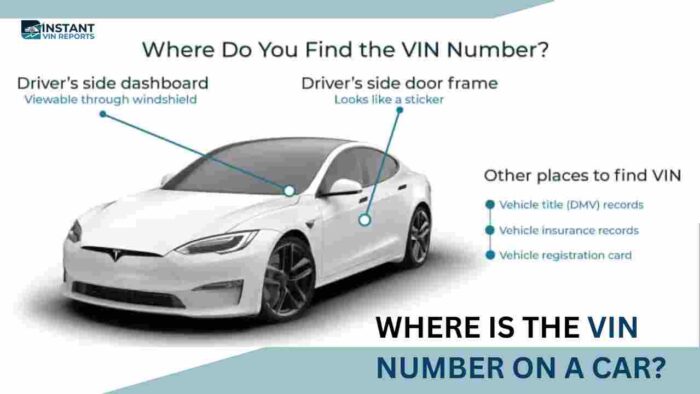
If you’re unsure where to find your Mercedes-Benz VIN or FIN, check the locations below. Once you’ve located it, you can retrieve the original factory datacard in just a few minutes.
Driver's Side Dashboard
The easiest place to locate the VIN is on the driver’s side dashboard near the base of the windshield. It can typically be viewed from outside the vehicle through the windshield.
Driver's Door Jamb
Open the driver’s door and inspect the certification label attached to the door jamb or B-pillar. Along with the VIN, you’ll often find manufacturing information, weight ratings, and tire specifications.
Engine Compartment
Many Mercedes-Benz models display the VIN or production identification plate within the engine compartment. Depending on the model, it may also include additional production information useful during servicing or restoration.
Vehicle Documents
If the vehicle isn’t nearby, the VIN can usually be found on the title, registration certificate, insurance card, financing paperwork, purchase agreement, and other ownership documents.
Mercedes me App
Many newer Mercedes-Benz models allow owners to access vehicle information through the Mercedes me app. After signing in, select your vehicle and navigate to Vehicle Details, Vehicle Information, or Garage to view the VIN and connected vehicle information. Available features may vary by model year and region.
Classic Mercedes-Benz FIN
Many classic Mercedes-Benz vehicles were identified using a Factory Identification Number (FIN) rather than today’s standardized 17-character VIN. Our lookup supports numerous classic Mercedes-Benz FINs and VINs ranging from 5 to 14 digits, making it easier to research older models and heritage vehicles.
Why Choose Our Mercedes-Benz Build Sheet Lookup?
Mercedes-Benz vehicles are built with thousands of possible production configurations. From classic Mercedes-Benz sedans to today’s MBUX-equipped luxury vehicles, our build sheet organizes factory production information into an easy-to-understand format that supports buyers, owners, collectors, and repair professionals.
Most Comprehensive Database Coverage
Our extensive vehicle database supports millions of VINs across numerous manufacturers, including modern Mercedes-Benz 17-character VINs and many classic Mercedes-Benz VINs and FINs with 5 to 14 digits, helping owners research vehicles from multiple generations.
High Accuracy, Cross-Checked Results
Our reports combine information from trusted automotive data sources whenever available, helping verify factory specifications, SA option codes, AMG equipment, production details, and original vehicle configuration with greater confidence.
24/7 VIN Experts Live Chat
Need help understanding your Mercedes-Benz datacard or choosing the right report? Our VIN specialists are available through live chat to answer questions and guide you through the lookup process.
Built for Mercedes-Benz Research
From SA option codes and AMG packages to MBUX technology, MANUFAKTUR finishes, and production datacards, our reports focus on the factory details that matter most to Mercedes-Benz owners, buyers, and enthusiasts.
Explore Other Mercedes-Benz VIN Search Tools
Whether you’re buying an AMG model, a Sprinter, a G-Class, or a classic Mercedes-Benz, reviewing more with our tools provides valuable insight before making a significant investment.
Free Mercedes-Benz VIN Decoder
Decode your Mercedes-Benz VIN at no cost to identify basic factory information such as the model year, engine, body style, transmission, manufacturing plant, and other vehicle identification details.
Mercedes-Benz Window Sticker Lookup
Retrieve the original Mercedes-Benz Window Sticker to view the factory MSRP, standard equipment, optional packages, destination charge, fuel economy ratings, safety information, warranty coverage, and pricing exactly as the vehicle was presented when sold new.
Get Build Sheets for Other Mercedes-Benz Models
Whether your Mercedes-Benz was built recently or decades ago, retrieving the original factory datacard starts with the VIN or FIN. We support both modern VINs and many classic chassis numbers.
190 (W201)
230 SL (W113 Pagoda)
280 SE
300 CE
300 D
300 E
300 SD
300 SDL
300 SEL
300 SL Gullwing
350 SL
380 SL
450 SEL
450 SL
500 E
560 SEC
560 SEL
A-Class
AMG GT
B-Class
C-Class
CLA
CLE
CLS
E-Class
EQB
EQE
EQS
G-Class
GLA
GLB
GLC
GLE
GLS
M-Class
Maybach S-Class
R107 SL
S-Class
SL
SLC
SLK
Sprinter
V-Class
W108
W111
W114
W115
W123
W124
W126
W140
Lookup Build Sheets for Other Makes
Need a Build Sheet for another manufacturer? Instant VIN Reports supports factory Build Sheet lookups for hundreds of vehicle brands, from luxury and performance vehicles to commercial vans, classics, and everyday passenger cars.
Mercedes-Benz Build Sheet Frequently Asked Questions
Where can I find a free Mercedes-Benz Build Sheet (Datacard) by VIN?
Free Mercedes-Benz VIN lookup tools provide only basic vehicle information such as the model year, engine, and body style. A complete Mercedes-Benz Build Sheet (Datacard) includes factory production data, SA option codes, paint codes, interior specifications, packages, and original equipment that usually aren’t available through free VIN decoders.
What is the difference between a Mercedes-Benz VIN and FIN?
The VIN (Vehicle Identification Number) is the standardized 17-character identifier used on modern vehicles worldwide. The FIN (Factory Identification Number) is Mercedes-Benz’s internal production identifier, commonly used on older models and within factory systems. Many classic Mercedes-Benz vehicles are more easily identified using the FIN than the standardized VIN.
What is the Mercedes-Benz EPC (Electronic Parts Catalog), and how does it relate to Build Sheets?
The Mercedes-Benz EPC is a factory parts catalog used to identify OEM replacement components. While the EPC focuses on parts compatibility, a Build Sheet (Datacard) documents the vehicle’s original production specifications, SA option codes, factory equipment, and configuration. Together, they help owners and repair professionals identify the correct parts for a specific vehicle.
How do I get a Build Sheet for a classic or vintage Mercedes-Benz (W124, W126, R129, etc.)?
Many classic Mercedes-Benz vehicles can still be researched using their VIN or FIN. Our Build Sheet lookup supports numerous 5 to 14-digit Mercedes-Benz VINs and classic chassis numbers, helping owners verify original production specifications for many heritage models.
Is the Mercedes-Benz Datacard the same as a Window Sticker (Monroney Label)?
No. A Mercedes-Benz Datacard records the vehicle’s factory production specifications, including SA option codes, paint codes, drivetrain, and manufacturing details. A Window Sticker (Monroney Label) displays consumer-facing information such as MSRP, fuel economy, warranty coverage, standard equipment, and optional pricing for vehicles sold new in applicable markets.
Where can I find Mercedes-Benz Digital Light option codes (316, 42U, 43U, P35)?
Digital Light and related lighting technologies are identified through Mercedes-Benz option codes and package information. If your vehicle was originally equipped with these factory features, the associated production codes typically appear on the Build Sheet as part of the original factory configuration.
What information is included on a Mercedes-Benz factory Build Sheet (Datacard)?
Our Mercedes-Benz Build Sheet includes the original model designation, engine, transmission, drivetrain, factory SA option codes, packages, production data, paint code, interior trim, original MSRP (when available), factory equipment, safety features, and other manufacturing specifications linked to the VIN or FIN.
How do I confirm if my Mercedes-Benz has Augmented Reality Navigation (U19 / 549) from the Build Sheet?
The Build Sheet lists factory-installed technology packages and option codes assigned during production. If your Mercedes-Benz originally included Augmented Reality Navigation or related MBUX technology, the corresponding factory equipment or option codes will generally appear in the production record.
What are common Mercedes-Benz option codes like 412 (Sunroof), 491 (U.S. Version), and 551 (Anti-Theft)?
Mercedes-Benz uses SA option codes to identify factory-installed equipment and market-specific configurations. Codes such as these describe production features assigned during manufacturing. Reviewing the complete Build Sheet provides the most accurate interpretation of each code within your vehicle’s original factory configuration.
How do I get a Build Sheet for a Mercedes-Benz Sprinter van?
Mercedes-Benz Sprinter vans can often be researched using the VIN to retrieve factory production specifications. A Build Sheet helps verify engine configuration, wheelbase, body style, factory equipment, packages, and commercial vehicle options before purchasing, servicing, or managing a fleet.
What is the difference between code 548 and code 549 on Mercedes-Benz MBUX?
Mercedes-Benz option codes identify specific production features and technology packages, and their meanings can vary by model year and market. A Build Sheet helps verify which MBUX equipment and factory technology were originally installed on your specific vehicle.
How do I find my Mercedes-Benz paint code (for example, 702 Smoke Silver) from the Build Sheet?
The factory Build Sheet records the original exterior paint code assigned during production. This information is useful when ordering OEM paint, verifying originality, or restoring a Mercedes-Benz to its factory appearance.
Does Mercedes-Benz offer Build Sheets for vehicles older than 1990?
Many older Mercedes-Benz vehicles can still be researched using factory VIN or FIN records, with our Build Sheet lookup, which supports numerous classic Mercedes-Benz models with 5 to 14-digit VINs and chassis numbers, including many vehicles produced before 1990.