
Hino Window Sticker by VIN: Check Truck Specs & Equipment
Need to know more about a Hino before buying, selling, or documenting it? A Hino window sticker by VIN organizes available vehicle information into one easy-to-read report. See the truck's model, year, engine information, fuel type, vehicle classification, weight details, manufacturing information, and other available specifications.
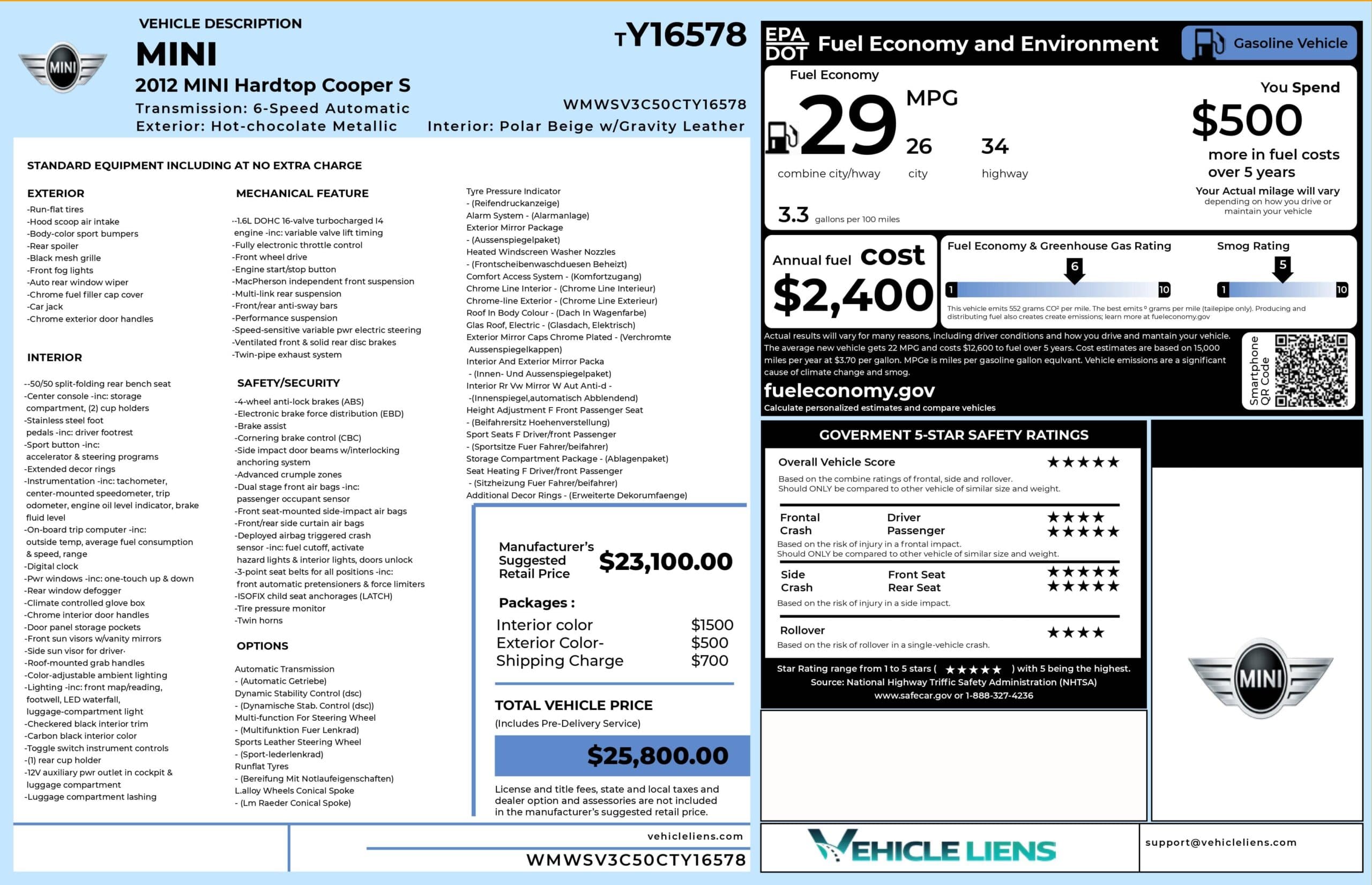
What is a Hino Window Sticker?
A Hino window sticker is a vehicle information report that organizes available details associated with a specific Hino VIN. The term Monroney label traditionally refers to a U.S. new-vehicle price label.
We provide a recreated window sticker. Depending on the truck, you will see the model, engine, fuel type, vehicle classification, GVWR, manufacturing details, and other specifications. A Hino window sticker by VIN gives buyers, sellers, fleet operators, and dealers one organized place to review available information about a specific truck.
What Information Is on a Hino Window Sticker?
A recreated Hino window sticker organizes available information associated with the truck's VIN. Depending on the model, year, configuration, and supporting records, the report can include:
Vehicle Description
Identifies the Hino linked to the VIN, including available model year, make, model, VIN, and other vehicle details that help confirm the truck's recorded identity.
Standard Equipment
Shows available factory equipment associated with the Hino configuration. Information depends on the specific truck, model year, configuration, and supporting vehicle records available.
Options and Packages
Organizes available options and package details linked to the VIN. These records can help compare Hino trucks with different equipment, configurations, and specifications.
Interior & Exterior Colors
Shows available exterior paint and interior color information associated with the vehicle. Comparing these details with the truck can help confirm its recorded configuration.
Original MSRP and Total Price
Provides available historical pricing information associated with the vehicle, including MSRP and other recorded costs when available. Pricing details depend on the specific Hino and records.
Engine and Transmission
Can include engine model, displacement, power, fuel type, and transmission details when supported. Available specifications depend on the Hino model, year, and vehicle records.
Cab, Body, and Equipment Details
Can include available cab configuration, mirrors, lighting, wheels, trim, and other recorded equipment. The information shown depends on the specific Hino and supporting records.
Safety and Security Features
Shows supported safety and security equipment associated with the vehicle. Available information varies by Hino model, production year, configuration, and recorded vehicle specifications.
Warranty Information
Includes available warranty details when supported by the vehicle records. Coverage information can vary by Hino model, production year, market, configuration, and individual vehicle.
Fuel, Drivetrain, and Mechanical Specifications
Can include fuel type, economy information, drivetrain, suspension, axles, wheels, tires, GVWR, and other mechanical specifications available for the specific Hino truck.
How to Get a Hino Window Sticker by VIN
Follow these simple steps to get the Hino window sticker in seconds.
Fill out the Form
Enter your Hino VIN into the lookup tool. Can’t find it? You can also use the U.S. license plate or the Hino year and model.
Submit the Form
Submit the information to start the lookup. The system processes the VIN and available vehicle records to create a recreated Hino window sticker based on the information available for that specific vehicle.
Get Window Sticker
Complete the payment process to access your recreated sticker. You can review the available Hino vehicle information in one organized report and save or print it for your records.
How to Read a Hino Window Sticker?
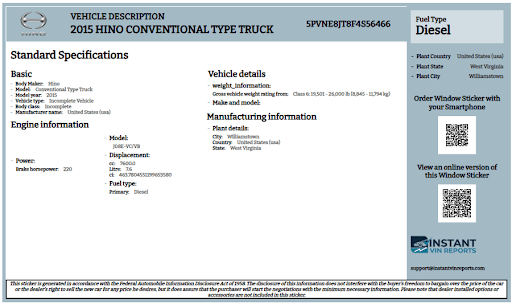
A recreated Hino window sticker organizes available VIN-based information into five areas. See the details below:
Top Section
Shows the Hino model, model year, VIN, and fuel type. This area gives you the vehicle's basic identity before you review its engine, weight, classification, and other available specifications.
Left Section
Contains available basic and engine information, such as make, model, cylinders, displacement, power, and fuel type. The exact fields depend on the Hino truck and its available records.
Middle Section
Organizes vehicle details and classification information, including body type, GVWR or weight classification, and other specifications linked to the specific Hino VIN.
Right Section
Displays additional information available for the vehicle. Depending on the truck and records, this area can contain further specifications or identifying details associated with its configuration.
Bottom Section
Contains the report disclaimer explaining that the sticker is recreated from available information. Options, accessories, or other details unavailable in the records will not be presented as confirmed information.
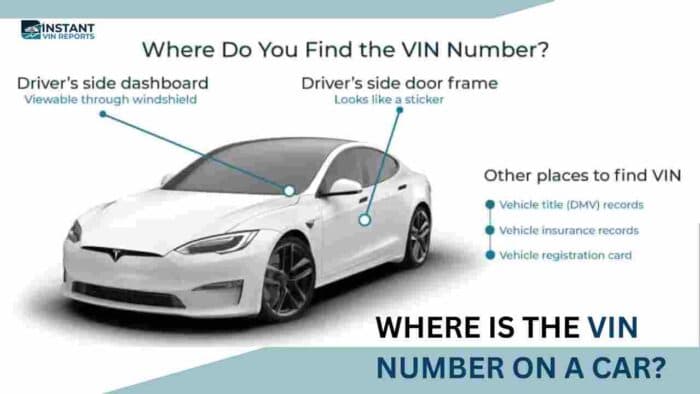
What is a Hino VIN Number and Where to Find it?
A VIN, or Vehicle Identification Number, is a vehicle's identification code. Hino's VIN documentation also shows that different characters can identify vehicle details such as model, engine, wheelbase, model year, and more. You can look for the VIN on:
- Dashboard near the windshield
- Driver-side door frame or certification label
- Vehicle title
- Registration documents
- Bill of sale or purchase paperwork
- Insurance documents
How Hino Window Stickers Help Solve Common Issues Buyers Face
A recreated Hino window sticker gives buyers another way to compare available VIN-based information with the truck and seller's description.
Missing Truck Specifications
Commercial truck listings do not always include every specification. Reviewing available VIN-based information can give you additional details about the Hino's recorded configuration.
Comparing Truck Configurations
Two Hino trucks can share a series while having different engines, wheelbases, GVWR ratings, or equipment. Available VIN information helps you compare their recorded specifications more clearly.
Checking Vehicle Information
Compare the available VIN-based information with the Hino you are inspecting. Differences can give you specific details to discuss with the seller before completing a purchase.
Reviewing Historical Pricing
Historical pricing information can be difficult to locate for older commercial trucks. When pricing data is available, the recreated sticker organizes it into a simpler format for reference.
Why Lookup a Hino Window Sticker by VIN?
A Hino window sticker lookup can be useful for buyers, sellers, and dealers who need organized VIN-based information about a commercial truck.
Buyers
Before purchasing a Hino truck, compare the available VIN-based configuration with the seller's description and the truck itself. Pay particular attention to engine, transmission, GVWR, wheelbase, equipment, and other specifications that affect how the truck is configured and used.
Review Truck Details
Check available specifications associated with the VIN before purchasing a Hino truck.
Compare Configurations
Compare available engine, GVWR, wheelbase, and equipment information between Hino trucks.
Ask Better Questions
Use the available vehicle data to identify details worth discussing with the seller.
Sellers
For sellers, a Hino window sticker can make vehicle information easier to present to potential buyers. It provides an organized reference for documenting the truck and supporting a clearer, more informative listing.
Present Clear Information
Give potential buyers an organized summary of available Hino vehicle information.
Document Your Truck
Keep a digital record of available specifications and configuration details.
Support Your Listing
Include the recreated sticker alongside your Hino truck listing for easier reference.
Dealers
For dealers, a Hino window sticker can simplify vehicle research and help organize information across commercial truck inventory. It provides a practical reference when preparing listings and maintaining vehicle records.
Speed Up Research
Bring available Hino VIN-based information together in one organized report.
Organize Vehicle Records
Keep a printable digital report containing available information for each Hino truck.
Prepare Better Listings
Use available specifications to create clearer commercial truck descriptions.
Why Choose Our Hino Window Sticker Lookup Tool?
Our Hino window sticker lookup creates a recreated digital window sticker from the VIN, giving you an organized way to review available factory vehicle information.
Fast VIN Lookup
Enter your Hino VIN to quickly access available vehicle information without manually researching the truck.
Convenient
Check the available specs, equipment, options, pricing, and vehicle details organized into a digital window sticker.
24/7 Trusted Customer Support
Questions about your VIN or window sticker? Our support team is available to help whenever you need assistance via Live Chat.
Money Back Guarantee
Not satisfied with the Hino window sticker? Contact us via live chat. For more details, look at our refund policy.
Supported Hino Models
Our Hino window sticker lookup supports available vehicle information across different Hino models and production years. Here are some popular models people often search for:
| L Series | L4 | L5 | L6 | L7 | XL Series |
| XL7 | XL8 | XL Series Tractor | 195 | 195h | 238 |
| 258 | 268 | 338 | 358 | 368 | 500 Series |
Hino Window Sticker vs Hino VIN Decoding
A Hino VIN decoder is useful for identifying a truck and reviewing basic VIN information. A paid window sticker lookup organizes available vehicle data into a recreated sticker, making specifications and other supported details easier to review and keep as a digital record.
| Feature | Free Hino VIN Decoder | Full Hino Window Sticker Lookup |
|---|---|---|
| VIN Decoding | ✓ Basic decoding | ✓ Full factory decoding |
| Year, Make, Model, Trim | ✓ | ✓ |
| Engine & Transmission | ✓ | ✓ Full OEM specs |
| Original MSRP Breakdown | ✗ | ✓ |
| Optional Packages | ✗ | ✓ |
| Factory-Installed Features | ✗ | ✓ |
| Interior & Exterior Colors | ✗ | ✓ |
| Fuel Economy Ratings | ✗ | ✗ |
| NHTSA Safety Ratings | ✗ | ✓ |
| Warranty Information | ✗ | ✓ |
| Shipping/Destination Charge | ✗ | ✓ |
| Total Vehicle Price | ✗ | ✓ |
| Mechanical Features | Limited | ✓ |
| Interior Features | ✗ | ✓ |
| Exterior Features | ✗ | ✓ |
| Safety & Security Features | ✗ | ✓ |
| Greenhouse Gas Ratings | ✗ | ✓ |
| License Plate Lookup | ✓ | ✓ |
| Classic Vehicle Support | ✓ | ✓ |
| Dealer-Friendly Documentation | ✗ | ✓ |
| Printable PDF Report | ✗ | ✓ |
Differentiating Between a Hino Window Sticker and a Hino Build Sheet
A Hino window sticker and build sheet can both help document a vehicle's original configuration, but they serve different purposes. Here is why:
Hino Window Stickers
A Hino window sticker is a recreated report that organizes available vehicle information, specifications, and other supported data associated with the VIN.
Hino Build Sheet
A Hino build sheet focuses more specifically on production and build information.
FAQs About Hino Window Sticker Lookup
Can I get a Hino window sticker by VIN?
Yes. You can use a Hino VIN to request a recreated window sticker based on available vehicle information. Depending on the truck and records, the report can include vehicle identification, engine information, fuel type, classification, weight details, manufacturing information, and other supported specifications.
Can I get a Hino window sticker for free?
No. The full recreated Hino window sticker is a paid product. A free VIN decoder is designed for basic vehicle identification, while the paid lookup organizes available Hino vehicle information into a dedicated, easy-to-read sticker report.
How can I find a window sticker using my VIN number?
To find a window sticker using a VIN, enter your Hino VIN into the window sticker lookup tool and submit the request. After completing the purchase, you will receive access to a recreated sticker containing the available vehicle information associated with that VIN.
Can I use a Hino VIN from an older truck?
Yes. Our service covers a wide range of older, classic, and vintage vehicles, including Hino trucks with 5- to 14-digit chassis or VIN numbers. When supporting vehicle data is available, we can create a recreated Hino window sticker based on the available information linked to the vehicle. Hino historical VIN references also document older chassis and VIN configurations.
What information does a Hino window sticker show?
A recreated Hino window sticker can show available vehicle details such as the model, VIN, engine information, fuel type, vehicle classification, weight information, and manufacturing details. The exact information depends on the specific Hino truck and available records.
Are VIN numbers on Hino window stickers?
Yes. The VIN is used to identify the specific Hino associated with the recreated sticker. Entering the complete VIN helps connect the report with the truck you are researching and reduces the risk of reviewing information for a different vehicle.
Can I look up Hino options by VIN?
Yes, you can use the VIN to review available configuration and equipment information associated with the Hino. The report will only present option or equipment information supported by available records, so unavailable details will not be presented as confirmed specifications.
Can I check Hino MSRP by VIN?
Yes, you can check for available pricing information through the window sticker lookup. When historical MSRP or related pricing information is available for the specific Hino, it can be included in the recreated report. Pricing availability depends on the vehicle and supporting records.
Can I get a Hino window sticker by VIN for a commercial truck?
Yes. Hino's lineup includes medium-duty commercial trucks with different configurations, GVWR ranges, wheelbases, and cab options. Our VIN lookup can organize available information for the specific truck rather than relying only on its model series.