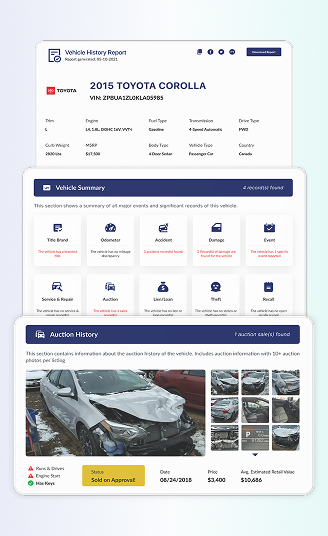

Free Volkswagen VIN Decoder: From Newest EV to Classic VW
Our Volkswagen VIN Decoder makes it easy to check any VW specs instantly. See the specifications for free, and add the vehicle history. Check the hidden history records at an affordable price. Got a classic? We also handle pre-1981 Volkswagen VIN numbers with shorter 5 to 14-character formats.
What is a Volkswagen VIN Decoder?
A Volkswagen VIN decoder is a tool that takes the 17-character VIN number from your VW and turns it into plain information. The VIN number itself is a mix of letters and numbers that follows international rules set in the early 1980s for vehicles sold on public roads.
When you enter that code into our VW VIN number decoder, it can show details such as model, body style, engine type, transmission, drive system, and even the original trim level. Because the VIN number is unique to each vehicle, it’s one of the safest ways to confirm what a car really is before you hand over any money.
Modern Volkswagen vehicles use standardized 17-character VINs, while classic Volkswagen models built before 1981 often use shorter VIN or chassis number formats ranging from 5 to 14 characters. Instant VIN Reports can decode both systems, helping owners, buyers, restorers, collectors, insurers, and sellers verify important vehicle information quickly.
Why Volkswagen VIN Decoding Matters Before Buying a Car
A Volkswagen VIN number can reveal important details that are not always visible in listings or seller descriptions. A free decode through Instant VIN Reports helps you verify factory specifications, confirm the vehicle identity, and spot inconsistencies before committing to a purchase.
Decode classic Volkswagen chassis numbers
Older Beetles, Buses, Vanagons, and Karmann Ghias often use shorter chassis numbers that require specialized decoding support.
Support restoration projects
For many classic Volkswagen enthusiasts, the chassis number is part of the car’s identity. VIN decoding helps restorers verify production years and compare basic factory configurations.
Verify model year accuracy
Classic Volkswagens are often misidentified by year. A VIN decode can help confirm the correct production period.
Understand factory production details
Volkswagen VINs can reveal manufacturing information, including assembly countries and production sequence details.
What Information Does a Volkswagen VIN Decoder Show?
Our free Volkswagen VIN decoder helps identify key details connected to the vehicle’s production data. This helps buyers, owners, and enthusiasts quickly confirm whether the car matches the description.
Manufacturer
Vehicle Origin
Volkswagen's Model Type & Year
Engine Specifications
Transmission Setup
Body Style
Trims
MSRP & Market Value
How to Use the Volkswagen VIN decoder
Using our free Volkswagen VIN decoder is simple. The process only takes a few minutes, even for first-time users. You just need the VIN (or chassis number for some classics) and a few minutes.
Step 1: Enter the VIN
Type the VIN into our VW VIN decoder form. Enter the characters exactly as they appear, with no spaces. Click the button and let our VW VIN lookup work.
Step 2: Check the Vehicle Specs
In seconds, you’ll see a free preview with the core details, like year, make, model, trim, body, engine, and other key specs.
Step 3: Get the Full VIN Report
If you want deeper ownership, title brands, mileage history, liens, accidents, auction photos, and more, upgrade to the full Instant VIN Reports history.
How To Read a 17-Digit Volkswagen VIN Number?
Volkswagen VIN numbers are not random. Every digit has a purpose, helping identify production details, vehicle characteristics, manufacturing locations, and unique identifiers tied to the vehicle.
Volkswagen VIN Positions Explained For: WVWSR7AN3NE011974
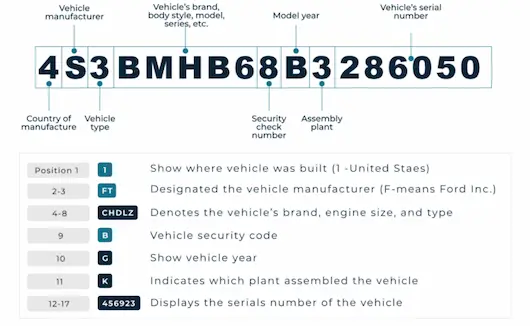
WMI (World Manufacturer Identifier)
Position 1 (W)
Vehicle manufactured in GermanyPosition 2 & 3 (VW)
Volkswagen passenger vehicleVDS (Vehicle Descriptor Section)
Positions 4 to 8 (SR7AN)
Vehicle attributes (model/trim/restraint/engine)Position 9 (3)
Check digitVIS (Vehicle Identifier Section)
Position 10 (N)
2022 model yearPosition 11 (E)
Assembly plantPositions 12 to 17 (011974)
Sequential production numberClassic Volkswagen VIN Decoder (Pre-1981)
Preserve originality. Decode VW heritage. Identify authentic classic Volkswagens. Restore with confidence.
From 1965, Volkswagen had its own nine or ten-digit chassis numbering system (pre-1965 models used a seven-digit system). There was no worldwide consistency, and each manufacturer had its own bespoke numbering system.
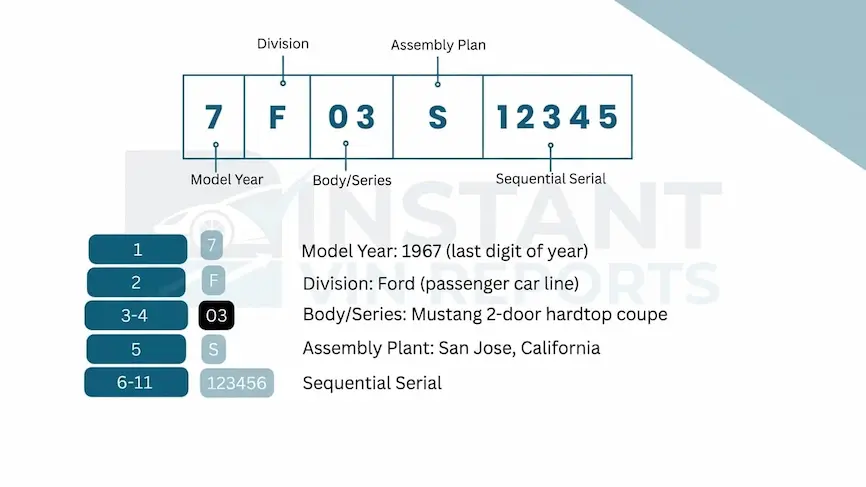
Pre-1965 Beetle Chassis Numbers (7-digit)
Early Volkswagen production numbers were relatively simple and did not follow later standardized systems. Many early Beetles used sequential chassis numbers that increased chronologically as production expanded after World War II.
Some early VW serial numbers included prefixes or hyphenated formats tied to production sequences. During this era:
- Chassis numbers were shorter,
- Production volumes were lower,
- And numbering conventions evolved rapidly.
Historic VW production references show that early Beetles from the 1940s and early 1950s used evolving serial formats tied directly to manufacturing output.
Because there was no global standard yet, decoding these very early Volkswagens often requires comparing the chassis number against factory production tables and historical Volkswagen archives.
Decoding 1965–1979 Chassis Numbers (9–10 digits)
Volkswagen introduced a more organized sequential numbering system beginning with the 1956 model year. During this period, many Beetles used a 9 to 10-digit production sequence.
In this classic era, the VW VIN breaks into :
First two digits
The first two digits of the 9-digit VW VIN number decide the VW model designation
Example:
- 11 = Beetle (Type 1)
- 14 = Karmann Ghia
- 15 = Beetle Cabriolet (Convertible) – from 1965 onward
- 17 = Golf / Rabbit Mk1
- 19 = Jetta (early models)
- 23 = Bus / Kombi (Type 2)
Third digit
Last digit of the model year. For many 1965–1979 Volkswagens, the third digit is:
- 5 = 1965
- 6 = 1966
- 7 = 1967
- and so on.
Remaining digits
The remaining numbers identified the vehicle’s position within the production sequence.
1970 model year and beyond (10-digit serial numbers)
Effective with the 1970 model year, all VWs have 10-digit serial numbers in compliance with federal regulations. The first two digits signify the model, the third is the last numeral of the model year, and the fourth to tenth digits indicate the consecutive production number.
Our decoder helps uncover factory specifications and production details with a Volkswagen-focused approach built for both enthusiasts and everyday owners.
Where To Find The VIN on a Volkswagen?
Volkswagen usually puts the VIN in several standard spots so you can read it without tearing the car apart. Here are the common places to look on a modern Volkswagen:
- Dashboard, driver’s side: Stand outside the car and look through the lower corner of the windshield on the driver’s side.
- Driver’s door jamb/B-pillar: Open the driver’s door and check the label on the door frame (the B-pillar).
- Engine bay and other stamped locations: On many Volkswagens, especially older models and some commercial vehicles, the VIN is stamped on a metal plate or directly into the body in the engine bay, near the strut tower, firewall, or front panel.
- Paperwork and records: You’ll also find the Volkswagen VIN printed on the registration card, title, insurance documents, and in dealer or service records.
- Via Infotainment/App: Easily viewable on the digital display in your car’s settings or inside the official myVW App.
For classic Volkswagens, the chassis number might be in slightly different places (for example, on the tunnel under the rear seat or on an inner body panel), but it still serves as the main identifier for that car.
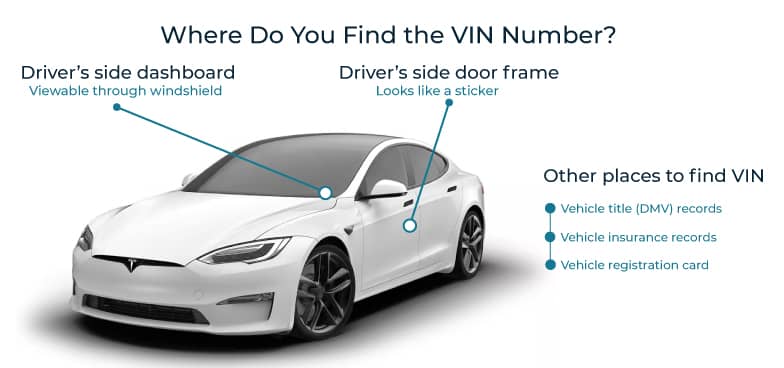
Need To See More? Get the Full Volkswagen Vehicle History Report
When you type a VW VIN and upgrade to a full VW VIN history record, you’re not just “checking a number”. You’re pulling a full story together. Here’s what each section of the full vehicle history report can show.
Vehicle Specifications
From a single Volkswagen VIN code decoder, you can confirm the year, model, body style, trim, engine size, transmission type, and other key specifications. In practice, that means our VW VIN decoder can tell you whether that imported Transporter matches its papers
Mileage History
Odometer rollbacks are sadly common, and Volkswagens are not immune. Our full VW history report will show recorded mileage readings over time. If the numbers jump backwards or look suspicious, the report will highlight it.
Lien / Loan Check
A lien check looks for active loans or finance records tied to the VIN. If you buy a VW with an unpaid lien, there’s a risk the lender could come after the car, even if you paid the seller in full. So this little line in the report can save a lot of headaches.
Ownership History
The ownership section shows how many times Volkswagen changed hands and in which states or regions, based on official title and registration data. A Volkswagen VIN number history report helps you see these patterns so you can spot “flip cars” and decide whether the story you’re being told really makes sense.
Recalls Check
Manufacturers and safety agencies keep recall information by VIN so owners can see if their vehicle is affected and if the repair has been done. In our Volkswagen history reports, you can see if your VW has any open safety recalls. That’s especially important for older models or imported Volkswagens, where recall letters might have been missed.
Service & Maintenance Records
Where available, maintenance sections show workshop visits, oil changes, brake jobs, and other service events over the life of the car. For a buyer or enthusiast, seeing regular service entries in a VW history report proves the car hasn’t just been driven; it has been cared for. And if there are long gaps, you know to ask more questions.
Title Brand Records
Title brands are legal labels added to a vehicle’s paperwork, often after serious damage or special use. In a Volkswagen VIN report, title brand records can indicate whether the VW was branded as salvage, rebuilt, junk, lemon, flood, or otherwise. These brands can follow a Volkswagen for life and strongly affect its value and insurability.
Theft Records
Theft Records show if a Volkswagen has been reported stolen and not yet recovered, or if it was previously recovered after theft. A Volkswagen VIN check helps you avoid accidentally buying stolen property, which can be seized without compensation.
Accident and Damage Records
Accident Records in a Volkswagen complete VIN decoder report can reveal if the VW has been involved in reported collisions. These records may include basic details like date, location, and the severity category. For a potential buyer, this helps you understand if that tidy Volkswagen was ever in a serious crash that might affect safety or resale value.
Auction and Sales History
Auction and sales history shows if the Volkswagen ever passed through online listing, wholesale, or salvage auctions, tied to the Volkswagen VIN number. The report will show you the available data of dealer sales, reported transactions, or historical listings with prices, and available photos.
Free Volkswagen VIN Decoder vs Vehicle History Report
Sometimes you just need a quick check to see if a Volkswagen VIN matches the ad. Other times, you want every possible detail before you commit. Our tools are built for both situations. The free Volkswagen VIN lookup handles the basics and works for all supported vehicle types, while the paid report adds the deep history.
Here’s the comparison:
| Feature | Free VIN Decoder | History Report (Paid) |
|---|---|---|
| VIN decoding for all vehicle types | ||
| Year, make, model, trim | ||
| Full vehicle specifications / detailed car specs | ||
| Market value snapshot | ||
| Sales listings (current/online ads) | ||
| Sales history (timeline of past listings/sales) | ||
| Auction records (when available) | ||
| Auction history with photos | ||
| Mileage during auction/sales (when available) | ||
| Odometer rollback checks | ||
| Ownership history | ||
| Vehicle usage type (personal, fleet, rental, commercial) | ||
| Title brand records (salvage, rebuilt, flood, lemon, etc.) | ||
| Lien & loan records | ||
| Accident & damage history | ||
| Theft / stolen records | ||
| Flood/hail/fire damage checks | ||
| Service/repair records | ||
| Warranty status & coverage | ||
| Recall information |
Daniel’s Volkswagen VIN Check Story
Daniel had been searching for a clean Volkswagen Arteon after driving older GTIs for years. He wanted something more refined but still very “Volkswagen” in personality, practical, understated, and enjoyable to drive.
Before contacting the seller, he used a free Volkswagen VIN decoder to check the car’s specs against the listing. After noticing some discrepancies, he opted for a full vehicle history report for more details. The free decode provided key specs, while the paid report revealed accident, auction, and title history.
VIN: WVWSR7AN3NE011974
Initial Impression
- Genuine 2022 Volkswagen Arteon confirmed
- Hatchback body style matched the seller’s listing
- Factory MSRP showed a higher-end VW configuration
- German-built Volkswagen with FWD setup
- Modern turbocharged VW drivetrain identified
- Looked like a clean daily-driver alternative to a crossover
Critical Findings
|
Outcome
|
Why 1 Million+ Drivers Choose Instant VIN Reports
Everyone wants information they can trust before making decisions. Instant VIN Reports helps users decode modern and classic Volkswagen VINs quickly while providing tools designed for both casual buyers and dedicated enthusiasts.
Daily Data Updates
Vehicle records and supporting databases are updated regularly to help provide more current information connected to VIN decoding and vehicle history reporting.
Unlimited Free Checks
Users can perform free Volkswagen VIN decoding without worrying about limited searches during basic vehicle research and comparison shopping.
24/7 Customer Support
Support is available around the clock for users who need help understanding Volkswagen VIN information or navigating report features.
Most Comprehensive Database
Instant VIN Reports supports a wide range of Volkswagen vehicles, including modern 17-digit VINs and many classic pre-1980 Volkswagen chassis number formats used on vintage models.
Who Should Use a Volkswagen VIN Decoder?
Honestly, almost everyone who touches a VW can have the benefit of decoding the VIN. Buyers get protection, private sellers get proof, and dealers get speed and consistency. A Volkswagen Chassis Number Decoder also helps restorers, long-term owners, and collectors keep track of what their cars have been through.
Buyers
Confirm the exact VW model, trim, engine, and other key factory specifications, not just what the ad claims.
Sellers
Stand out from other listings that have no documentation at all.
Dealers
Speed up intake by filling in year, make, model, trim, and engine from the VIN in seconds.
Classic Car Collectors
Classic Volkswagen VIN decoding can help collectors compare factory production information and confirm authenticity.
Restorers
VIN decoding helps restorers better understand how the Volkswagen was originally built before modifications or repairs.
Insurers & Appraisers
VIN decoding supports appraisals by helping confirm model information tied to classic or performance Volkswagen vehicles.
Supported Volkswagen Models
Whether you drive a modern Golf R or restore a vintage Beetle, Instant VIN Reports supports Volkswagen VIN check across multiple generations. Our system can decode both standardized VINs and many classic Volkswagen chassis formats with shorter serial numbers.
Popular Volkswagen Models
These are some of the most commonly searched and decoded Volkswagen models supported by Instant VIN Reports.
Golf
Golf GTI
Golf R
Jetta
Passat
Arteon
Tiguan
Atlas
Taos
ID.4
Beetle (New Beetle)
GLI
Touareg
Atlas Cross Sport
Eos
CC
Supported Classic Volkswagen Models
Our classic Volkswagen decoder supports many discontinued and collector-focused VW models across multiple production eras.
Beetle
Super Beetle
Type 2 Bus
Split Window Bus
Bay Window Bus
Karmann Ghia
Type 3 Squareback
Type 3 Fastback
Type 3 Notchback
Thing
Type 4
Vanagon
Transporter
Corrado
Scirocco Mk1
Rabbit Mk1
Frequently Asked Questions about Volkswagen VIN Decoding
How to decode VIN number of a Volkswagen?
To decode a Volkswagen VIN, you first need the VIN number from the windshield, door jamb, or paperwork. Then just enter it into our online Volkswagen VIN decoder at Instant VIN Reports.
The tool reads the VIN sections (who built it, what model it is, and which exact car) and turns them into clear details like year, model, body style, engine, transmission, and more. Preserve originality. Decode VW VIN easily with our decoder.
Can a VIN number be 5 digits?
Yes. Some very early classic Volkswagen models used extremely short chassis or serial number formats before VIN standardization existed. Early Beetles and other vintage Volkswagens may use shorter production sequences compared to modern 17-digit VINs.
How many digits is a VW VIN number?
Most modern Volkswagen vehicles use a 17-digit VIN system that became standardized starting in 1981. However, many classic Volkswagen models built before 1981 used shorter VIN or chassis number formats that could range from 5 to 14 characters depending on the production era and model.
Instant VIN Reports supports both modern 17-digit Volkswagen VINs and many older classic Volkswagen chassis formats.
Do classic cars have different VIN numbers?
Yes. Many classic vehicles, including older Volkswagens, used different VIN or chassis numbering systems before 1981. These earlier systems were often shorter and less standardized compared to modern VIN structures.
Can I look up my car specs by VIN?
Yes. When you run a VW VIN lookup through our decoder, it pulls out the core specs tied to that VIN, including the trim level, engine size, gearbox type, body style, drive type, and so on.
It’s much more accurate than guessing from photos or badges, especially if someone has modified the car. If you’re checking a used Volkswagen before buying, this is the easiest way to see what it really left the factory as.
Is a Volkswagen VIN decoder free to use?
Our free Volkswagen VIN decoder lets you decode the VIN and see the main specs at no cost, showing you the year, make, model, trim, and other basic details. If you want the deeper stuff, like ownership history, mileage records, title brands, accident and damage entries, liens, recalls, and auction photos, that’s where the full history report comes in.
How to check VW specs?
To check VW specs, you need to type the VIN into our VW VIN decoder, and you’ll get a spec and other basic information that matches the exact Volkswagen, not just a generic model description.
How to check VW specs?
To decode it, you need the tools that can read the classic car VIN. Because a 1969 Volkswagen Fastback usually doesn’t have a modern 17-digit VIN. Instead, it uses a shorter chassis number stamped on the body or tunnel. Our system is built to handle many older VW formats, so it can often tell you the model, series, and build period of your ’69 Fastback.
Carefully copy that number and enter it into our Volkswagen VIN decoder. We will show you the available data of the Volkswagen Fastback 1969, making it one of the easiest ways to check if the classic car’s identity matches its story.