
Saab VIN Decoder – Check Specs and Market Value
Use Instant VIN Reports VIN Decoder to c Dheck the detailed information on Saab’s vehicle specifications like engine, fuel type, transmission, and market value for no cost. Click on the form below to begin.
What is a Saab VIN Decoder?
A Saab VIN decoder is a tool that reads a VIN number and explains what the characters stand for. A VIN is meant to identify one specific vehicle and can include details like the manufacturer and other encoded identifiers.
In the U.S., NHTSA describes a VIN as a 17-character number that encodes specific information about a particular vehicle. So the decoder’s job is basically to turn that “coded” string into something normal people can understand. If your Saab is older, some ID formats can be shorter, and that’s where classic decoding matters too.
Why Decoding a Saab VIN Is Important Before Buying
When purchasing a used Saab, it's important to verify more than just the vehicle's appearance and service records. A Saab VIN decoder can help confirm the car's identity, validate its original specifications, and uncover discrepancies that could affect its value or authenticity.
Verify the Vehicle's Identity
A Saab VIN decoder helps confirm that the vehicle's details match factory records. This can reveal inconsistencies between the seller's description and the vehicle's original configuration.
Confirm Original Factory Specifications
VIN decoding allows you to verify important details such as the model year, engine type, trim level, body style, and factory-installed equipment. This is especially useful for Saab models that were offered with multiple engine and equipment combinations.
Avoid Paying More Than the Vehicle is Worth
Understanding the vehicle's actual specifications can help you better assess its market value. This information can be valuable when negotiating with private sellers, dealerships, or collectors.
Verify Vehicle Information
Access to verified vehicle information helps reduce uncertainty during the buying process. By confirming the vehicle's background and specifications, buyers can make more informed decisions before committing to a purchase.
What Information Can You Get From the Saab VIN Decoder?
Instant VIN Reports' free Saab VIN Decoder can decode a VIN in seconds and provide detailed information about the vehicle's factory specifications, production details, and other identifying data.
Manufacturer
Check the location where the production took place.
Vehicle Origin
Verify the country of origin of the vehicle.
Model Type & Year
Examine the actual model type and year.
Engine Specifications
Detailed information on the vehicle’s engine, like capacity and type.
Transmission Setup
Check if the vehicle has a manual or automatic transmission.
Body Style
Identify the motorcycle's body style and configuration.
Trims
Discover the exact trim level and factory-equipped features.
MSRP & Market Value
Compare the MSRP with the motorcycle's current market value.
How to Use the Saab VIN Decoder
To use the Instant VIN Reports Saab VIN decoder is easy, you just need to follow these steps, and get it done in less than a minute.
Enter the VIN
Click the form above and write the VIN of any classic or modern Saab model.
Submit the Form
Then, click on the button to submit the form.
Check the Vehicle Specs
Check the preview page to see the complete vehicle’s specifications, like engine, transmission, model year, and country of origin.
Reading a Saab VIN
A Saab VIN consists of a 17-digit code of numbers and letters. The VIN is placed into three categories: WMI, VDS, and VIS. To make it clearer, take a look at the section below.
Digits 1–3: 5S3
5 = Country of origin (United States)S3 = Saab 9-7X / GM-Saab Division
Digits 4–9: ET13S4
E = Vehicle line (9-7X Series)T1 = Model and trim configuration3 = Body style (4-door SUV)S = Engine designation4 = Check digit
Digits 10–17: 72800082
7 = Model year (2007)2 = Assembly plant (Moraine, Ohio, USA)800082 = Production sequence number
Classic Saab VIN Breakdown
On the other hand, the classic Saab VIN had less than 17-digit codes. Take a look at the example below.
Sample VIN: 97725000852
Model Series
Digits 1–2: 97
97 = Saab Sonett
- Identifies the vehicle as part of the Saab Sonett sports car range.
- The Sonett was Saab's lightweight two-seat sports car.
- Produced in limited numbers compared to mainstream Saab models.
Body and Engine Designation
Digits 3–4: 72
72 = Sonett II V4
- Indicates the Sonett II body style equipped with the Ford-sourced V4 engine.
- The V4 replaced the earlier two-stroke engine used in the original Sonett II.
- This designation was used during the late 1960s production period.
Production Serial Number
Digits 5–11: 5000852
Sequential production number
- Unique serial number assigned by Saab during production.
- Used to distinguish the vehicle from other Sonett models.
- Can help determine the approximate production order when compared with factory records.
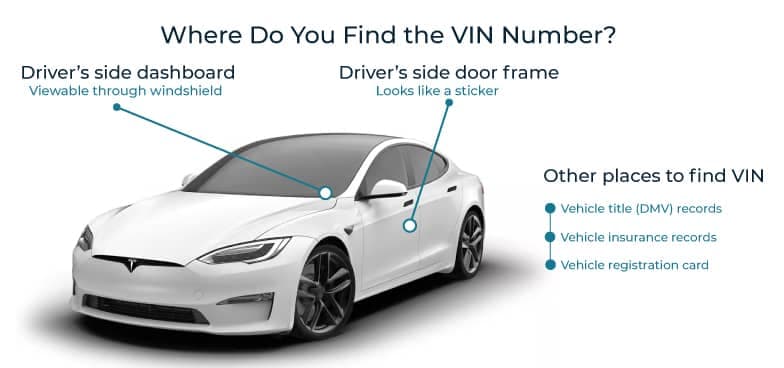
Where to Find the VIN on a Saab?
If someone says the VIN is “hard to find,” take your time and locate it yourself. The VIN is meant to be used for identification, so it should be there.
- Dashboard (visible through the windshield): Quick to check from outside.
- Driver-side door jamb/door area: Often shown on a label or plate.
- Vehicle documents: Good for cross-checking against the car.
- Older/classic placement: May vary from modern patterns.
Need More Than VIN Specifications? Get a Saab Vehicle History Report
A free Saab VIN decoder can reveal key details such as the model, engine, trim, and factory configuration. However, if you want a deeper look into the vehicle's background, a full vehicle history report can help you to show the detailed history of any Saab.
Vehicle Specifications
Review Saab's original factory configuration, including the model, engine, transmission, body style, drivetrain, manufacturing information, and other specifications. This helps verify that the vehicle matches its advertised description and factory build.
Ownership History
Access available ownership records, including the number of previous owners, registration history, and ownership duration. Personal information, such as names and addresses, is not included.
Title Status & Branding Records
Check whether the vehicle has ever carried a clean, salvage, rebuilt, flood, junk, or other branded title. These records can help identify issues that may affect value, registration, or insurance eligibility.
Lien & Financial Records
Determine whether any outstanding liens or financial claims are associated with the vehicle. This can help ensure ownership can be transferred without unexpected complications.
Theft & Recovery Records
Search available databases for theft and recovery records linked to the VIN. When available, reports may include incident dates and reporting sources.
Safety Recall Information
Review manufacturer-issued recall information associated with the vehicle, including affected components, recall descriptions, and available repair status details.
Service & Maintenance History
View available maintenance and service records, including inspections, repairs, and routine servicing. A consistent maintenance history can provide valuable insight into how the Saab has been cared for over time.
Accident & Damage History
Review reported incidents such as collisions, flood damage, fire damage, hail damage, or structural repairs. Available records may include dates, locations, and severity details.
Odometer Readings & Mileage Timeline
Track reported mileage entries over time to identify inconsistencies, unusual gaps, or potential odometer rollback concerns.
Auction & Sales Records
Access available auction results and historical sales listings, including sale prices, condition reports, listing descriptions, and vehicle photographs when available. These records can provide additional context about the vehicle's past condition and market activity.
Free Saab VIN Decoder vs. Paid VIN Check
The free Saab VIN Decoder shows the complete vehicle’s specifications, history, fuel, engine information, and market value. However, if you need to check the vehicle’s records, such as accident, auction, damage, and service history, we recommend that you get the vehicle history report.
Feature | Free VIN Decoder | History Report (Paid) |
|---|---|---|
VIN decoding for all vehicle types | ||
Year, make, model, trim | ||
Full vehicle specifications / detailed car specs | ||
Market value snapshot | ||
Sales listings (current/online ads) | ||
Sales history (timeline of past listings/sales) | ||
Auction records (when available) | ||
Auction history with photos | ||
Mileage during auction/sales (when available) | ||
Odometer rollback checks | ||
Ownership history | ||
Vehicle usage type (personal, fleet, rental, commercial) | ||
Title brand records (salvage, rebuilt, flood, lemon, etc.) | ||
Lien & loan records | ||
Accident & damage history | ||
Theft / stolen records | ||
Flood/hail/fire damage checks | ||
Service/repair records | ||
Warranty status & coverage | ||
Recall information |
Why Getting a Saab History Report is Important Before Buying?
John planned to purchase a used 2009 Saab 9-7x from a used car dealer in Chicago. The car looked nice, and before he purchased it, he decided to run a quick check to ensure it was in good condition.
Sample VIN: YS3ED59G773522990
First Impression
During the inspection, the car looked nice, and there was no visible damage to be seen. The salesman said that the car has a complete maintenance schedule, meaning that there wasn’t any service left due. However, the price was below the market.
What John Sees on the Report
This is what John gets on the report:
- 1 accident record
- 1 Record(s) of damage
- 1 auction record
- 2 lien or loan record
- The vehicle has a loan/lien record
- The vehicle has a corrected title record
- The vehicle has a minor/major damage incident
The Outcome
John decided not to purchase the vehicle because it had plenty of bad records, especially when he found out that the salesman never explained the accident, auction, and lien/loan records.
Why Use Instant VIN Reports for VIN Decoding?
Instant VIN Reports helps buyers, sellers, owners, and enthusiasts access reliable vehicle information quickly and conveniently. Always run a quick VIN decoder with a trusted service to get the best result.
Frequently Updated Data
Our vehicle data is sourced from trusted databases like the Vehicle Databases and is regularly updated to provide access to current information.
Transparent, One-Time Pricing
VIN decoding is available free of charge. Vehicle history reports can be purchased for only $25.00.
Dedicated Customer Support
Our support team is available to assist with VIN-related inquiries 24/7.
Fast Results in Seconds
Our system delivers vehicle specifications and records in less than a minute.
Who Should Use the Saab VIN Decoder
A VIN decoder is a valuable service that can be used to decode the VIN and get the complete vehicle’s specifications. Whether you are a seller, buyer, or even an insurer, decoding the VIN is a crucial step.
Buyers
Verify the vehicle's model, year, engine, trim level, and factory specifications before purchasing. VIN decoding can also help identify discrepancies between the vehicle and the seller's description.
Sellers
Provide prospective buyers with verified vehicle information to increase transparency, build confidence, and support a smoother sales process.
Dealers
Quickly confirm vehicle specifications, evaluate trade-ins, verify inventory details, and ensure Saab vehicles are accurately represented before resale.
Saab Enthusiasts & Collectors
Authenticate classic and collectible Saab models by verifying production details, factory configurations, and other information that may influence collectability and value.
Restoration Specialists
Access original build information and factory specifications to help maintain authenticity and accuracy throughout the restoration process.
Insurance Providers & Vehicle Appraisers
Use VIN-based information to support vehicle valuations, underwriting decisions, claims assessments, and documentation requirements.
Supported Saab Models
Take a look at the section below to quickly decode the VIN.
| 900 | 9000 | 9-3 | 9-5 | 9-4X | Sonett |
| 92 | 93 | 95 | 96 | 99 | 9-7X |
FAQs on Saab VIN Decoder
How do I decode my SAAB VIN for free?
You can decode your Saab VIN for free by entering the VIN into a Saab VIN decoder tool. A free check usually confirms basic details like the Saab’s year, model, and make. This is useful for quick checks. If you want deeper information, like mileage history, title issues, or accident records, upgrading to a full Instant VIN Reports vehicle history report gives you more complete results.
Where is the VIN located on a SAAB car?
On most Saab vehicles, the VIN is found on the dashboard near the windshield on the driver’s side. You can also check the driver-side door frame, vehicle registration, insurance papers, or title documents. Older Saab models may show the VIN or chassis number in different locations, especially under the hood or on a metal plate.
What information can I get from a SAAB VIN decoder?
A Saab VIN decoder can show basic vehicle details like the year, model, and manufacturer. When you use a full vehicle history report, you may also see ownership records, mileage entries, accident reports, title brands, recalls, theft records, and auction history when available. This helps you understand both what the Saab is and what it has been through.
How do I find my SAAB's production year using the VIN?
To find the SAAB’s production year using the VIN, use a VIN decoder that reads this position automatically and shows the correct model year without you needing to decode it manually. This is especially helpful when the listings are unclear or when the Saab’s paperwork does not clearly match the car.
Can I get the SAAB factory options from the VIN?
Yes, you can get the SAAB factory options from the VIN. A Saab VIN decoder can identify factory-installed specifications such as trim level, engine type, and body style. For deeper factory-style details, a full vehicle history report may include build-related information when available. This is useful for collectors, restorers, or anyone checking originality.
What do the digits in a SAAB VIN mean?
Each part of a Saab VIN has a purpose. The first section identifies the manufacturer, the middle section describes the vehicle, and the final section identifies the specific car. While you can decode this manually, it’s easy to make mistakes. Using a Saab VIN decoder explains these characters clearly without guesswork.
How do I check SAAB recalls by VIN?
You can check Saab recalls by entering the VIN into a VIN decoder or vehicle history report tool. Recalls are linked directly to the VIN, not just the model name. This helps you see if safety recalls are associated with your specific Saab and whether further action may be needed.
Is there an official SAAB VIN decoder website?
There is no single official Saab-owned VIN decoder today, as Saab Automobile is no longer producing vehicles. However, VIN decoding still follows standardized rules. Tools like Instant VIN Reports use these standards to decode Saab VINs accurately, including support for older and classic Saab models.
How can I tell what engine my SAAB has from the VIN?
A Saab VIN can indicate the engine type through its vehicle descriptor section. A VIN decoder reads this information automatically and displays the engine details clearly. This is especially helpful when buying used Saabs, where engine swaps or incorrect listings sometimes happen.
Does SAAB have different VIN systems for different model years?
Yes. Modern Saab vehicles use the standard 17-character VIN format. Older Saab models, especially pre-1981 vehicles, may use shorter chassis numbers instead. Instant VIN Reports supports decoding both modern Saab VINs and many classic Saab identification formats, so you’re not limited by the car’s age.
How to decode a classic car VIN number?
To decode a classic vehicle VIN, start by locating the identification number on the dashboard, door jamb, firewall, or vehicle documentation. Because VIN formats were not standardized before 1981, many classic vehicles use shorter serial or chassis numbers. A specialized decoder, such as the Instant VIN Reports VIN Decoder, can help interpret these older VIN formats, including identifiers as short as 5 characters.
What year is the 900 Saab?
The Saab 900 was manufactured across two generations between 1978 and 1998, evolving from Saab's distinctive original design into a more modern platform while retaining many of the brand's signature characteristics.
What is the difference between the 900 and 9000 Saab?
Although their names are similar, the Saab 900 and Saab 9000 were designed for different segments of the market. The 900 became known for its unconventional engineering, aircraft-inspired design, and loyal enthusiast following, while the larger 9000 was developed as a premium executive vehicle focused on comfort, practicality, and long-distance performance.