
Find Your Car’s Exact Paint Code by VIN
Input your VIN to quickly and accurately discover your car’s original color code and paint type.This tool ensures precise matching for any touch-up or repaint job, preserving your vehicle’s resale value and its original charm.
What is my Paint Code by VIN?
Every vehicle comes with a unique color identifier known as a paint code. This code is a combination of numbers and letters that represents the exact shade, finish, and formulation of your car’s exterior paint.
Here’s the thing: the paint code is not the same as the color name. Two cars might both say “Metallic Silver,” but their paint codes could be totally different. For example, 1F7 for one and WA636R for another.
They might look similar in the sun, but they’re mixed differently. That’s why knowing your actual paint code by VIN matters when ordering touch-up paint or doing bodywork.
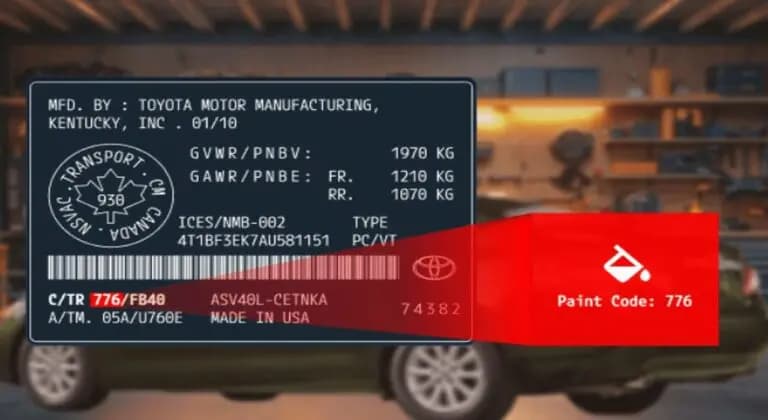
Can You Find Your Paint Code by VIN?
You cannot directly get the paint code by VIN. The VIN is a unique identifier that contains important details about your vehicle’s make, model, manufacturing date, and other specifications, but the exact paint code is not encoded within those 17 characters.
However, you can get window sticker lookup by VIN to find any car’s exact factory color information, including the interior and exterior colors of the vehicle. For example,
- Exterior color: Blue Metallic
- Interior color: Dune White/Perforated Leather-Trimmed Bucket Seats
How to Find Paint Code from VIN Lookup
While a window sticker lookup by VIN can reveal the car paint color (exterior and interior) and the paint type (e.g. clear coat), it doesn’t provide the precise paint code.
Some steps you can take to view the vehicle’s true color by VIN are:
Find the VIN
Locate your 17-digit VIN on the dashboard of the vehicle, the driver-side door jamb, or on its documents.
Fill out the Form
Enter the VIN into the form above and submit it. No VIN? You can also get the vehicle’s color using the license plate number or year, make, and model information.
View the Vehicle’s Factory Color
After submitting the form and making payment, you can now view the vehicle’s actual interior and exterior colors on the downloadable/printable window sticker.
Where to Find the Paint Code on Your Vehicle
The easiest method to verify a Car’s color code is through a VIN lookup, but you can also locate the paint code by checking the vehicle. A manufacturer label is affixed to most cars somewhere on the body that displays the respective code.
Common Physical Locations on the Vehicle
Some common paint code locations include:
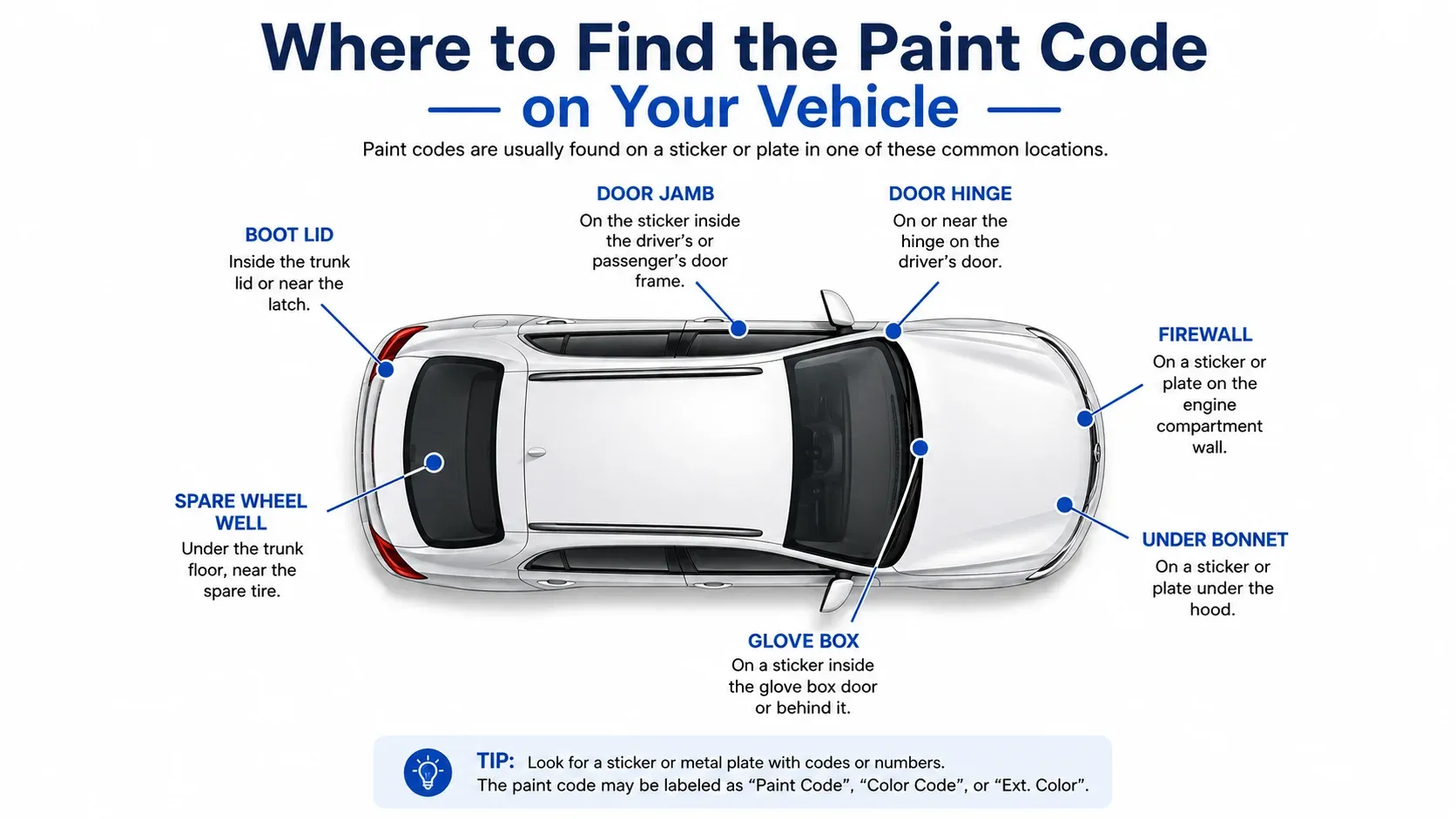
Driver Door Sticker
This is the most common place. Open the driver’s door and look at the door jamb; you’ll find a sticker with the VIN, tire pressures, and paint code (labeled “Paint,” “Color,” or “PNT”).
Radiator Support or Engine Bay
Pop the hood and check the radiator support bar or the firewall, especially on older Japanese models like Honda, Toyota, and Mazda.
Under the Hood on the Strut Tower
Some manufacturers place the paint code label on the strut tower or inner fender under the hood. This is more common on European and older performance models
Glove Box
Some GM and Nissan vehicles print the paint code inside the glove compartment or on a service label.
Trunk Lid or Spare Tire Area
Check under the trunk lid or near the spare tire compartment. You’ll often find it there on BMW and Mercedes-Benz models.
Trunk Lid or Spare Tire Area
Less common, but possible on older or classic vehicles.
Other Ways to Find the Paint Code
If the paint code label is missing or unreadable, there are still a few reliable ways to track it down using official vehicle records and documentation.
Dealership Parts Department
A dealership can look up the paint code using your VIN through manufacturer systems. This is one of the most reliable options if the physical label is missing or unreadable.
Manufacturer Build Records or Window Sticker
A window sticker lookup by VIN confirms the original factory color and paint finish. While it may not list the paint code directly, it helps identify the exact color so the correct code can be verified through dealer records or the vehicle label.
Service Records or Repair Invoices
In some cases, previous bodywork or dealership service invoices may reference the paint code used during repairs.
What Does A Paint Color by VIN Lookup Show?
A paint color by VIN lookup shows the vehicle’s original factory color details, exactly as they were recorded when the car was built. It does not guess or rely on visual inspection. Instead, it pulls verified manufacturer data tied to that specific VIN.
Here’s what you’ll typically see in the results:
Official exterior paint color name
This is the factory-assigned color name, not a dealership description or marketing label. It reflects how the manufacturer recorded the color at production.
Interior color and trim pairing
Many vehicles are built with specific interior colors matched to the exterior. The lookup confirms that original combination.
Paint finish type
You’ll see whether the paint was solid, metallic, pearl, or clear-coated, which matters for repairs and refinishing.
Get More than Paint Color with a Window Sticker by VIN
A window sticker lookup doesn’t just confirm your car’s original paint color code. It shows the complete picture. You’ll see your vehicle’s factory options, trim, interior materials, safety ratings, engine and transmission specs, standard features, fuel economy, MSRP, and much more exactly as it was built.
Here’s what you will get with a paint color by VIN lookup:
Interior and Exterior Color
See the car’s true factory colors exactly as it left the assembly line. This includes the official exterior paint name and the matching interior color or upholstery material.
Standard Equipment
See everything that came as standard from the manufacturer. This includes performance, safety, and design features included in every model of the trim level.
Optional Packages
Find all the added features or appearance packages that were installed at the factory. From tech bundles to premium trims, you’ll see exactly what was added and how it affected the price.
MSRP and Total Costs
View the Manufacturer’s Suggested Retail Price along with the total cost after all factory options and destination charges. It helps you understand the vehicle’s original value when new.
Mechanical Features
Find detailed information about what powers the vehicle, including the engine size, fuel type, horsepower, torque, and transmission type
Exterior Features
Review the factory exterior equipment that gives a vehicle its look and function, such as lighting, wheel design, body accents, and mirror types.
Interior Features
Learn about the cabin features the vehicle came with, including seat materials, infotainment options, climate control systems, and comfort upgrades.
Safety and Crash Ratings
Check the safety features and official NHTSA crash test ratings available at the time of production. It’s a useful way to see how the vehicle performed in safety evaluations.
Fuel Economy and Warranty Information
Review the official EPA fuel ratings and the manufacturer’s original warranty coverage, including powertrain and corrosion protection.
Why Use a VIN Color Lookup Tool?
Knowing the exact factory color helps remove doubt and avoids costly mistakes. It helps buyers make smarter decisions, sellers present vehicles honestly, and owners keep their cars looking the way they should.
Some reasons why you need to verify a vehicle’s paint color are:
Car Buyers
Verify original paint
A lookup helps confirm whether the vehicle still wears its factory color or has been repainted at some point.
Spot past body repairs
Mismatched shades or panels that differ from the factory color can signal previous accident repairs or cosmetic work.
Buy with more confidence
Knowing the original color makes it easier to judge the car’s condition and avoid surprises after purchase.
Paint Color Code Formats For Different Car Makes
Can you recognize a paint code if you’ve found it? Just like the locations differ for many manufacturers, the paint code format also differs greatly. Here are formats for some popular car brands:
Car Makes and Paint Code Formats
| Car Make | Paint Code Format |
|---|---|
| Acura, Mitsubishi | NH-XXXX |
| Audi, Volkswagen | Two to four digits with numbers and/or letters |
| BMW | Three numbers |
| Buick, Cadillac, Chevrolet, GMC, Hummer | Starts with WA, BC/CC, or U, may be prefaced by a three-digit number and letter combination |
| Chrysler, Dodge | Starts with P, Q, G, or T, three digits with letters and numbers. May be prefaced by PNT. |
| Ford, Hyundai, Kia | Two digits with numbers and/or letters |
| Honda | NHXXXX or YRXXXXX |
| Infiniti | Three digits with numbers and/or letters, may include a fourth digit after a space |
| Isuzu | Three digits with numbers |
| Jeep | Starts with P, Q, G, or T, three digits with letters and numbers. Older models may have two digits. May be prefaced by PNT. |
| Lexus, Toyota | Three digits with numbers and/or letters, usually prefaced by CTR |
| Lincoln | Two digits with numbers and/or letters |
| Mazda | Two or three digits with numbers and/or letters |
| Mercedes Benz | DB-XXX |
| Mini, Nissan, Subaru, Suzuki | Three digits with numbers and/or letters |
What Type of Vehicles Are Covered?
Our Car color code by vin lookup tool works for all vehicle types, including, but not limited to, the following:
Get Your Car’s Original Color and Build Details Instantly
If you’re planning a touch-up or a repaint or just want to know a car’s exact factory color and specs, a window sticker lookup by VIN gives you everything in one place. You’ll see the vehicle’s true color, features, and equipment details straight from official factory records.
FAQs About Paint Code by VIN Lookup
How do I check if my paint code matches?
To check if your paint code matches, you need to compare the paint code on your car’s information label (usually found on the driver’s door jamb or under the hood) with the color details shown on your window sticker lookup. The paint name should match the factory record.
Can I find my paint code by VIN?
You cannot directly find the paint code by VIN. The VIN itself does not include the paint code, but you can use it to access the original color through a window sticker lookup. This will show the exact exterior and interior color names linked to your VIN.
How to find a paint code by VIN?
To find a paint code by VIN, start by locating your 17-digit VIN on your dashboard, door jamb, or registration papers. Then use a window sticker lookup tool to view your vehicle’s original color information. For the actual paint code, you just need to check the paint label on your vehicle to find it.
Can you find paint code by VIN for free?
Free VIN searches usually won’t include paint codes. They might show the color name, but full factory color data generally comes from paid lookups or dealer systems.
Can a dealership find the paint code?
Yes, dealerships have the most reliable data. They can use your vehicle specifications to get the paint code and confirm your exact factory color and finish type.