
Geo VIN Decoder
Use our free Geo VIN Decoder to identify your truck’s model year, engine, body type, and factory details in seconds. Upgrade anytime to access title records, mileage history, accidents, and ownership data.
What is a Geo VIN Decoder?
Every Geo vehicle carries a unique identification number. A Geo VIN decoder online tool interprets that number using the official VIN structure defined by U.S. authorities. It breaks the code into sections and explains what each part means.
This helps buyers or sellers verify authenticity and confirm vehicle configuration. If you are restoring a classic Geo or researching an older unit, decoding earlier VIN formats is also available through Instant VIN Reports.
What is a Geo VIN (Vehicle Identification Number)?
A Geo VIN is a 17-character combination of letters and numbers assigned to each Geo vehicle. This format became standard in 1981 under U.S. federal regulations. Before that year, VIN formats varied, especially for classic cars.
Each part of the VIN has meaning. It identifies the manufacturer, vehicle type, engine specification, model year, assembly plant, and production sequence. For Geo vehicles, which were produced under General Motors from 1989 to 1997, the VIN also reflects partnerships with companies such as Toyota and Suzuki.
Checking a Geo VIN number is often the first step before buying a used vehicle. It confirms whether the vehicle matches the seller’s description. It can also help avoid problems such as purchasing a stolen vehicle or discovering unexpected title issues later.
You could decode this manually using official VIN structure charts, but honestly, it takes time and attention to detail. A free Geo VIN decoder makes the process faster and reduces human error.
How to Read a Geo VIN Number?
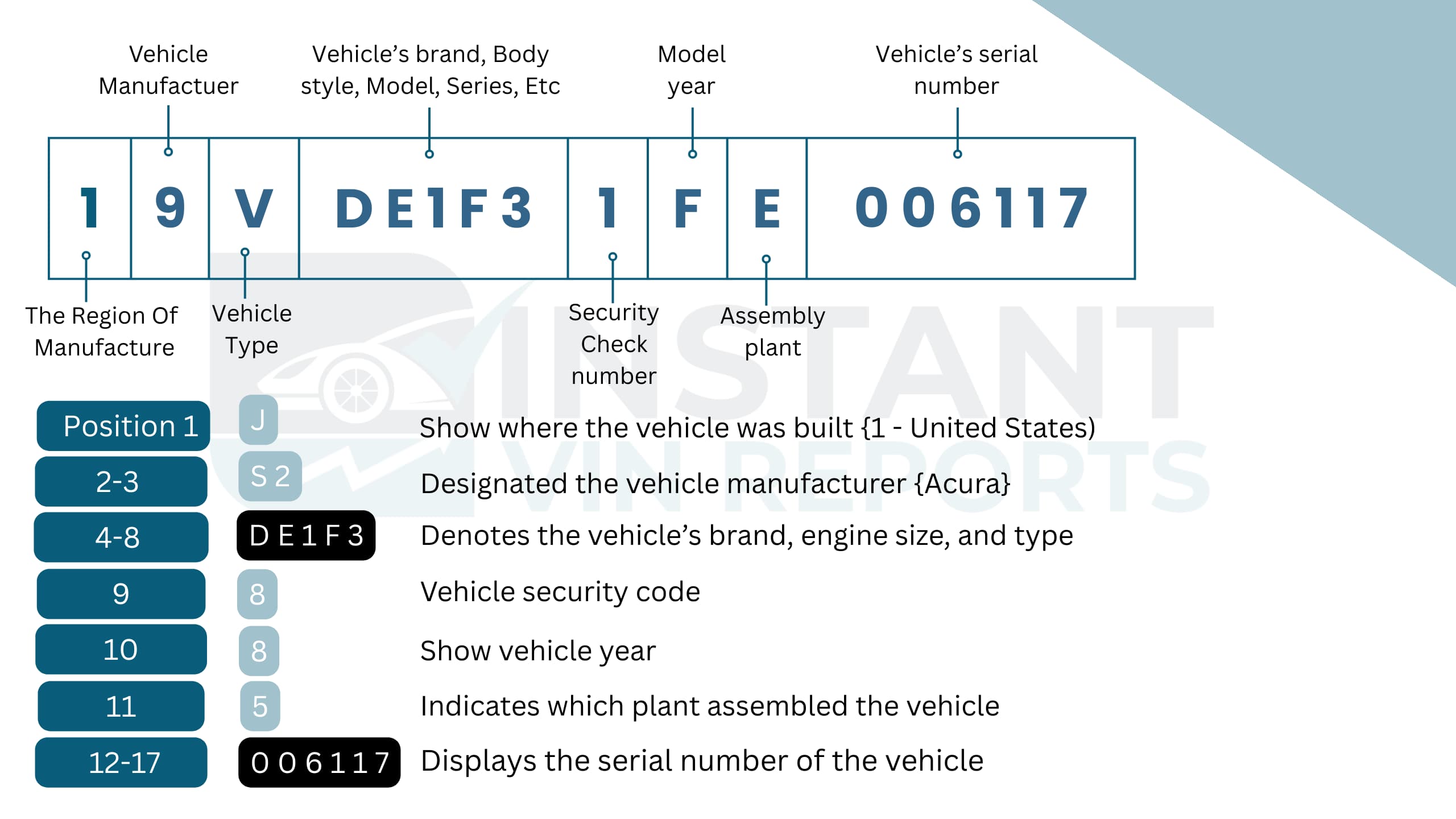
The VIN is divided into three sections: WMI, VDS, and VIS. Each group of characters tells a different part of the vehicle’s story. Let us go through them one by one.
WMI (World Manufacturer Identifier)
The WMI consists of the first three characters of the VIN. It identifies the vehicle manufacturer and the country where it was produced. For Geo vehicles, this section reflects General Motors involvement and manufacturing partnerships.
- 1 – Manufactured in the United States
- 2 – Manufactured in Canada
- J – Manufactured in Japan
Common Geo WMIs include:
- 1Y1 – NUMMI plant (California, joint GM-Toyota production)
- 2CN – CAMI Automotive (Canada, partnership with Suzuki)
- JAB / JAC – Japanese production (Suzuki-related models)
Each character position:
- 1st character: Country of origin
- 2nd character: Manufacturer
- 3rd character: Vehicle type or division
VDS (Vehicle Descriptor Section)
The VDS covers characters 4 through 8, while the 9th character is a check digit used for security verification. This section describes the model, engine type, body style, and restraint system.
- 4th–5th characters – Model or series (Metro, Tracker, Prizm, Storm)
- 6th character – Body style or trim level
- 7th character – Engine type
- 8th character – Safety or restraint system
- 9th character – Check digit (validates the VIN mathematically)
VIS (Vehicle Identifier Section)
The VIS includes characters 10 through 17. This section identifies model year, assembly plant, and the vehicle’s production sequence number.
VIS Character Meaning
- 10th character – Model year
- Below is the list of the model year codes and their meaning for the model years:
| 10th Digit | Model Year | 10th Digit | Model Year | 10th Digit | Model Year | 10th Digit | Model Year |
|---|---|---|---|---|---|---|---|
| A | 1980 | M | 1991 | 2 | 2002 | D | 2013 |
| B | 1981 | N | 1992 | 3 | 2003 | E | 2014 |
| C | 1982 | P | 1993 | 4 | 2004 | F | 2015 |
| D | 1983 | R | 1994 | 5 | 2005 | G | 2016 |
| E | 1984 | S | 1995 | 6 | 2006 | H | 2017 |
| F | 1985 | T | 1996 | 7 | 2007 | J | 2018 |
| G | 1986 | V | 1997 | 8 | 2008 | K | 2019 |
| H | 1987 | W | 1998 | 9 | 2009 | L | 2020 |
| J | 1988 | X | 1999 | A | 2010 | M | 2021 |
| K | 1989 | Y | 2000 | B | 2011 | N | 2022 |
| L | 1990 | 1 | 2001 | C | 2012 | P | 2023 |
- 11th character – Assembly plant (NUMMI, CAMI, Japan facilities)
- 12th–17th characters – Production sequence number
Where to Find the VIN on a Geo?
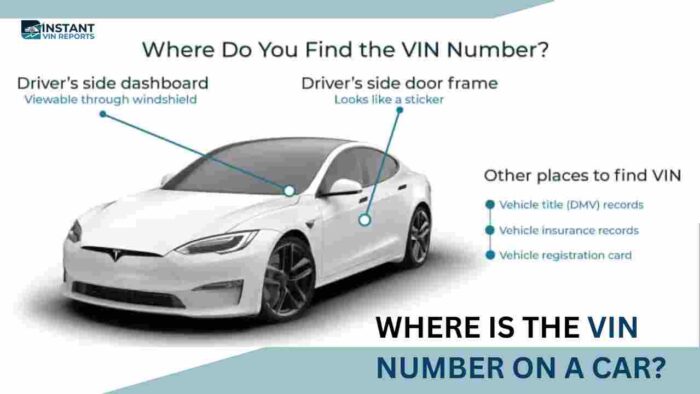
Finding the Geo VIN number is easier than most people think. It is placed in visible and secure locations. You just need to know where to look.
- Dashboard: Visible through the windshield on the driver’s side. This is the most common and accessible location.
- Driver-Side Door Frame: Located on a sticker or metal plate inside the door jamb. Often includes manufacturing details.
- Engine Bay: Stamped on the firewall or near the engine block in some models.
- Vehicle Title and Registration: The VIN is printed on official documents. Always confirm it matches the physical vehicle.
- Insurance Card: Your insurance paperwork also lists the VIN for verification purposes.
What Information Can You Get from a Geo VIN Decoder?
While a free Geo VIN decoder gives you the right starting point, a full Geo VIN history report provides the deeper background you truly need. It helps you avoid costly surprises and make a confident decision, especially in the used Geo market.
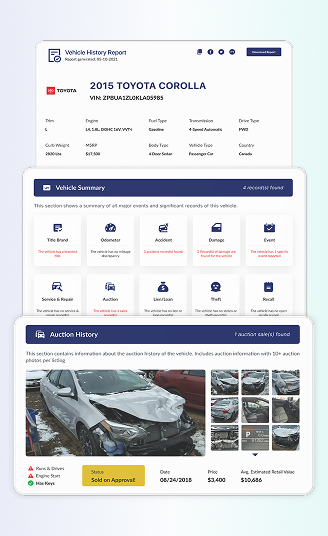
Here is what you can access through a complete Geo vehicle history VIN report at Instant VIN Reports:
Vehicle Specifications
View detailed information about your Geo, including model, trim level, engine type, transmission, body style, and country of origin. This helps confirm the vehicle matches the seller’s description and ensures it fits your needs, whether you are restoring a Geo Metro or checking a Tracker.
Ownership History
See how many owners the Geo has had over the years. The report may include ownership duration, purchase dates, and registration locations. This helps you understand how the vehicle was used and whether it changed hands frequently.
Accident Reports
Accident and damage records depend on reporting by insurance companies, state agencies, and other data providers. While many incidents are recorded, some older or minor events may not appear in digital databases. That is why reviewing both the VIN report and a physical inspection is always recommended.
Sales Records
Sales listing history will show recorded past advertised prices and listing dates. This helps track how the Geo’s value changed over time. If the same vehicle was repeatedly listed, that may suggest unresolved issues. A Geo VIN history report helps you see the bigger picture.
Auction History
If the Geo was ever sold at auction, you may see auction dates, locations, and sometimes vehicle condition notes. Auction images, when available, can provide visual proof of the car’s previous state.
Lien / Loan Records
Before buying a used Geo, it is important to confirm there are no outstanding loans attached to the vehicle. A lien means a lender still has a financial interest in the car. If unresolved, this can delay ownership transfer. A detailed Geo vehicle history VIN report may show lien or loan flags when reported, helping you avoid legal or financial trouble.
Theft History
Verify whether the Geo has ever been reported stolen or involved in theft-related incidents. The report may include dates and case details when available. This step protects you from legal complications.
Mileage Records
Mileage records are extremely important in the used car market. A Geo VIN check can show previously reported odometer readings from inspections, sales, or service entries. By comparing these numbers, you can detect possible inconsistencies. A Geo VIN search gives you recorded mileage data that helps protect your investment.
Title Information
Understand the title status of the Geo. The report may show whether it holds a clean title or if it has been branded as salvage, rebuilt, flood-damaged, or otherwise affected. Title brands can strongly influence resale value and insurance eligibility.
Warranty Coverage
Although most Geo vehicles are older and may no longer carry factory warranties, some extended coverage records may still appear when available. Checking warranty information through a Geo VIN number lookup helps owners understand whether any protection remains.
Recalls and Safety Concerns
Geo vehicles were produced under General Motors, and some models may have been subject to safety recalls. A Geo VIN lookup can help identify open or past recalls connected to that specific vehicle. Knowing this allows owners to address safety concerns promptly. Safety should never be ignored, especially with older vehicles.
Service and Maintenance Records
Service records show reported maintenance such as oil changes, brake replacements, or major repairs. Regular maintenance often reflects responsible ownership. When reviewing a Geo VIN history report, maintenance entries can help you judge the car’s overall care and reliability.
Why Use a Geo VIN Decoder?
Geo vehicles may be discontinued, but their risks in the used market are still very real. Some VIN tools only decode surface-level vehicle data. Our Geo VIN decoder goes further. With Instant VIN Reports, you can move from a simple Geo VIN lookup to a complete Geo VIN history report in seconds.
That means specifications, accident records, title brands, mileage history, and more in one place. It is not just decoding. It is protection.
Who Can Benefit from Using a Geo VIN Decoder?
Whether you are buying your first Geo, restoring a classic Tracker, or managing inventory as a dealer, decoding the Geo VIN number is an important step. It reduces uncertainty. It confirms facts. And honestly, it gives peace of mind.
For Buyers
- Confirm the Geo year, model, and trim
- Verify engine and transmission details
- Check the accident history when reported
- Review mileage records for inconsistencies
- Identify title brands such as salvage or rebuilt
For Sellers
- Confirm correct vehicle specifications
- Prove ownership transparency
- Show clean title status if applicable
- Present accident-free records when available
- Offer a downloadable PDF report as documentation
For Dealers
- Quickly decode multiple Geo VIN numbers
- Screen inventory for title issues
- Check lien or theft records before listing
- Verify accurate specifications for ads
- Reduce return or dispute risks
How to Use the Free Geo VIN Decoder?
Running a free Geo VIN decoder online is simple. You do not need technical knowledge. Just follow three steps.
1) Find the VIN
Locate the 17-character Geo VIN number on the dashboard, driver-side door frame, or registration documents. For classic models, the VIN may be shorter.
2) Fill in the Form
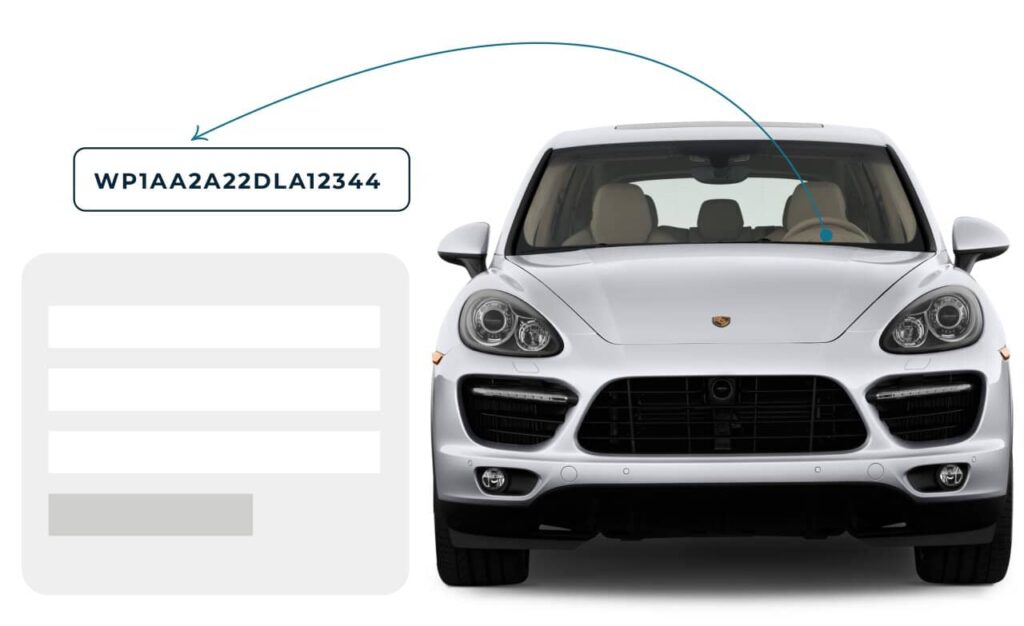
Enter the Geo VIN number into our search box. Double-check the characters to avoid typing mistakes.
3) Get the Report
Instantly receive basic vehicle details. If you need deeper data, such as accident history or title records, you can upgrade to a full Geo VIN history report.
Free Geo VIN Decoder vs. Paid Geo VIN Decoder
Some users only need a quick Geo VIN lookup. Others need complete vehicle history details. See the difference below:
| Feature | Free VIN Decoder | History Report (Paid) |
|---|---|---|
| VIN decoding for all vehicle types | ||
| Year, make, model, trim | ||
| Full vehicle specifications / detailed car specs | ||
| Market value snapshot | ||
| Sales listings (current/online ads) | ||
| Sales history (timeline of past listings/sales) | ||
| Auction records (when available) | ||
| Auction history with photos | ||
| Mileage during auction/sales (when available) | ||
| Odometer rollback checks | ||
| Ownership history | ||
| Vehicle usage type (personal, fleet, rental, commercial) | ||
| Title brand records (salvage, rebuilt, flood, lemon, etc.) | ||
| Lien & loan records | ||
| Accident & damage history | ||
| Theft / stolen records | ||
| Flood/hail/fire damage checks | ||
| Service/repair records | ||
| Warranty status & coverage | ||
| Recall information |
Decode VIN by Other Manufacturers
 Alfa romeo
AM general
Aston Martin
Audi
Austin Healey
Avanti Motors
Bentley
BMW
Bricklin
Bugatti
Buick
Cadillac
Chevrolet
Chrysler
Daewoo
Daihatsu
Datsun
Dodge
Eagle
Ferrari
Fiat
Fisker
Ford
Freightliner
Genesis
Geo
GMC
Harley Davidson
Hino
Honda
Hummer
Hyundai
Infiniti
Isuzu
Jaguar
Jeep
Kawasaki
Kenworth
Kia
Koenigsegg
Lamborghini
Land Rover
Lexus
Lincoln
Lotus
Maserati
Maybach
Mazda
McLaren
Mercedes Benz
Mercury
MG
MINI
Mitsubishi
Morgan
Nissan
Oldsmobile
Panoz
Peterbilt
Plymouth
Polestar
Pontiac
Porsche
Rolls-Royce
Ram
Saab
Saleen
Saturn
Scion
Shelby
Smart
Subaru
Suzuki
Tesla
Toyota
Triumph
Volkswagen
Volvo
Yamaha
Alfa romeo
AM general
Aston Martin
Audi
Austin Healey
Avanti Motors
Bentley
BMW
Bricklin
Bugatti
Buick
Cadillac
Chevrolet
Chrysler
Daewoo
Daihatsu
Datsun
Dodge
Eagle
Ferrari
Fiat
Fisker
Ford
Freightliner
Genesis
Geo
GMC
Harley Davidson
Hino
Honda
Hummer
Hyundai
Infiniti
Isuzu
Jaguar
Jeep
Kawasaki
Kenworth
Kia
Koenigsegg
Lamborghini
Land Rover
Lexus
Lincoln
Lotus
Maserati
Maybach
Mazda
McLaren
Mercedes Benz
Mercury
MG
MINI
Mitsubishi
Morgan
Nissan
Oldsmobile
Panoz
Peterbilt
Plymouth
Polestar
Pontiac
Porsche
Rolls-Royce
Ram
Saab
Saleen
Saturn
Scion
Shelby
Smart
Subaru
Suzuki
Tesla
Toyota
Triumph
Volkswagen
Volvo
Yamaha
Frequently Asked Questions about Geo VIN Decoder
How do I decode my GEO VIN number?
You can decode your GEO VIN number by entering the 17-character code into a Geo VIN decoder online. The tool interprets each section, including manufacturer, model year, engine type, and plant location. For deeper insights like accident history or title brands, a premium Geo VIN history report provides more complete information.
Where is the VIN located on a GEO vehicle?
The VIN is commonly located on the dashboard near the windshield on the driver’s side. It may also appear inside the driver-side door frame or on official registration documents. Always match the physical VIN with paperwork before purchase.
What information can I get from a GEO VIN decoder?
A Geo VIN decoder can confirm year, model, engine type, body style, and production details. A full Geo VIN report may also include accident records, ownership history, mileage entries, lien flags, and title brands when available.
How do I find my GEO's manufacturing year and model using the VIN?
The 10th character of the Geo VIN represents the model year based on standardized codes. Other characters identify the model and production plant. A Geo VIN lookup tool calculates this automatically to avoid confusion.
Can I verify the GEO model authenticity (vs Chevy/Suzuki) from the VIN?
Yes. The first three characters, called the WMI, identify the manufacturer and production origin. Since Geo vehicles were produced under General Motors with partnerships, the VIN helps confirm proper branding and origin.
What do the 17 digits in a GEO VIN mean?
The 17 digits are divided into three sections: WMI, VDS, and VIS. They identify manufacturer, vehicle specifications, model year, plant location, and production sequence. A Geo VIN number decoder translates each character clearly.
How do I check if my GEO has any recalls using the VIN?
You can run a Geo VIN check to see recall information connected to that specific vehicle when available. This helps owners address safety concerns promptly.
Can I decode Geo VIN for free?
Yes, you can use a free Geo VIN decoder for a quick identity check. For complete history details such as accidents, mileage, or title records, a premium Geo VIN history report provides more protection.
How to verify Geo VIN?
To verify a Geo VIN, confirm the 17-character code matches across the dashboard, door frame, and paperwork. Then use a Geo VIN search tool to validate the check digit and production details.