
Geo VIN Decoder
Use our free Geo VIN Decoder to identify your vehicle’s model year, engine, body type, and factory details in seconds. Upgrade anytime to access title records, mileage history, accidents, and ownership data.
What is a Geo VIN Decoder?
Every Geo vehicle carries a unique identification number. A Geo VIN decoder is an online tool that interprets the number using the official VIN structure defined by U.S. authorities. It breaks the code into sections and explains what each part means.
This helps buyers or sellers verify authenticity and confirm vehicle configuration. If you are restoring a classic Geo or researching an older unit, decoding earlier VIN formats is also available through Instant VIN Reports.
Why Geo VIN Decoding Matters Before Buying a Car
A quick search with the Instant VIN Reports Geo VIN Decoder gives you a free preview of essential vehicle information, helping you spot inconsistencies before making a buying decision.
Confirm the Correct Model
Many Geo models share similar styling. VIN decoding identifies the exact model and factory designation before you commit to a purchase.
Check Engine Configuration
Verify that the installed engine matches the original factory specifications, especially when shopping for older Geo vehicles.
Identify the Original Trim
Different trims include different equipment packages. VIN decoding helps determine which trim the vehicle originally left the factory with.
Compare Multiple Vehicles
When shopping for several Geo vehicles, decoding each VIN lets you compare factory specifications quickly and consistently.
What Information Does a Geo VIN Decoder Show?
Every Geo VIN tells a story about how the vehicle left the factory. After entering the VIN into the Instant VIN Reports Geo VIN Decoder, you'll receive a free preview of important specifications that help identify the vehicle and verify its original configuration.
Manufacturer
The decoder identifies the company that built your Geo.
Vehicle Origin
Every VIN identifies the vehicle's country of manufacture.
Geo's Model Type & Year
Confirms both the model and production year.
Engine Specifications
Verify the vehicle's original powertrain before ordering parts or evaluating a purchase.
Transmission Setup
The VIN helps identify the vehicle's original transmission configuration when available in the decoding data.
Body Style
Distinguish between different versions of the same model. The decoder identifies the vehicle's factory body configuration.
Trims
Different Geo trims came with different equipment packages, engines, and features.
MSRP & Market Value
See estimated market value information based on the vehicle's condition.
How to Use the Geo VIN decoder
Running a free Geo VIN decoder online is simple. You do not need technical knowledge. Just follow three steps.
Step 1: Enter the VIN
Enter the Geo VIN number into our form above. You can locate the 17-character Geo VIN number on the dashboard, driver-side door frame, or registration documents. For classic models, the VIN may be shorter.
Step 2: Fill out the Form
Double-check the characters to avoid typing mistakes, then click the button to decode the Geo VIN.
Step 3: Check the Vehicle Specs
Instantly receive basic vehicle details. If you need deeper data, such as accident history or title records, you can upgrade to a full Geo VIN history report.
How To Read a 17-Digit Geo VIN Number
A Geo VIN is a 17-character combination of letters and numbers assigned to each Geo vehicle. This format became standard in 1981 under U.S. federal regulations. Before that year, VIN formats varied by the manufacturer, model, and year, especially for classic cars.
Each part of the VIN has meaning. The VIN is divided into three sections: WMI, VDS, and VIS. Each group of characters tells a different part of the vehicle’s story. Let us go through them one by one.
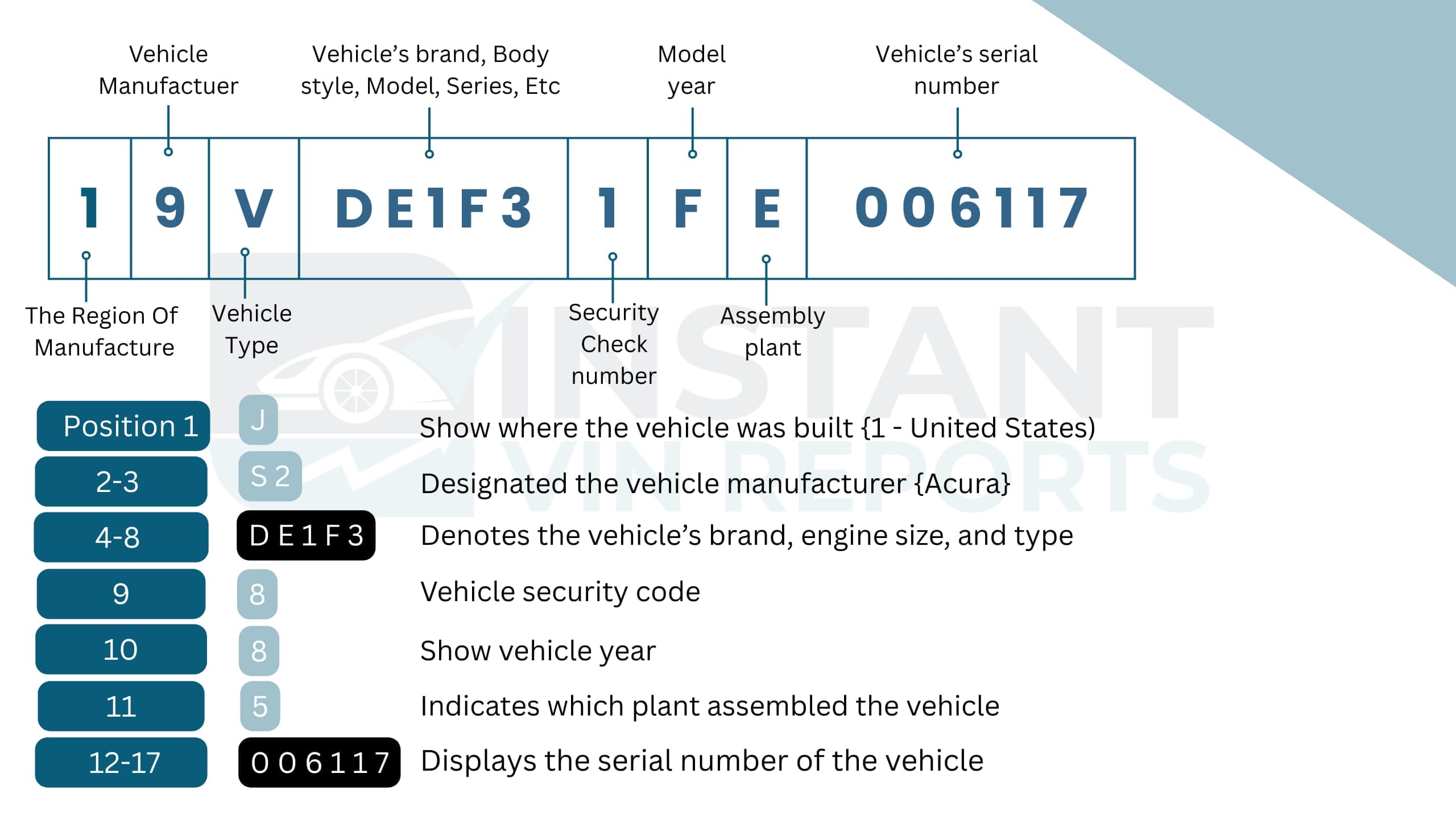
Geo VIN Positions Explained For: **1Y1SK5366PZ074203**
WMI (World Manufacturer Identifier)
Position 1 (1)
The United States is the manufacturer country
Position 2 & 3 (Y1)
Geo / General Motors (Passenger Car)
VDS (Vehicle Descriptor Section)
Positions 4 to 8 (SK536)
Prizm Sedan with 1.6L configuration
Position 9 (6)
Check Digit
VIS (Vehicle Identifier Section)
Position 10 (P)
Model Year: 1993
Position 11 (Z)
NUMMI, Fremont, California, (assembly plant)
Positions 12 to 17 (074203)
Sequential production number
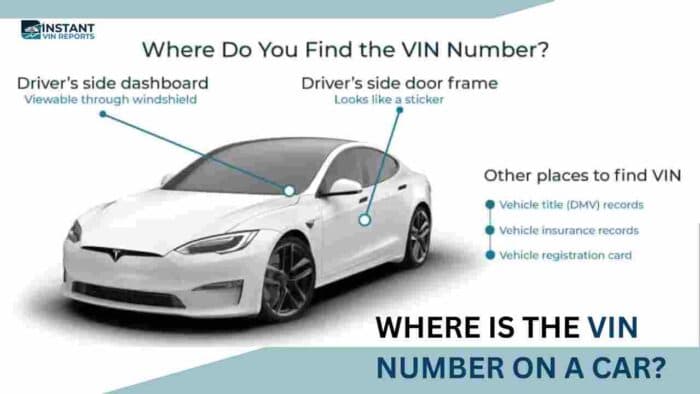
Where to Find the VIN on a Geo?
Finding the Geo VIN number is easier than most people think. It is placed in visible and secure locations. You just need to know where to look.
- Dashboard: Visible through the windshield on the driver’s side. This is the most common and accessible location.
- Driver-Side Door Frame: Located on a sticker or metal plate inside the door jamb. Often includes manufacturing details.
- Engine Bay: Stamped on the firewall or near the engine block in some models.
- Vehicle Title and Registration: The VIN is printed on official documents. Always confirm it matches the physical vehicle.
- Insurance Card: Your insurance paperwork also lists the VIN for verification purposes.
Need To See More? Get the Full Geo Vehicle History Report
While our free Geo VIN decoder gives you the starting point, our full Geo VIN history report provides the deeper background you may truly need. It helps you avoid costly surprises and make a confident decision, especially in the used Geo market.
Here is what you can access through a complete Geo vehicle history VIN report at Instant VIN Reports:
Vehicle Specifications
Compare the decoded specifications with the seller's description to confirm the Geo has the correct engine, trim, transmission, and body style before you spend money.
Ownership History
See how many owners the Geo has had over the years. The report will include ownership duration, purchase dates, and registration locations. This helps you understand how the vehicle was used and whether it changed hands frequently.
Accident Reports
Confirm the accident and damage records based on reporting by insurance companies, state agencies, and other data providers, tied to the Geo VIN. We also recommend reviewing both the VIN report and a physical inspection.
Sales and Auctions Records
A Geo VIN history report helps you see the bigger picture. If the Geo were ever sold at auction or on an online listing, you would see the event dates, locations, and recorded vehicle condition notes. With available images to provide visual proof of the car’s previous state.
Lien / Loan Records
Before buying a used Geo, it is important to confirm there are no outstanding loans attached to the vehicle. A lien means a lender still has a financial interest in the car. If unresolved, this can delay ownership transfer. Our detailed Geo vehicle history VIN report will show lien or loan flags when reported, helping you avoid legal or financial trouble.
Theft Records
Verify whether the Geo has ever been reported stolen or involved in theft-related incidents. The report will include dates and case details when available. This step protects you from legal complications.
Mileage Records
Mileage records are extremely important in the used car market. A Geo VIN check can show previously reported odometer readings from inspections, sales, or service entries. By comparing these numbers, you can detect possible inconsistencies. A Geo VIN search gives you recorded mileage data that helps protect your investment.
Title Information
Understand the title status of the Geo. The report will show whether it holds a clean title or if it has been branded as salvage, rebuilt, junk, flood-damaged, or otherwise affected. Title brands can strongly influence resale value and insurance eligibility.
Recalls and Safety Records
Geo vehicles were produced under General Motors, and some models may have been subject to safety recalls. Our Geo VIN lookup can help identify open or past recalls connected to that specific vehicle. Knowing this allows owners to address safety concerns promptly. Safety should never be ignored, especially with older vehicles.
Service and Maintenance Records
Service records show reported maintenance such as oil changes, brake replacements, or major repairs. Regular maintenance often reflects responsible ownership. When reviewing a Geo VIN history report, maintenance entries can help you judge the car’s overall care and reliability.
Free Geo VIN Decoder vs Vehicle History Report
Some users only need a quick Geo VIN lookup. Others need complete vehicle history details. See the difference below:
Feature | Free VIN Decoder | History Report (Paid) |
|---|---|---|
VIN decoding for all vehicle types | ||
Year, make, model, trim | ||
Full vehicle specifications / detailed car specs | ||
Market value snapshot | ||
Sales listings (current/online ads) | ||
Sales history (timeline of past listings/sales) | ||
Auction records (when available) | ||
Auction history with photos | ||
Mileage during auction/sales (when available) | ||
Odometer rollback checks | ||
Ownership history | ||
Vehicle usage type (personal, fleet, rental, commercial) | ||
Title brand records (salvage, rebuilt, flood, lemon, etc.) | ||
Lien & loan records | ||
Accident & damage history | ||
Theft / stolen records | ||
Flood/hail/fire damage checks | ||
Service/repair records | ||
Warranty status & coverage | ||
Recall information |
How Our Free Geo VIN Lookup Helped Andrew Shop Smarter
When Andrew found a 1993 Geo Prizm for sale, he used our free Instant VIN Reports Geo VIN Decoder to verify the VIN. He then upgraded to the full vehicle history report for a more complete look at the car's history.
VIN: 1Y1SK5366PZ074203
Initial Impression
- Found a 1993 Geo Prizm listed online.
- Listing showed limited vehicle details.
- Wanted to verify the vehicle before contacting the seller.
Critical Findings
- Our free decoder confirmed it was a true 1993 Geo Prizm with a 1.6L 4-cylinder gasoline engine.
- Upgraded to the full vehicle history report for additional peace of mind.
- The full report shows that the vehicle has a corrected title, a duplicate title record, and more than one owner record.
Outcome
After getting more detailed information about the car, he contacted the seller with more informed questions and scheduled an inspection with greater confidence before deciding whether to purchase the vehicle.
Why 1 Million+ Drivers Choose Instant VIN Reports
Buying a discontinued vehicle often means verifying more than just the asking price. Instant VIN Reports helps bring all the important records together in one place, making research faster and easier.
Daily Data Updates
Vehicle records continue to change as ownership, registrations, inspections, and other reported events occur. See the most current information available whenever you perform a VIN lookup or order a vehicle history report.
No Hidden Fees or Subscriptions
Know exactly what you're paying for before completing your purchase. We offer transparent pricing without requiring long-term subscriptions, allowing you to buy only the reports you need.
24/7 Customer Support
Our customer support team is available around the clock to help with report access, VIN decoding questions, and general assistance whenever you need it.
Most Comprehensive Database
We bring together vehicle specifications and supported historical records in one place. Instead of searching multiple sources, you can access it through a single report.
Who Should Use a Geo VIN Decoder?
Whether you are buying your first Geo, restoring a classic Tracker, or managing inventory as a dealer, decoding the Geo VIN number is an important step. It reduces uncertainty. It confirms facts. And honestly, it gives peace of mind.
Buyers
Start with the free decoder. Upgrade to the full vehicle history report and see a complete recorded history for peace of mind before buying.
Sellers
A verified VIN lookup can make your listing more complete and help serious buyers feel more confident.
Dealers
Quickly identify incoming inventory and verify vehicle specifications before preparing sales listings.
Classic Car Collectors
Research factory specifications and verify identification details before adding a collectible vehicle to your collection.
Restorers
Factory specifications help you identify the correct engine, body style, and other original vehicle details before beginning restoration.
Insurers & Appraisers
Confirm factory specifications before preparing appraisals or reviewing vehicle documentation.
Supported Geo Models
These are some of the Geo models supported by our decoder. Even if your vehicle isn't listed below, you can still search its VIN. We also support discontinued Geo vehicles and decode many classic 5 to 14-digit VINs and chassis numbers for older vehicles from other manufacturers.
| Geo Metro | Geo Tracker | Geo Prizm | Geo Storm | Geo Spectrum |
Frequently Asked Questions about Geo VIN Decoding
How do I decode my GEO VIN number?
You can decode your GEO VIN number by entering the 17-character code into our online Geo VIN decoder. The tool interprets each section, including manufacturer, model year, engine type, and plant location. For deeper insights like accident history or title brands, a premium Geo VIN history report provides more complete information.
Where is the VIN located on a GEO vehicle?
The VIN is commonly located on the dashboard near the windshield on the driver’s side. It may also appear inside the driver-side door frame or on official registration documents. Always match the physical VIN with paperwork before purchase.
What information can I get from a GEO VIN decoder?
Our Geo VIN decoder can confirm year, model, engine type, body style, and production details. If you need deeper research, consider upgrading to our full Geo VIN report, which will include accident records, ownership history, mileage entries, lien flags, and title brands when available.
How do I find my GEO's manufacturing year and model using the VIN?
The 10th character of the Geo VIN represents the model year based on standardized codes. Other characters identify the model and production plant. A Geo VIN lookup tool calculates this automatically to avoid confusion.
What do the 17 digits in a GEO VIN mean?
The 17 digits are divided into three sections: WMI, VDS, and VIS. They identify manufacturer, vehicle specifications, model year, plant location, and production sequence. Our Geo VIN number decoder translates each character clearly and accurately.
Why Geo Doesn't Use Short VINs Like Other Classic Cars?
Unlike many long-established automakers, Geo did not exist before VIN standardization. The brand debuted in 1989, which means every Geo left the factory with the federally standardized 17-digit VIN used on modern vehicles.
How do I check if my GEO has any recalls using the VIN?
You can run a Geo VIN check to see recall information connected to that specific vehicle when available. This helps owners address safety concerns promptly.
Can I decode Geo VIN for free?
Yes, you can use our free Geo VIN decoder for a quick identity check. For complete history details such as accidents, mileage, or title records, a premium Geo VIN history report provides more protection.
How to verify Geo VIN?
To verify a Geo VIN, confirm the 17-character code matches across the dashboard, door frame, and paperwork. Then use a Geo VIN search tool to validate the check digit and production details.