
Free VIN Decoder: Lookup Any Peterbilt Trucks Now
Looking up a Peterbilt has never been easier with our Peterbilt VIN decoding tool. Simply enter the Peterbilt VIN number to get accurate specifications and trim at no cost. Upgrade to a full history report to see a deeper history, like mileage, lien/loan, stolen records, and more!
What is a Peterbilt VIN Decoder?
A Peterbilt VIN decoder is an online tool that translates a truck’s VIN into readable information. Instead of staring at 17 characters and guessing, you type it in and get details like year, make, model, trim, engine, transmission, and more.
For used-truck shopping, it matters because you can compare decoded specs against the listing and the actual truck. Our Peterbilt VIN lookup tools can also support pre 1980 classic and discontinued Peterbilt models with chassis numbers ranging from 5 to 14 digits.
Why Decode a Peterbilt VIN?
Decoding a Peterbilt Vehicle Identification Number (VIN) is vital to ensure the heavy-duty truck or vehicle matches the seller’s claims. Here are some reasons why:
Verify Factory Specifications
Confirm the original engine, transmission, axle configuration, wheelbase, cab type, and factory build before purchasing.
Verify Commercial Configuration
Peterbilt trucks can be built for highway hauling, vocational work, tanker service, logging, refuse collection, and other specialized applications. VIN decoding helps verify the original intended use.
Order the Correct Parts
Even trucks with the same model number can have different wheelbases, axle ratios, suspension systems, or engines. VIN decoding helps ensure parts compatibility.
Protect Your Investment
Commercial trucks represent significant financial investments. Comparing VIN results with an online listing can reveal specification errors before you negotiate.
What Information Does a Peterbilt VIN Decoder Reveal?
Our free Peterbilt VIN lookup provides factory information recorded when the truck was built, helping you verify key specifications before making a purchase.
Manufacturer
Verify Peterbilt Motors Company as the original manufacturer.
Vehicle Origin
Identify where the truck was manufactured.
Peterbilt's Model Type & Year
Confirm the exact Peterbilt model and production year.
Transmission
Identify the original factory transmission configuration.
Engine Specifications
Verify the original engine family, fuel type, displacement, horsepower, and emissions configuration.
Cab Configuration
Verify whether the truck left the factory as a day cab, sleeper, extended cab, or another factory configuration.
Vehicle Type
Identify whether the vehicle is a highway tractor, straight truck, vocational truck, dump truck, or another factory configuration.
MSRP & Market Value
Compare available pricing information with the estimated market value before buying.
How to Use the Peterbilt VIN decoder
Using our decoder-free tool is simple. You don’t need to be a truck expert; all you need is the VIN and a careful eye to type it correctly.
Enter the VIN
Enter the Peterbilt VIN into the lookup tool.
Fill Out the Form
After filling out the form, click Decode VIN.
Check the Vehicle Specs
Review the factory specifications, then upgrade to unlock the complete vehicle history report.
How To Read a 17-Digit Peterbilt VIN Number
A VIN isn’t just “a number.” It’s a structured code. Here’s an example of how to read a 17-character Peterbilt VIN.
Peterbilt VIN Positions Explained For: 1XPWDB9XX8D761972
WMI (World Manufacturer Identifier)
Position 1 (1)
Manufactured in the United States.
Position 2 & 3 (XP)
Peterbilt Motors Company. Commercial Truck.
VDS (Vehicle Descriptor Section)
Positions 4 to 8 (WDB9X)
Identifies the truck's model, engine, cab configuration, and other factory specifications.
Position 9 (X)
Check digit used to validate the VIN.
VIS (Vehicle Identifier Section)
Position 10 (8)
Model Year: 2008
Position 11 (D)
Assembly Plant
Positions 12 to 17 (761972)
Sequential production number
How to Decode a Classic Peterbilt VIN (Pre-1981)
Peterbilt trucks built before 1981 don't use today's standardized 17-character VIN. Instead, they often carry 5- to 14-character chassis or serial numbers, with formats that vary by production year and truck model.
Whether you're restoring a classic Model 281, 351, 359, or another vintage Peterbilt, identifying the truck's original specifications can be challenging without the proper decoding tools.
Instant VIN Reports supports both modern 17-character Peterbilt VINs and eligible classic chassis numbers from 5 to 14 characters. Simply enter your classic Peterbilt VIN to retrieve available factory information, helping verify authenticity, support restorations, and identify the correct components before investing in repairs or parts.
Where to Find the VIN on a Peterbilt?
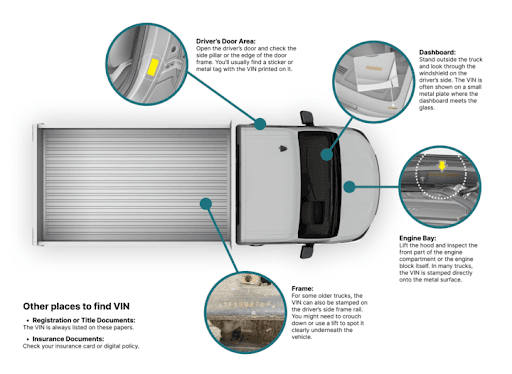
On a Peterbilt, the VIN is usually not hidden, but it can still take a minute to spot, especially on older trucks or trucks that have seen a lot of work.
- Dashboard/windshield area: Often visible from outside near the lower windshield area on the driver’s side.
- Driver-side door jamb or door frame: Look for a VIN label/plate around the door opening area.
- VIN plate (cab or body plate): Some vehicles use a VIN plate or tag as the main display point.
- Vehicle paperwork: Title, registration, and insurance documents usually show the VIN.
- Other stamped locations (varies by build): Some VINs can also be stamped on metal, depending on the vehicle and manufacturer practices.
Need To See More? Get the Full Peterbilt Vehicle History Report
A Peterbilt VIN number is not just for paperwork. It can tell you what the truck should be on paper, and sometimes what it has been through in real life. Instant VIN Reports is built for quick decoding and history-style checks in one place.
Vehicle Specifications
Peterbilt trucks have been equipped with Caterpillar, Cummins, and PACCAR MX engines depending on model year and configuration. This specifications help you confirm what the truck is supposed to be from the factory side.
Theft Records
Theft records show whether the Peterbilt was ever reported stolen and whether it was later recovered, when that information is available through the VIN trail. This is critical in the commercial trucking world, where a stolen unit can create legal and financial complications for a buyer.
Warranty Status
Warranty status outlines whether any factory or extended coverage may still apply and what the timeline looks like. With a Peterbilt, warranty coverage can significantly affect operating costs, especially when major components like the engine or drivetrain are involved.
Market Value
Market value helps you compare the asking price to broader market data. A Peterbilt’s price can vary based on condition, mileage, specifications, and demand. This section provides a reference point so you can judge whether the listing price is fair, inflated, or unusually low.
Service & Maintenance Records
Service history shows recorded maintenance patterns such as scheduled servicing, inspections, and major repairs. Gaps in records may suggest undocumented maintenance or possible neglect. For buyers and fleet managers, this helps evaluate reliability and plan future upkeep.
Vehicle Usage Record
Usage records provide insight into how the Peterbilt was operated over time. Was it used for long-haul transport, regional routes, heavy-duty hauling, or fleet service? Different usage patterns affect wear and overall condition.
Ownership History
Ownership history shows how many operators or companies previously owned the Peterbilt. A steady ownership record can feel more reliable than a truck that frequently changes hands. In commercial vehicles, rapid turnover may sometimes indicate operational or mechanical concerns.
Auction History
Auction history indicates whether the Peterbilt passed through auction channels, along with recorded dates when available. This can help buyers identify quick resale patterns or “flip” activity in the truck’s history.
Sales History
Sales history reflects when the Peterbilt was listed, sold, or transferred, if that information appears in recorded data. Frequent re-listings may suggest pricing adjustments, changing business needs, or unresolved mechanical or financial issues.
Mileage History
Mileage history allows you to review consistency in recorded odometer readings over time. Instead of relying on a single dashboard photo, you can assess whether Peterbilt’s mileage progression appears logical and uninterrupted.
Accident Records
Accident records show reported incidents linked to the VIN. Even when repairs are completed, accident history can influence resale value, insurance costs, and long-term durability expectations for a commercial truck.
Title Brand Records
Title brand records highlight any major red flags in the truck’s title history. These may include salvage, rebuilt, junk, flood, or other branded designations. For a Peterbilt, a branded title can significantly affect resale value, financing eligibility, and insurance coverage.
Free Peterbilt VIN Decoder vs Vehicle History Report
Confirm the truck’s basic details tailored to the VIN for free, and upgrade to the paid history, and verify the truck’s mileage, ownership history, title check, lien/loan records, theft records, and more. See the list below to see the difference:
Feature | Free VIN Decoder | History Report (Paid) |
|---|---|---|
VIN decoding for all vehicle types | ||
Year, make, model, trim | ||
Full vehicle specifications / detailed car specs | ||
Market value snapshot | ||
Sales listings (current/online ads) | ||
Sales history (timeline of past listings/sales) | ||
Auction records (when available) | ||
Auction history with photos | ||
Mileage during auction/sales (when available) | ||
Odometer rollback checks | ||
Ownership history | ||
Vehicle usage type (personal, fleet, rental, commercial) | ||
Title brand records (salvage, rebuilt, flood, lemon, etc.) | ||
Lien & loan records | ||
Accident & damage history | ||
Theft / stolen records | ||
Flood/hail/fire damage checks | ||
Service/repair records | ||
Warranty status & coverage | ||
Recall information |
How Michael Used a Peterbilt VIN Decoder Before Buying
Michael was looking for a used Peterbilt 388 to expand his owner-operator business. While browsing online truck listings. Before contacting the seller, he entered the VIN into the free Instant VIN Reports Peterbilt VIN Decoder to verify the truck's factory specifications.
VIN: 1XPWDB9XX8D761972
Initial Impression
- Found a competitively priced 2008 Peterbilt 388 listed online.
- The seller described it as a dependable long-haul truck with its original specifications.
- Claimed it had been well maintained and ready for work.
- Used the free VIN Decoder before calling the seller.
Critical Findings
- The free VIN Decoder confirmed it was a 2008 Peterbilt 388 with a Caterpillar diesel engine and 6×4 tractor configuration, matching the truck's original factory build.
- After upgrading to the full Vehicle History Report, Michael discovered the truck had a salvage title, four previous owners, two reported accidents, damage records, auction history, and nearly 799,000 recorded miles, that was the details that weren't fully disclosed in the listing.
Outcome
The free VIN Decoder helped Michael verify the truck's factory configuration before contacting the seller. The report helped Michael negotiate a lower purchase price after discovering the truck's salvage title and extensive operating history.
Why 1 Million+ Drivers Choose Instant VIN Reports
Whether you're buying your first Peterbilt, expanding a fleet, or restoring a classic rig, Instant VIN Reports helps you verify factory specifications and uncover critical truck history before investing.
Decode Modern & Classic Peterbilt VINs
Decode modern 17-character Peterbilt VINs and eligible classic chassis numbers from 5 to 14 characters using one convenient platform.
Verify Original Truck Specifications
Confirm the original engine, axle configuration, cab type, wheelbase, drivetrain, and factory build before purchasing, repairing, or registering a Peterbilt.
24/7 Customer Support
Need help understanding a Peterbilt VIN or your report? Our support team is available whenever you need assistance.
Downloadable PDF Reports
Save your Peterbilt Vehicle History Report as a PDF for financing, fleet records, insurance documentation, or future maintenance.
Who Should Use a Peterbilt VIN Decoder?
Our Peterbilt VIN Decoder is valuable for anyone buying, selling, operating, or maintaining a commercial truck. Whether it's a long-haul tractor, vocational truck, or classic Peterbilt, decoding the VIN helps verify the truck before making important business decisions.
Owner-Operators
Verify the original engine, drivetrain, sleeper configuration, and factory specifications before purchasing a used truck or planning major repairs.
Fleet Managers
Confirm truck specifications, ownership records, and vehicle history before adding equipment to your fleet or replacing existing units.
Truck Dealers
Quickly verify inventory, identify factory configurations, and create accurate listings for used Peterbilt trucks.
Sellers
Build buyer confidence by verifying the truck's original specifications and ensuring your listing accurately reflects its factory configuration.
Heavy Equipment Buyers
Confirm axle configuration, GVWR, engine family, and intended application before investing in a used vocational or highway truck.
Classic Peterbilt Owners & Restorers
Decode eligible pre-1981 Peterbilt chassis numbers to identify original production details and factory specifications before beginning a restoration.
Supported Peterbilt Models
Our Peterbilt VIN Decoder supports nearly every modern Peterbilt truck, along with many classic models built before 1981.
| Model 379 | Model 389 | Model 579 | Model 567 | Model 589 |
| Model 520 | Model 220 | Model 330 | Model 335 | Model 337 |
| Model 348 | Model 357 | Model 365 | Model 367 | Model 520 |
| Model 536 | Model 537 | Model 548 | Model 567 | Model 579EV |
| Model 281 | Model 351 | Model 352 | Model 353 | Model 359 |
| Model 362 | Model 372 | Model 377 | Model 378 |
Frequently Asked Questions about Peterbilt VIN Decoding
How do I decode my Peterbilt truck VIN for free?
To decode your Peterbilt truck VIN for free, simply enter the VIN into the decoder to get the truck’s basic specifications and identity in just a few seconds.
Where is the VIN located on a Peterbilt heavy-duty truck?
On most Peterbilt heavy-duty trucks, you’ll usually find the VIN on an identification plate or label and also on official documents like registration and title. If you’re physically inspecting a truck, check common spots first, then verify it matches the paperwork.
That simple matching step matters more than people think, especially when you’re buying used. If you just want to run a Peterbilt vin lookup fast, Instant VIN Reports works once you have the VIN copied correctly.
What information can I get from a Peterbilt VIN decoder?
A Peterbilt VIN decoder pulls out the key vehicle specifications embedded in the 17-character VIN, like the truck’s model, engine, and build year. A full vehicle history report provides access to available title, accident, ownership, mileage, auction, and theft records.
If you’re comparing multiple trucks, a decoder helps you stop guessing and start confirming. Instant VIN Reports is built to keep that flow simple.
How do I find my Peterbilt's engine specifications using the VIN?
To find the Peterbilt’s engine specifications using the VIN, you can run a Peterbilt VIN number lookup through a decoder that interprets the VIN’s descriptor section and links it to available spec data.
It won’t replace opening the hood or reading an engine tag, but it’s a solid first check, especially when the listing description feels vague. Start by running the VIN through Instant VIN Reports, then compare the decoded results with the truck’s physical components and paperwork for confirmation.
What do the digits in a Peterbilt VIN mean for heavy trucks?
For heavy trucks, the digits follow the same overall VIN structure:
- The first part identifies the manufacturer,
- The middle describes the vehicle, and
- The last part identifies the individual unit with year/plant/serial details.
That structure is based on the standardized 17-character VIN system used for vehicles sold in the U.S. Since it’s coded, the easiest way to understand what each position means is to use a VIN decoder rather than trying to “eyeball” it. Instant VIN Reports can decode the full Peterbilt VIN breakdown in seconds, so you don’t need to do the heavy lifting.
How do I check Peterbilt recalls by VIN?
To check recalls by VIN, you can use the U.S. government’s recall lookup tool, which lets you search using the VIN and see whether safety recalls are open. This is one of those checks that’s worth doing even if the truck seems perfect, because recalls can be missed for years. Many owners run the Instant VIN Reports to round it out with not only recall but also the truck’s specs and history sections, all in one place.
How can I tell what transmission my Peterbilt has from the VIN?
Yes. you can start with the VIN, but it’s not always a complete answer. To get a clearer picture, decode the VIN first (to confirm you’re dealing with the correct truck configuration), then cross-reference with the build tag, service records, or inspection reports.
Instant VIN Reports offers a helpful tool for this; just use the Peterbilt window sticker tool to access factory build details and get comprehensive information about the vehicle’s transmission and other specifications.
Can I decode an older Peterbilt VIN from before the standardized 17-digit system?
Yes, you can decode an older Peterbilt VIN from before the standardized 17-digit system. Although the standardized 17-character VIN format became required for vehicles sold in the U.S. starting with the 1981 model year, older Peterbilt trucks may have shorter VINs or older formats. That doesn’t mean they’re “wrong,” it just means you need a decoder that supports classic VIN formats too. Instant VIN Reports can help decode Peterbilt VINs, including classic trucks with fewer than 17 characters.