
Free Kenworth VIN Decoder: Check Any Kenworth Trucks VIN
Use our free Kenworth VIN Decoder to identify your truck’s model year, engine, body type, and factory details in seconds. Upgrade anytime to access title records, mileage history, accidents, and ownership data.
What is a Kenworth VIN Decoder?
A Kenworth VIN decoder is the tool that translates the 17-digit VIN number into a complete, readable spec sheet and history report. It translates the VIN into readable information about how the Kenworth was originally configured, including key specifications and identifiers, based on available manufacturer and industry data.
You need to know the true specifications before you consider a purchase, because that determines everything from the maintenance schedule to the spare parts you might need. Don’t skip this step.
Why Kenworth VIN Decoding Matters Before Buying a Car
Checking the VIN is crucial when considering a used Kenworth, as it provides essential information about the truck. Here’s why:
Verify the Original Truck Configuration
Confirm the original cab type, sleeper configuration, wheelbase, axle setup, and intended application before purchasing.
Confirm the Engine
Verify whether the truck was originally equipped with a PACCAR MX engine, Cummins engine, or another approved powertrain.
Check Drivetrain & Axle Configuration
Heavy-duty trucks often vary by axle layout and drivetrain. A VIN lookup helps confirm configurations such as 4×2, 6×2, or 6×4.
Verify Vocational Applications
Many Kenworth trucks are built for specialized industries, including long-haul transportation, logging, construction, refuse collection, and heavy hauling.
What Information Does a Kenworth VIN Decoder Show?
Every Kenworth VIN contains production information recorded during manufacturing. See what information you will gain when you decode the Kenworth VIN with our tools.
Manufacturer
Confirm the truck was originally built by Kenworth.
Vehicle Origin
Verify what country Kenwory comes from.
Kenworth's Model Type & Year
Identify the original truck model and series.
Engine Specifications
Verify the original diesel engine installed at the factory.
Transmission Setup
View the original transmission type and axle configuration.
Body Style
Verify the original cab style, sleeper, tractor, or vocational body.
Trims
Check the available trims of Kenworth trucks.
MSRP & Market Value
Compare original specifications with today's estimated market value before purchasing.
How to Use the Kenworth VIN decoder
To use the Kenworth VIN decoder on Instant VIN Reports, you first need the VIN itself. After that, it’s just three simple steps.
Enter the VIN
Type in the full Kenworth VIN number exactly as it appears. On many Kenworth vehicles, the VIN is stamped on a plate at the base of the windshield on the driver’s side, and also printed on a label on the driver’s door pillar, and on your paperwork.
Fill Out the Form
Click the Decode VIN button to begin the search. Our system will decode the VIN and retrieve available factory information associated with that vehicle.
Check the Vehicle Specs
Within seconds, you'll receive a free summary showing key vehicle specifications such as year, model, trim, engine, and drivetrain. If you want the full Kenworth vehicle history report, you can upgrade to see accidents, mileage history, and more.
How To Read a 17-Digit Kenworth VIN Number
Understanding the Kenworth VIN structure doesn’t require a degree in engineering. Here’s how you read it
Kenworth VIN Positions Explained For: 1XKYDP9X8LJ341097
WMI (World Manufacturer Identifier)
Position 1 (1)
For this VIN, 1 indicates the United States.
Position 2 & 3 (XK)
These characters identify Kenworth Truck Company as the manufacturer.
VDS (Vehicle Descriptor Section)
Positions 4 to 8 (YDP9X)
Position 9 (8)
Check digit.
VIS (Vehicle Identifier Section)
Position 10 (L)
Model Year: 2020
Position 11 (J)
Assembly plant
Positions 12 to 17 ( )
Sequential production number
How to Decode a Classic Kenworth VIN (Pre-1981)
Kenworth trucks built before 1981 did not use the standardized 17-character VIN adopted across the automotive industry. Instead, they used manufacturer-specific serial or chassis numbers, with formats varying by production year, model, and intended application.
These identification numbers can help verify classic Kenworth trucks such as the W900, K100, Needlenose, and other historic models, but they don't follow the same structure as modern VINs.
Instant VIN Reports can decode eligible classic Kenworth chassis numbers from 5 to 14 characters, alongside modern 17-character VINs, helping identify available factory specifications for both vintage and contemporary Kenworth trucks.
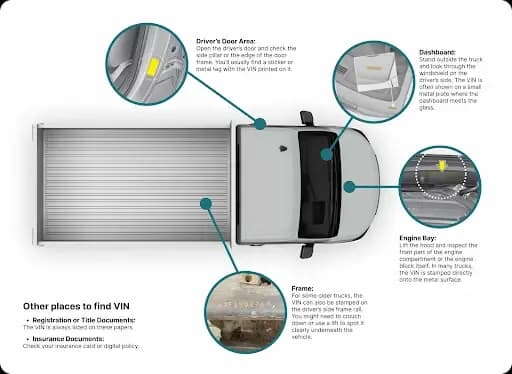
Where to Find the VIN on a Kenworth?
To find the Kenworth VIN, you can look it up in several places:
- Driver’s Side Dashboard: Look through the windshield, close to where the dashboard meets the glass on the driver’s side.
- Frame Rail (Engine Bay): Many heavy trucks, including Kenworth, have the VIN stamped into the actual steel frame rail, usually in the engine compartment or sometimes near the front axle.
- Federal Safety Certification Label: This label, usually located on the inside edge of the driver’s door or door jamb, will list the VIN along with the GVWR and other critical safety information.
- Documents: The VIN will be listed on the vehicle’s title, registration, and insurance cards. Again, these are for reference, not final verification. Always compare them against the physical stamps on the truck.
Need To See More? Upgrade to the Full Kenworth Vehicle History Report
The VIN acts as the foundation for identifying a Kenworth truck. When combined with a vehicle history report, it helps uncover recorded events like title brands, accidents, theft records, and mileage data, where available.
Vehicle Specifications
This section is all about what Kenworth originally built. It takes the first 11 digits of the VIN and tells you the factory details like the model, for example, a T680 or T880 model, the cab type, the number of axles, the engine code, and the original transmission type.
Auction History
If a Kenworth was sold at a major auction, especially one specializing in damaged or salvaged vehicles, the report will often show details and sometimes even pictures from the auction block. This provides a great look at the truck’s condition just before it was repaired or resold.
Sales History
The sales history section reveals the recorded purchase details of the Kenworth truck online listing, showing when and where it was bought or sold. This adds an additional layer of confidence to your purchase.
Service & Maintenance Records
Regular maintenance, like oil changes, brake service, and major component checks, shows that the owner took good care of the Kenworth. We look for gaps in the service records, which can signal neglect. A truck with a long, consistent history of service is almost always a better bet.
Theft Records
No one wants to buy a stolen truck. This section quickly checks national databases to see if the Kenworth has been reported as stolen and not recovered. It’s a simple check, but it offers huge peace of mind and keeps you out of serious legal trouble.
Recalls Check
Safety is key, especially in a big truck. This section pulls data from sources like the National Highway Traffic Safety Administration (NHTSA) to see if your Kenworth has any open, uncompleted safety recalls. Common Kenworth recalls might involve issues like steering gears or brake systems. If there’s an open recall, the manufacturer (PACCAR) is required to fix it for free.
Title Brand Records
This is a big one. Title brands are like warning labels stamped on a truck’s title. We check for brands like Salvage, Rebuilt, Junk, or Flood. A clean title is what you want, but a title brand dramatically lowers the value and can indicate severe structural damage. We’ve always said a quick VIN run saves headaches down the road.
Accident Records
Accident reports are crucial in understanding the condition of the truck. The Kenworth VIN decoder will show if the vehicle has been involved in any accidents, providing important details like the date, location, and severity of the incident.
Damage History
The damage history section tells you if the truck has sustained damage from fire, flood, or hail. This ensures that you’re fully aware of any structural issues or repairs that might be needed in the future.
Mileage History
Knowing the mileage history through the VIN can help you spot any discrepancies in the truck’s odometer readings. It’s an essential factor when buying a used Kenworth, as you want to avoid trucks that may have undergone odometer tampering.
Free Kenworth VIN Decoder vs Vehicle History Report
The Free VIN decoder will provide you with the vehicle specifications, including engine type, model year, and more. However, for detailed historical data, like accident records, market value insights, and service histories, you can upgrade to the Paid VIN Decoder.
See the details below:
Feature | Free VIN Decoder | History Report (Paid) |
|---|---|---|
VIN decoding for all vehicle types | ||
Year, make, model, trim | ||
Full vehicle specifications / detailed car specs | ||
Market value snapshot | ||
Sales listings (current/online ads) | ||
Sales history (timeline of past listings/sales) | ||
Auction records (when available) | ||
Auction history with photos | ||
Mileage during auction/sales (when available) | ||
Odometer rollback checks | ||
Ownership history | ||
Vehicle usage type (personal, fleet, rental, commercial) | ||
Title brand records (salvage, rebuilt, flood, lemon, etc.) | ||
Lien & loan records | ||
Accident & damage history | ||
Theft / stolen records | ||
Flood/hail/fire damage checks | ||
Service/repair records | ||
Warranty status & coverage | ||
Recall information |
How Mike Avoided Buying the Wrong Fleet Truck
Mike, an owner-operator looking to expand his small trucking business, found a 2020 Kenworth T680 advertised online as a one-owner truck with low mileage and a clean history. Before contacting the seller, he entered the VIN into the free Instant VIN Reports Kenworth VIN Decoder.
VIN: 1FA6P8JZ1G5525556
Initial Impression
- Found a competitively priced Kenworth T680 listed online.
- The seller advertised low mileage and excellent fleet maintenance.
- Wanted to verify the truck's original specifications before arranging an inspection.
- Used the free VIN Decoder first.
Critical Findings
- The free VIN Decoder confirmed the truck was originally built as a 2020 Kenworth T680 with a PACCAR MX-13 diesel engine, 6×4 drivetrain, and truck tractor configuration, matching the factory build.
- After upgrading to the full Vehicle History Report, Mike discovered three reported accidents, damage records, auction history, multiple lien records, two previous owners, and over 635,000 recorded miles, which differed significantly from the seller's description.
Outcome
The free VIN Decoder confirmed the truck's factory configuration, while the Vehicle History Report uncovered commercial-use records that helped Mike negotiate a better price and avoid purchasing a truck with a more demanding service history than advertised.
Why 1 Million+ Drivers Choose Instant VIN Reports
Whether you're buying a single truck or managing an entire fleet, Instant VIN Reports helps you verify factory specifications and uncover important commercial vehicle history before making a purchase. From owner-operators to fleet managers, millions of drivers rely on our reports to make more informed decisions.
High Accuracy, Cross-Checked Results
Vehicle information is compiled and cross-referenced from multiple trusted sources to help verify specifications and historical records with greater confidence.
Unlimited Free VIN Decoding
Run unlimited free Kenworth VIN lookups to verify factory specifications before deciding whether you need the complete Vehicle History Report.
No Hidden Fees or Subscriptions
Purchase only the reports you need. There are no recurring subscriptions, automatic renewals, or unexpected charges.
24/7 Customer Support
Our support team is available whenever you need assistance understanding your VIN results, truck history report, or purchase.
Who Should Use a Kenworth VIN Decoder?
A Kenworth VIN Decoder helps buyers, owner-operators, fleet managers, dealerships, mechanics, and commercial truck businesses verify factory specifications before making important decisions.
Owner-Operators
Verify the original engine, sleeper configuration, axle setup, and factory specifications before investing in your next work truck.
Fleet Managers
Confirm truck specifications and review ownership history before expanding your fleet or replacing existing equipment.
Used Truck Buyers
Compare factory specifications with the seller's listing to verify the truck matches its advertised configuration before purchasing.
Truck Dealers
Provide verified factory specifications and vehicle history to increase buyer confidence and improve listing accuracy.
Repair Shops & Mechanics
Identify the correct engine, transmission, drivetrain, and factory configuration before ordering replacement parts or performing major repairs.
Heavy Equipment & Construction Companies
Verify vocational truck specifications before purchasing trucks for construction, heavy hauling, logging, refuse collection, oilfield operations, or other demanding commercial applications.
Supported Kenworth Models
Our Kenworth VIN Decoder supports virtually every modern and classic Kenworth truck, helping owner-operators, fleets, and dealerships verify factory specifications before purchasing or maintaining commercial vehicles.
| T680 | T680E | T660 | T600 | W900L |
| W900B | W990 | T880 | T800 | T480 |
| T370 | T270 | K100 | K300 | K270 |
| K370 | T180 | T280 | T380 | W900A |
| W900S | Needlenose | C500 | LW900 |
Frequently Asked Questions about Kenworth VIN Decoding
How do I decode my Kenworth truck VIN for free?
To decode the Kenworth truck VIN for free, you can use a free Kenworth VIN decoder like the one on Instant VIN Reports. You type the VIN, submit it, and you’ll get basic key identification details for free. If you want deeper stuff (e.g., title brands, theft, liens, mileage signals), that’s typically in a full vehicle history report.
Where is the VIN located on a Kenworth heavy-duty truck?
On many Kenworth heavy-duty trucks, the VIN shows up on certification labels around the driver’s door area, like the door frame or door edge. Kenworth body builder documents mention certification labels in that spot, especially for incomplete vehicle certification labeling.
The VIN also appears on paperwork like registration and title, which is sometimes the cleanest place to read it.
How do I find my Kenworth's engine specifications using the VIN?
To find the Kenworth’s engine specifications using the VIN, see the VIN’s middle section (often called the descriptor part), which is where manufacturers encode vehicle attributes, and the results you see depend on what data is available.
A practical way is to run the Kenworth VIN lookup through Instant VIN Reports first, then compare the results with the truck’s door labels and build documentation. If you’re hunting parts, this step saves you from ordering the wrong thing.
Can I get Kenworth truck build details from the VIN?
Yes, you can get build-related identification details from the VIN, with Instant VIN Report VIN decoder tools. Just type the VIN into the form above, and you will see the basic build details. You can use the Kenworth window sticker by Instant VIN Report to see the detailed factory build of the Kenworth.
What do the digits in a Kenworth VIN mean for heavy trucks?
A modern VIN is standardized as 17 characters, and one important detail is the check digit in position 9, which helps validate that the VIN is mathematically “real” and not a random typo.
Beyond that, what each position means can vary by manufacturer, because the manufacturer defines many of the encoded attributes. That’s why a Kenworth truck VIN decoder is useful. It turns those characters into normal words people can actually read.
Can I decode an older Kenworth VIN from before the standardized 17-digit system?
Yes, but older VIN formats can be tricky because the modern U.S. VIN standard is built around 17 characters.
That’s why it helps to use a decoder that supports older formats, not one that just throws an error. Instant VIN Reports can help decode many classic/older VINs, too, which is useful if you’re restoring, registering, or verifying an older Kenworth with a shorter VIN.
How many digits are in a semi truck VIN?
For modern on-road vehicles sold under U.S. rules, the VIN is 17 characters. Older trucks (especially pre-standardization) may have shorter VINs or different numbering formats (often 5 to 14 digits), which is why people get confused when they compare a 1970s or older unit to a newer Kenworth.
What does the 8th digit of a VIN mean?
The 8th character sits in the “vehicle description” area of the VIN, which is commonly used to describe vehicle attributes (the exact meaning depends on the manufacturer’s coding).
So, for a Kenworth heavy truck VIN decoder, the 8th digit might relate to configuration details in Kenworth’s coding system, but you usually need a decoder tool to translate it into plain language.