
Free Hyundai VIN Decoder: Check Any Hyundai Now
Use our free Hyundai VIN Decoder to identify your car's model year, engine, body type, and factory details in seconds. Upgrade anytime to access title records, mileage history, accidents, and ownership data.
What is a Hyundai VIN Decoder?
A Hyundai VIN decoder breaks down the VIN into important information. Those letters and numbers show the car’s specifications, build year, engine family, transmission, and more. It’s the quickest way to confirm a Hyundai’s identity.
And if you’re dealing with older or classic Hyundai models that have fewer than the 17-digit standard, our tools can read those pre-1981 formats. It’s handy whether you’re a buyer, seller, or someone who just wants to learn more about your vehicle. Instant VIN Reports make the whole process easy.
Why Decode a Hyundai VIN?
Decoding a Hyundai VIN before buying prevents vehicle cloning and verifies the car's exact identity. Here are other reasons why you need to decode a Hyundai VIN.
Verify the Original Trim
Hyundai offers numerous trims, including SE, SEL, N Line, Limited, Calligraphy, XRT, and N, that can look alike but include very different equipment. Our VIN lookup confirms the original trim level.
Confirm the Original Powertrain
Many Hyundai models are available with multiple engines and electrified options. Decoding the VIN verifies whether the vehicle left the factory with a gasoline, hybrid, plug-in hybrid, electric, or hydrogen powertrain.
Verify Advanced Technology Packages
Features such as Hyundai SmartSense®, panoramic displays, premium Hyundaio, digital keys, and Highway Driving Assist often depend on the original trim. A VIN lookup helps confirm the factory equipment.
Compare Factory Data with the Listing
Used vehicle listings don't always reflect the original specifications. A free VIN Decoder helps you identify discrepancies before contacting the seller.
What Information Does a Hyundai VIN Decoder Show?
See what you’ll see when decoding the Hyundai VIN into our free VIN decoder:
Manufacturer
Confirm the vehicle was originally manufactured by Hyundai.
Model
Identify the exact Hyundai model before comparing listings.
Trim Level
Verify the original trim package and available factory equipment.
Engine & Powertrain
Confirm the original engine, hybrid system, EV battery, or fuel-cell configuration.
Model Year
Verify the production year before researching values or compatible parts.
Transmission & Drivetrain
View the original transmission type and whether the vehicle was built with FWD, AWD, or RWD.
Factory Specifications
Review body style, manufacturing details, seating capacity, and original production information.
MSRP & Estimated Market Value
Compare the original MSRP with today's estimated market value before negotiating.
How to Use the Hyundai VIN decoder
To run the Hyundai VIN decoder is easy. See the following steps below:
Enter the VIN
Locate your Hyundai VIN and enter the 17-character VIN into the lookup tool. We can also decode classic Hyundai chassis numbers that others can’t.
Fill Out the Form
Click Decode VIN to retrieve factory specifications in seconds.
Check the Vehicle Specs
Check the engine, drivetrain, trim, model year, body style, and production information. Upgrade anytime to unlock the complete vehicle history report.
How To Read a 17-Digit Hyundai VIN Number
At first glance, a Hyundai VIN looks like a jumble of characters. But it actually follows a clear pattern that’s used across the car industry. Since 1981, most vehicles have used a 17-character VIN that is divided into three main parts: the WMI, VDS, and VIS. Each section tells you something different about the vehicle. Here are the details of each section:
Hyundai VIN Positions Explained For: KMHHU6KJ1FU121939
WMI (World Manufacturer Identifier)
Position 1 (K)
For this VIN, K indicates South Korea.
Position 2 & 3 (MH)
These characters identify Hyundai Motor Company as the original manufacturer.
VDS (Vehicle Descriptor Section)
Positions 4 to 8 (HU6KJ)
Position 9 (1)
Check digit
VIS (Vehicle Identifier Section)
Position 10 (F)
Model Year: 2015
Position 11 (U)
Assembly plant
Positions 12 to 17 (121939)
Sequential production number
How to Decode a Classic Hyundai VIN (Pre-1981)
Hyundai vehicles built before 1981 did not use today's standardized 17-character VIN system. Instead, they used manufacturer-specific chassis or serial numbers, typically ranging from 5 to 13 characters, depending on the model, production year, and market.
Unlike modern VINs, these early identifiers do not follow a universal structure, so decoding them often requires manufacturer records and historical references to verify production details and vehicle specifications.
Instant VIN Reports can also decode many classic chassis numbers from 5 to 14 characters, including Hyundai, helping identify available factory information for early Hyundai models alongside modern 17-character VINs.
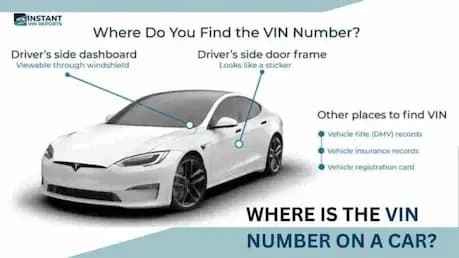
Where to Find the VIN on a Hyundai?
Before you decode the Hyundai VIN, you can find the Hyundai VIN in some places. Here are the main places to look:
- Driver’s side dashboard: Stand outside the car and look through the windshield at the base of the glass on the driver’s side.
- Driver’s door jamb/door frame: Open the driver’s door and check the pillar or frame area.
- Under the hood: On some Hyundai models, especially older ones, the VIN may also be stamped or printed in the engine bay, such as the firewall, radiator support, or near the front of the engine compartment.
- Front frame or inner fender: For classic or early Hyundai models, you may find the number on the front frame rail, slam panel, or inner fender area.
- Vehicle documents: If the car isn’t nearby, you can still find the VIN on the registration, title, insurance papers, and many service or inspection records.
Need To See More? Get the Full Hyundai Vehicle History Report
A free Hyundai VIN Decoder confirms how the vehicle left the factory, but it doesn't reveal what happened throughout its life. The premium Vehicle History Report reveals details that could dramatically influence a buying decision.
Below are the key sections you’ll see on our full Hyundai VIN report:
Vehicle Specifications
This is the identity section of the Hyundai. The vehicle specifications section shows the year, make, model, trim, body style, engine, transmission, drivetrain, and other build details. For a used Hyundai like the Hyundai Tucson, Sonata, or Elantra, this tells you exactly how the car left the factory, not just what the seller remembers.
Service & Maintenance Records
The service & maintenance records section lists the available data of the oil changes, brake jobs, tire services, and other repairs or checks. For a Hyundai that’s a few years old, this helps you see if basic maintenance was done on time or skipped. A long, steady line of maintenance entries usually hints at a careful owner.
Theft Records
This section checks for theft records linked to the Hyundai VIN. If the car was ever reported stolen and later recovered, the report can show when and where that happened. For buyers, it’s an extra layer of protection. For owners, it explains odd notes in the paperwork and keeps you from stepping into legal trouble without realizing it.
Title Brand Records
The title brand records section shows you the Hyundai’s title records, such as salvage, rebuilt, flood, junk, or lemon. These brands can affect value, insurability, and safety. If a Hyundai carries a flood or salvage title, you’ll want to know before you put it in your driveway or try to resell it later.
Accident Records
Accidents are not always a dealbreaker, but you deserve to know. The accident records section collects reported events from trusted databases where available. It shows whether a Hyundai has been involved in minor fender benders or major crashes that could affect safety and resale value.
Damage History
Accident records tell you that something happened; the damage history section helps you understand what kind of damage. This can include structural damage, flood/water damage, hail damage, fire damage, and other serious issues when they have been reported.
Recalls Check
Hyundai, like other manufacturers, issues safety recalls when they discover issues that need to be fixed. The recalls check uses the VIN to see if any recall entries are tied to that vehicle and whether they appear open or already addressed. This helps you plan a visit to a Hyundai dealer and makes sure you’re not driving around with an unresolved safety problem.
Auction & Sales History
If the Hyundai ever passed through an auction or an online listing, the report shows you when and where it appeared, and includes condition notes and mileage at the time. Many reports also show up to 10 available auction photos. This lets you compare how the car looked then versus now, which is especially helpful for higher-end or heavily modified Hyundai models.
Lien / Loan Check
The lien/loan check section of your Hyundai VIN lookup tells you whether the vehicle might still have an unpaid loan attached. This is crucial because if you buy a Hyundai with an active lien and the previous owner disappears, the lender can still come after the car.
Mileage History
Odometer tampering still happens, sadly. The mileage history part of a Hyundai vehicle history report shows recorded mileage readings from inspections, registrations, auctions, or service entries when available. If the miles suddenly go backward or look suspicious, that’s a red flag.
Free Hyundai VIN Decoder vs Vehicle History Report
A lot of people like to “try before they buy,” and that’s fair. Our Hyundai VIN decoder can decode the VIN for you for free. If you need deeper records, you can upgrade to the paid reports. Here’s how they compare:
Feature | Free VIN Decoder | History Report (Paid) |
|---|---|---|
VIN decoding for all vehicle types | ||
Year, make, model, trim | ||
Full vehicle specifications / detailed car specs | ||
Market value snapshot | ||
Sales listings (current/online ads) | ||
Sales history (timeline of past listings/sales) | ||
Auction records (when available) | ||
Auction history with photos | ||
Mileage during auction/sales (when available) | ||
Odometer rollback checks | ||
Ownership history | ||
Vehicle usage type (personal, fleet, rental, commercial) | ||
Title brand records (salvage, rebuilt, flood, lemon, etc.) | ||
Lien & loan records | ||
Accident & damage history | ||
Theft / stolen records | ||
Flood/hail/fire damage checks | ||
Service/repair records | ||
Warranty status & coverage | ||
Recall information |
How Rachel Verified a Hyundai Before Buying
Rachel was shopping for a Hyundai Tucson Hybrid to replace her aging SUV. She found a listing that advertised the vehicle as a Limited AWD Hybrid with premium technology and a clean history. Here’s what she does before contacting the seller.
VIN: KMHHU6KJ1FU121939
Initial Impression
- Found a well-priced Hyundai listed online.
- The seller advertised premium trim and advanced features.
- Wanted to confirm the vehicle's original factory configuration before arranging a test drive.
- Used the free Instant VIN Reports Hyundai VIN Decoder.
What She Found
- The free VIN Decoder verified the vehicle's original factory specifications, allowing Rachel to compare the listing with official production data before moving forward.
- After upgrading to the full Vehicle History Report, she uncovered a salvage title, fire damage, one reported accident, insurance loss, auction history, multiple lien records, and an extensive service history that weren't fully disclosed in the listing.
Outcome
The free VIN Decoder helped Rachel verify the vehicle before investing more time. The premium Vehicle History Report revealed important history that influenced her decision, allowing her to continue shopping with greater confidence.
Why 1 Million+ Drivers Choose Instant VIN Reports
Whether you're shopping for a dependable daily driver, Hyundai's latest electric vehicle, or an N performance model, Instant VIN Reports helps you verify factory specifications and uncover important vehicle history before you buy.
Daily Data Updates
Results in Seconds
Instantly decode your Hyundai VIN, then upgrade anytime to access a comprehensive vehicle history report.
24/7 Customer Support
Our support team is available to help you understand your VIN results or answer questions about your Vehicle History Report.
Downloadable PDF Reports
Save or print your report for insurance, financing, dealership negotiations, maintenance records, or future resale.
Who Should Use a Hyundai VIN Decoder?
Whether you are buying, selling, restoring, or managing a lot full of Hyundai vehicles, decoding the VIN brings structure and calm to the whole process.
Used Car Buyers
Confirm the original trim, engine, drivetrain, and factory equipment before purchasing a used Hyundai.
Hyundai Owners
Verify factory specifications before ordering parts, scheduling repairs, or checking compatibility with accessories.
Hybrid & EV Buyers
Confirm whether a Hyundai was originally built as a hybrid, plug-in hybrid, battery-electric, or hydrogen fuel-cell vehicle.
N Performance Enthusiasts
Verify genuine Hyundai N and N Line models before buying a performance-oriented vehicle or paying a premium price.
Dealers & Sellers
Provide verified factory specifications to create more accurate listings and give buyers greater confidence.
Families Comparing SUVs
Verify the original configuration of models like the Tucson, Santa Fe, Palisade, Kona, and Venue, including drivetrain, seating configuration, and factory equipment, before making a long-term purchase.
Supported Hyundai Models
Our Hyundai VIN Decoder supports virtually every modern Hyundai vehicle, from compact sedans to performance cars, hybrid SUVs, and all-electric models.
| Accent | Elantra | Sonata | Azera | XG300 |
| XG350 | Venue | Kona | Tucson | Santa Cruz |
| Santa Fe | Palisade | NEXO | IONIQ Hybrid | IONIQ Plug-in Hybrid |
| IONIQ Electric | IONIQ 5 | IONIQ 6 | Kona Electric | Tucson Hybrid |
| Tucson Plug-in Hybrid | Santa Fe Hybrid | Santa Fe Plug-in Hybrid | Elantra N | Kona N |
| IONIQ 5 N | Elantra N Line | Sonata N Line | Veloster | Veloster Turbo |
| Genesis Coupe | Tiburon | Pony | Pony Coupe | Stellar |
| Excel | Scoupe |
Frequently Asked Questions about Hyundai VIN Decoding
How to decode a Hyundai VIN number?
To decode a Hyundai VIN, locate the 17-character number on the car or documents and enter it into a Hyundai VIN decoder like Instant VIN Reports. Our system reads the WMI, VDS, and VIS segments of the VIN, validates the check digit, and then turns that into clear reports with specs and a history record.
Is a Hyundai VIN lookup really free?
Yes, our Hyundai VIN lookup is free at Instant VIN Reports. You can see the car year, make, model, trim, and core specifications at no cost. If you want the complete vehicle history with all the deeper checks, that part is in the paid report.
What extra details do I get in the paid report?
The paid report adds the “heavy” information, such as the ownership history, mileage timeline with rollback checks, title brands, liens and loans, accidents and damage, theft, flood/hail/fire checks, service records, recalls, warranty status, auction data with photos, and more, as listed in our comparison tables above.
Is the Hyundai Elantra VIN decoder free to use?
Yes, we can decode any of the Hyundai models, including the Hyundai Elantra. Enter the VIN into the VIN decoder by Instant VIN Report, and the system will give you the basic specs at no charge, with the option to upgrade to a full history report if you need more details.
Can I find my Hyundai Elantra’s engine type using the VIN?
Yes, you can find the Hyundai Elantra’s engine type using the VIN. The vehicle specifications section of the report lists engine family and displacement based on the Hyundai VIN. So a Hyundai Elantra VIN decoder will clearly show whether the car has the engine you expect before you agree to buy it.
Can I check Hyundai recalls by VIN?
Yes. The Hyundai full report can show recall entries attached to that VIN. You’ll see recall dates and brief reasons so you can arrange fixes through Hyundai’s dealer network if needed.
How accurate is the information from a Hyundai Elantra VIN decoder?
The decode itself is based on standardized VIN rules and manufacturer data. Historical items like accidents, mileage, and service records come from multiple trusted data sources. Our report is designed to gather as much as possible so you can see a fuller picture before making a decision.