
AM General VIN Decoder – Check Engine Type and Transmission Info
Before getting a used AM General, it is important to check the specs and MSRP. Decode the VIN and get model year, trim, engine specifications, transmission setup, body style, production details, and more.
What is an AM General VIN Decoder?
An AM General VIN decoder is a tool that decodes a vehicle's VIN (Vehicle Identification Number) and shows the vehicle’s complete specification information. By entering the VIN, you can verify specifications such as the model, production year, engine, body style, manufacturing plant, and other original build details.
For most AM General vehicles built from 1981 onward, the VIN consists of 17 characters following the standard established by the U.S. National Highway Traffic Safety Administration (NHTSA). Our decoder also supports many classic and pre-1981 AM General vehicles, making it a valuable resource for owners, buyers, collectors, and restoration enthusiasts.
AM General: Why Decode an AM General VIN?
AM General vehicles include military-derived platforms, commercial vehicles, and civilian models with unique identification systems. Decoding the VIN or serial number helps verify factory information and confirm exactly what vehicle you're looking at.
Verify Original Factory Specifications
Confirm the model, production year, engine, drivetrain, body configuration, and other factory build information.
Confirm Vehicle Authenticity
Differentiate civilian AM General vehicles from military-derived models and verify that the identification matches the vehicle's documentation.
Support Restoration & Preservation
Original factory information helps restorers and collectors maintain authenticity and preserve the vehicle's historical value.
Purchase With Confidence
Whether you're buying from a surplus dealer, collector, auction, or private owner, VIN decoding helps reduce uncertainty before the sale.
What Information Can You Get From an AM General VIN Decoder?
The Instant VIN Report AM General VIN Decoder translates your VIN into detailed factory specifications in less than a minute, helping you verify the vehicle's identity, original configuration, and production details.
Manufacturer
Identify the vehicle's manufacturer and review available production information associated with the VIN.
Country of Manufacture
Find out where the AM General vehicle was originally built and assembled.
Model & Production Year
Confirm the exact model, production year, and other identifying details encoded within the VIN.
Engine Specifications
View factory engine information, including engine type, displacement, fuel system, horsepower (when available), and other original specifications.
Transmission & Drivetrain
Review the original transmission and drivetrain configuration to determine whether the vehicle was equipped with two-wheel drive, four-wheel drive, or another factory setup.
Body Style
Identify the original body configuration, such as a utility vehicle, pickup, chassis cab, wagon, or other AM General body styles, depending on the model.
Trim Level & Factory Equipment
Check the original trim level, factory-installed options, and equipment to verify how the vehicle was configured when it left the assembly line.
MSRP & Market Value
Compare the vehicle's original Manufacturer's Suggested Retail Price (MSRP) with its current market value.
How to Use the AM General VIN Decoder by VIN
To use the Instant VIN Reports AM General VIN Decoder, you can follow these simple steps and get it done in seconds.
Enter the VIN
Click the form above and write the VIN of any AM General vehicle.
Submit the Form
Then, click on the button to submit the form.
Check the Vehicle Specs
Check the preview page to see the complete vehicle’s specifications, like engine, transmission, model year, and country of origin.
How to Read an AM General VIN
An AM General VIN has 17-digits of numbers and letters that are put into three categories: WMI, VDS, and VIS. Take a look at the section below to see how to read an AM General VIN Number.
Digit 1 to 3: 137
- 1 = Country of origin (United States)
- 37 = Manufacturer identifier
Digit 4 to 9: ZA84361
- Z = Model or series: Likely Open Top or Utility variant
- A = Body or restraint system
- 8 = Engine: Likely 6.5L V8 Diesel
- 4 = Body type: 4-door
- 3 = Trim level or series
- 6 = Transmission
- 1 = Check digit
Digit 10 to 17: 1E191177
- 1 = Model year (2001)
- E =Manufactured at AM General's Mishawaka, Indiana, plant
- 191177 = Serial number
Where to Find the VIN on an AM General?
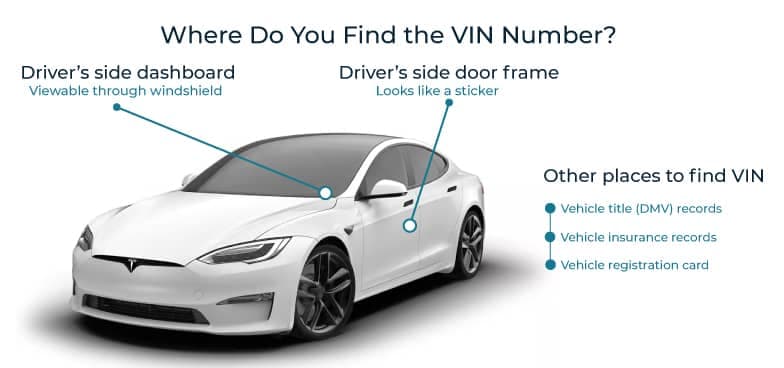
Looking for the VIN? It is usually visible without tools. Modern vehicles make it easy to spot from the outside.
- Dashboard: Visible through the windshield on the driver’s side. The most common location for modern units.
- Driver-Side Door Frame: Sticker or metal plate attached to the door jamb area.
- Engine Bay: Stamped on the frame or firewall in certain models.
- Vehicle Title and Registration: Listed on official ownership documents.
- Military Data Plate: On some HMMWV models, located inside the cabin or near the dashboard area.
What Information Is Available From an AM General VIN Decoder
An AM General VIN decoder helps verify a vehicle’s original factory specifications, but it only shows part of the picture. A vehicle history report shows more information on a vehicle’s past, including ownership records, title status, accident history, and more.
Vehicle Specifications
Review how the AM General vehicle was originally built, including model, engine configuration, transmission, drivetrain, body style, fuel system, and factory production details. This helps confirm whether the vehicle matches its advertised specifications.
Ownership History
Access available ownership records such as the number of previous owners, registration timeline, and length of ownership periods. Personal details like names and addresses are not included in the report.
Title Status & Branding Records
Check whether the vehicle has ever carried a clean, salvage, rebuilt, flood-damaged, junk, lemon, or other branded title. This helps identify major events that may affect safety, legality, or resale value.
Lien & Financial Records
Verify whether any financial institution currently holds or previously held a lien on the vehicle. This ensures there are no outstanding financial obligations that could affect ownership transfer.
Theft & Recovery Records
Search available databases to determine whether the vehicle has ever been reported stolen or recovered. Where available, records may include incident dates, locations, and reporting sources.
Safety Recall Information
Review manufacturer and regulatory recall data linked to the VIN, including affected components, recall dates, and repair status. This helps confirm whether any outstanding safety issues have been addressed.
Service & Maintenance History
Access available service and repair records such as inspections, oil changes, brake servicing, and other maintenance work. A documented history can provide insight into how the vehicle has been maintained over time.
Accident & Damage History
Review reported incidents involving the vehicle, including collisions, flood exposure, fire, hail, or structural damage. Records may include dates, severity levels, and location details when available.
Odometer Readings & Mileage Timeline
Track recorded mileage over time to help identify consistent usage patterns or possible discrepancies. Gaps or irregular readings may indicate reporting errors or potential odometer issues.
Auction & Sales Records
Review past auction listings and sales history, including sale dates, pricing, condition reports, listing details, and available images. These records help verify the vehicle’s history and provide additional insight into its market background.
Free AM General VIN Decoder vs. Paid VIN Check
The AM General VIN Decoder shows the detailed information on the vehicle’s specifications and market value. However, if you need more information, you can use the paid VIN check and get the detailed vehicle history report.
Feature | Free VIN Decoder | History Report (Paid) |
|---|---|---|
VIN decoding for all vehicle types | ||
Year, make, model, trim | ||
Full vehicle specifications / detailed car specs | ||
Market value snapshot | ||
Sales listings (current/online ads) | ||
Sales history (timeline of past listings/sales) | ||
Auction records (when available) | ||
Auction history with photos | ||
Mileage during auction/sales (when available) | ||
Odometer rollback checks | ||
Ownership history | ||
Vehicle usage type (personal, fleet, rental, commercial) | ||
Title brand records (salvage, rebuilt, flood, lemon, etc.) | ||
Lien & loan records | ||
Accident & damage history | ||
Theft / stolen records | ||
Flood/hail/fire damage checks | ||
Service/repair records | ||
Warranty status & coverage | ||
Recall information |
Why Do You Need to Get the AM General Vehicle History Report
Arnold wanted to purchase a used AM General; he decided to run a quick check to see what's up with the vehicle.
Sample VIN: 137ZA84361E191177
First Impression
The seller said that it has no bad records, despite its old age. However, the car was priced above the market value.
What Owen Gets on the Report
Here’s the information that Owen gets on the vehicle.
- 1 Record(s) of damage are found for the vehicle
- 2 specific events reported
- 1 sales record(s)
- 4 lien or loan record(s)
The Outcome
Arnold decided not to purchase the car before it has too many damages and overpriced for an old car.
Why Use Instant VIN Reports for an AM General VIN Decode?
Instant VIN Reports helps AM General owners, buyers, sellers, and enthusiasts quickly verify important vehicle information before you purchase a used AM General vehicle.
Frequently Updated Data
Vehicle information is regularly updated using trusted automotive databases, including Vehicle Databases.
Simple Pricing
The AM General VIN decoder is free to use. If additional insights are needed, a full vehicle history report is available as a single one-time purchase.
24/7 Customer Support
Our customer service team is available 24/7 to assist with any questions related to the vehicle.
Fast and Easy Process
Enter the VIN to quickly access key factory specifications and available vehicle details in just seconds.
Who Can Benefit From an AM General VIN Decoder?
Whether you're buying a surplus military vehicle, selling a Hummer-based model, managing inventory, or restoring a classic AM General unit.
Buyers
Verify the vehicle’s model, production year, engine configuration, drivetrain, body type, and factory specifications before purchasing.
Sellers
Provide verified factory information to potential buyers to increase transparency, build trust, and help speed up the sales process.
Dealerships & Surplus Vehicle Dealers
Quickly validate AM General specifications, verify inventory records, evaluate trade-ins, and ensure vehicles are accurately represented before resale.
Collectors & Military Vehicle Enthusiasts
Confirm production details, factory configurations, and historical specifications for Humvee, HMMWV, Hummer H1, and other AM General models.
Restoration Specialists
Access original factory build data to support accurate restorations and ensure vehicles remain true to their original military or civilian specifications.
Insurance Companies & Vehicle Appraisers
Use VIN-based data to support valuation assessments, underwriting decisions, claims processing, and documentation for specialized and high-value utility vehicles.
Supported AM General Models
Our AM General VIN decoder supports a wide range of military and civilian vehicles, including Humvee (HMMWV), Hummer H1, and other AM General-built platforms, helping verify factory specifications and production details.
| HUMMER H1 | Hummer H2 | Hummer H3 | AM General HMMWV / Humvee M998 Series | AM General DJ-5 |
| AM General M35 | M151 | M35 | M809 | M939 |
| M998 | HMMWV | M1025 | M1026 | M1035 |
FAQs on AM General VIN Decoder
How do I decode my AM General VIN for free?
You can use our free AM General VIN decoder by entering the VIN into the search box. It will show basic details such as model year and specifications. For deeper records like accidents or title brands, you can upgrade to the full report.
Where is the VIN located on an AM General military vehicle?
The VIN is usually found on the dashboard near the windshield, the driver-side door frame, or on a data plate inside the cabin. Always match the physical VIN with registration documents before purchase.
What information can I get from an AM General VIN decoder?
An AM General VIN decoder provides vehicle specifications, production year, manufacturer details, and assembly plant. A full vehicle history report can also include accident records, mileage history, lien checks, and title brand status.
How do I find my HMMWV’s production year using the VIN?
Check the 10th character of the VIN. It represents the model year under U.S. VIN standards introduced in 1981. Our Humvee VIN decoder automatically interprets this for you.
Can I get AM General military specifications from the VIN?
The VIN reveals model configuration and factory details. However, highly specific military contract equipment may require additional documentation. Our AM General military vehicle VIN decoder helps clarify base configuration data.
How do I check if my AM General vehicle is military surplus?
Review ownership history, usage records, and auction history through a full vehicle history report. Military surplus units often appear in auction data and prior registration types.
How can I tell what model HMMWV I have from the VIN?
The Vehicle Descriptor Section of the VIN identifies model series and configuration. Our AM General VIN number decoder breaks this down into readable details so you can confirm the exact model.
Where is the VIN located on an AM General military vehicle?
Many military-contracted AM General vehicles, such as the HMMWV (Humvee), use a 6-digit or military-style serial number instead of a standard 17-character VIN. This identifier is typically found on a metal data plate located on the driver’s side door jamb or stamped on the frame rail area near the rear of the vehicle.
How do I find my HMMWV’s production year using the VIN?
The production year for an HMMWV is not always decoded the same way as civilian vehicles. In some cases, year information may be tied to the serial number or listed on the data plate rather than in the VIN format. Because military identification systems differ from civilian VIN standards, the most accurate production details are usually confirmed through official decoder tools or physical data plate references.
Can AM General VIN decoding help me verify a real AM General vs. an altered build?
VIN decoding can help distinguish civilian AM General-built vehicles (such as the Hummer H1) from military HMMWV units that may have been modified or re-titled. However, proper verification should always combine VIN or serial decoding with data plate matching and physical inspection, since military and civilian AM General identification systems do not follow the same structure.